
ToonMe - cartoons from photos

50M+
Installs
Linerock Investments LTD
Developer
-
Video Players & Editors
Category
-
Rated for 3+
Content Rating
-
support@pho.to
Developer Email
-
https://pho.to/privacy
Privacy Policy
Screenshots
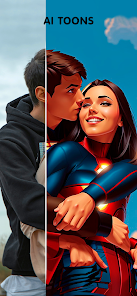
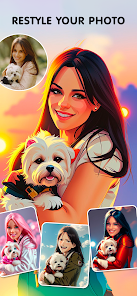
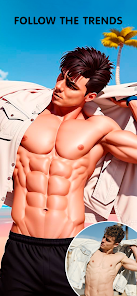
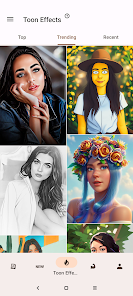
editor reviews
ToonMe is a fun photo editing tool that uses AI to turn your regular selfies and portraits into cartoon-style artwork. It's basically the kind of app you download when you're bored with your usual Instagram filters and want something that actually makes you look like a character from a Pixar movie or a comic book. The app has been downloaded over 50 million times on the Google Play Store alone, which tells you how many people are curious about seeing themselves as a cartoon. When you first launch it, there's no confusing tutorial or forced sign-up, which I really appreciate. You just pick a photo from your gallery and immediately see a few cartoon previews. That instant result is what hooks you. The app is free to download, but like most things in this space, you'll run into a paywall if you want the full-resolution image without a watermark. There are also optional in-app purchases for extra styles and effects, but you can definitely test the waters without spending a cent.
Once you start using it, the experience is pretty straightforward. You upload a photo, wait a few seconds for the AI to process it, and then you're shown a few cartoon versions side by side. Some look more like a Disney-style character, others lean into a more painted or sketchy look. You can swipe between them and pick your favorite. The interface is clean and modern, with big buttons and clear labels, so even someone who isn't tech savvy won't get lost. I found that the app works best with front-facing, well-lit selfies. Group photos or pictures where your face is partly turned away don't come out as great. One small tip: if you tap on a result and hold, you can see a before-and-after comparison, which is actually pretty satisfying. The processing is usually fast, maybe 5 to 10 seconds, unless the servers are busy, which happens sometimes on weekends. After you pick your style, you can either save it, share it directly to social media, or set it as your wallpaper. It's simple, but that's the whole point.
After using ToonMe for a couple of weeks, I think it nails the novelty factor but doesn't have much depth beyond that. If you're someone who likes to update their profile picture often or just wants to send a funny cartoon of yourself to friends, you'll get a kick out of it. But if you're looking for a serious art tool with layers of customization, this isn't it. Compared to apps like Prisma or Picsart, ToonMe is much more limited in what it does. Prisma gives you a huge library of artistic filters, while Picsart is basically a full photo editor. ToonMe only does one thing, but it does it well. The main reason I kept it installed is because it's so quick and the results are genuinely entertaining. I uninstalled it eventually though, because once you've seen yourself as a cartoon a few times, there's not much reason to keep opening it unless new styles are added. It's a fun app for a weekend, not a permanent resident on your phone.
features
- ✨ AI Cartoon Transformation - The core feature is the AI that turns your photos into cartoons. It's not just a simple filter; it actually analyzes facial features and generates a stylized version that keeps your likeness while making you look like a cartoon character. Competing apps like Cartoon Face sometimes produce results that look too generic or overly smooth, but ToonMe offers a variety of distinct styles, from 3D Pixar-like renders to hand-drawn comic looks.
- ✨ Multiple Style Options - After you upload a photo, ToonMe generates several cartoon versions at once. You can choose from styles like "Comic," "Disney," "Painted," and more. This is a big advantage over simpler apps like MomentCam, which usually only offer one or two basic cartoon filters. The variety means you're more likely to find a result you actually want to save and share.
- ✨ Before and After Comparison - The app includes a neat feature where you can tap and hold on a cartoon result to see the original photo side by side. This isn't a groundbreaking tool, but it adds a satisfying "wow" factor that makes the transformation feel more impressive. Most similar apps don't have this, so it's a small touch that makes the experience feel more polished.
pros
- ✅ Speed and Efficiency - ToonMe processes images much faster than many similar apps like Prisma. You don't wait around for more than 10 seconds usually, which makes it great for quick edits when you're on the go. The app doesn't crash or freeze up, which is a common complaint with some of the heavier art filter apps.
- ✅ User-Friendly Interface - The app is designed for casual users. You don't need to learn any editing tools or adjust sliders. It's a "pick a photo, get a result, save it" kind of experience. This makes it more accessible than something like Picsart, which has a steep learning curve for new users.
- ✅ High-Quality Output - The cartoon results are genuinely high resolution and look good as profile pictures, even on larger screens. Other apps like Cartoon Photo often output lower quality images that look pixelated when you zoom in. ToonMe maintains a sharp, clean look that doesn't feel cheap.
cons
- ❌ Aggressive Watermark and Paywall - The free version slaps a large watermark across your image, and you have to pay to remove it. Apps like Prisma offer more free features before pushing a paid subscription. The cost feels a bit high for what is essentially a one-trick pony, especially when you consider that other apps offer similar cartoon effects for free without a watermark.
- ❌ Limited Editing Control - You cannot fine-tune the results. If you don't like a specific aspect of the cartoon, like the skin tone or the style of the eyes, you're stuck with it. Apps like Picsart allow you to manually adjust filters and overlay effects, giving you much more control over the final look.
- ❌ Requires Clear Photos - The app struggles with group photos, side profiles, or images with poor lighting. If your photo isn't a well-lit, front-facing selfie, the AI will produce a distorted or unclear cartoon. This limits its usefulness compared to apps like FaceApp, which handle a wider variety of photo types more reliably.
Recommended Apps
![]()
Daily Horoscope
KADO Apps4.4
![]()
FOX Sports: Watch Live Games
Fox Digital Services, LLC3.7
![]()
Fake Call from Santa Claus
ThunderClap4.2![]()
Google Maps
Google LLC4.2![]()
PhotoLayers-Superimpose,Eraser
handyCloset Inc.4.6![]()
Healthy Benefits+
Solutran, Inc.4.5![]()
SuperMe - Avatar Maker Creator
THE.DEMON3.7![]()
Air Horn
Tenoku4.8![]()
Football Wallpaper HD 4K
Orange Infotech Studio4.6![]()
Artplay - AI Photo & Video
Hideaway Technology Limited4.5![]()
Horoscopes – Daily Zodiac Horo
Mail.Ru Group4.1![]()
Passport Parking
Passport Labs, Inc.2.5![]()
ParkMobile: Park. Pay. Go.
Parkmobile, LLC4.3![]()
FestAI: Ghost Detector App
Now Tech3.2![]()
Photo Tool
COLIFER LAB4





























