

Photo Editor - Lumii

50M+
Installs
InShot Video Editor
Developer
-
Video Players & Editors
Category
-
Rated for 3+
Content Rating
-
lumii@inshot.com
Developer Email
-
http://inshotapp.com/lumii/website/privacypolicy.html
Privacy Policy
Screenshots
editor reviews
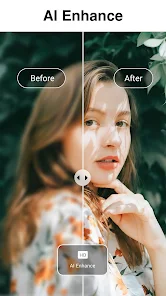
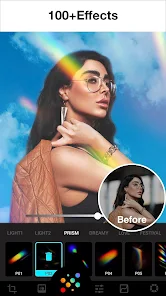
When you first hear the name "Photo Editor - Lumii," you might think it's just another basic image tweaker. But it's actually a pretty full-featured photo editing app developed by InShot, the same team behind the popular video editor. You mainly use it for touching up photos, applying filters, adding text, and doing more advanced edits like background removal and double exposure. I downloaded it from the Play Store out of curiosity since it's free, hit a few million installs, and there's no forced registration. The first impression once it launches is how clean and modern it feels, with a nice dark interface that doesn't clutter your screen. No sign-up pop-ups, and ads are there but not too aggressive, so you can start editing within seconds.
Getting into actual use, the interface is pretty intuitive. The main screen shows all your recent edits on top, then a big "Edit a Photo" button below. After you pick an image, you see a horizontal toolbar with the core tools: Enhance, Cutout, Filter, Adjust, Text, and so on. The Cutout tool for background removal is surprisingly accurate for a free app. If you tap on Auto Cutout, it usually nails the subject on the first try, but you can also use a brush or lasso for tricky parts. One little tip I found useful is that the "Adjust" tool lets you tweak exposure, contrast, and saturation individually, which many free editors hide behind a paywall. There's also a "Doodle" section for drawing on photos, and the double exposure function works by layering two images and adjusting blend modes. The app doesn't bombard you with complicated sliders or pro terms. Onboarding is quick: a few tooltips appear when you first open it, and after that you're basically on your own, but it's easy to figure out.
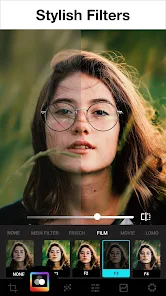
After messing around with Lumii for a couple of weeks, I'd say it's a solid pick for everyday photo editing. People who just want quick, good-looking edits without spending money will find a lot to like here. The filters look modern and not too overprocessed, and the Cutout tool alone makes it worth keeping on your phone. On the flip side, if you're a heavy user who needs raw camera support, layer-based masking, or super precise color grading, this won't replace Lightroom or PicsArt. Compared to something like Snapseed, Lumii feels more focused on trendy edits and social media content. The app does have some ads in the free version, and a few of the better gradients and stickers are locked behind a watermark unless you pay. Still, for basic retouching, adding text, or removing backgrounds, it's more than enough. I haven't felt the need to uninstall it because it's quick to open for a 30-second edit and doesn't drain storage or battery.
features
- 🎨 The double exposure tool works really well compared to PicsArt. In PicsArt, you have to manually adjust blend modes and opacity, but Lumii offers a dedicated Double Exposure function with preset blend styles that produce clean results in just a few taps.
- 🧹 The background removal (Cutout) is shockingly accurate for a free app. Snapseed doesn't even have a dedicated cutout tool, and PicsArt's cutout often leaves rough edges. Lumii's edge detection is smooth and handles hair details decently.
- 🖌️ The Text tool has more font options than expected, plus you can add shadows, outlines, and even gradient colors. Snapseed has very limited text options, so Lumii wins if you like putting words on your photos.
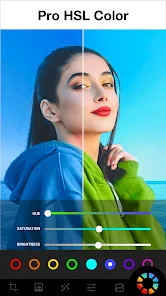
- ✨ The Adjust tool lets you change individual RGB channels, white balance, and sharpness manually. Most free editors lock these behind a pro version, so having free access to curves and color channels is a big plus.
pros
- 👍 It's completely free to start editing without registration. Snapseed is also free but owned by Google, and PicsArt pushes its premium subscription hard. Lumii feels less pushy.
- 👍 The interface is minimal and dark, not cluttered. PicsArt can feel overloaded with tabs and stickers, and Lightroom's mobile version throws too many pro controls at once. Lumii is middle-ground.
- 👍 The Cutout tool is genuinely good for a free app. Snapseed lacks a cutout tool entirely, and PicsArt's free cutout is less precise. Lumii gives accurate results without needing a subscription.
cons
- 👎 There are occasional ads that pop up after saving an image, which Snapseed completely avoids. It's not annoying enough to make me delete the app, but it's noticeable.
- 👎 Some features like certain stickers, overlays, and higher-resolution exports require payment or a watermark. PicsArt does the same thing, but Snapseed gives full resolution free.
- 👎 No RAW file support. Lightroom Mobile handles RAW files natively, but Lumii doesn't even open them. If you shoot in RAW on your phone, this app isn't for you.
- 👎 The app can be a bit slow when applying heavy filters to large images. Snapseed processes edits faster, and Lumii's lag on a phone with 6GB RAM was surprising.
Recommended Apps
![]()
Daily Horoscope
KADO Apps4.4
![]()
FOX Sports: Watch Live Games
Fox Digital Services, LLC3.7
![]()
Fake Call from Santa Claus
ThunderClap4.2![]()
Google Maps
Google LLC4.2![]()
PhotoLayers-Superimpose,Eraser
handyCloset Inc.4.6![]()
Healthy Benefits+
Solutran, Inc.4.5![]()
SuperMe - Avatar Maker Creator
THE.DEMON3.7![]()
Air Horn
Tenoku4.8![]()
Football Wallpaper HD 4K
Orange Infotech Studio4.6![]()
Artplay - AI Photo & Video
Hideaway Technology Limited4.5![]()
Horoscopes – Daily Zodiac Horo
Mail.Ru Group4.1![]()
Passport Parking
Passport Labs, Inc.2.5![]()
ParkMobile: Park. Pay. Go.
Parkmobile, LLC4.3![]()
FestAI: Ghost Detector App
Now Tech3.2![]()
Photo Tool
COLIFER LAB4





























