
LINE Camera - Photo editor

100M+
Installs
LINE (LY Corporation)
Developer
-
Video Players & Editors
Category
-
Rated for 3+
Content Rating
-
linecamera@snowcorp.com
Developer Email
-
https://terms.snow.me/linecamera/privacy
Privacy Policy
Screenshots


editor reviews
You know how sometimes you just want to take a quick selfie or snap a random moment and instantly make it look cute without spending forever editing? That's exactly where LINE Camera comes in. It's a photo editing app from the same folks behind the messaging app LINE, so if you're already in that ecosystem, it feels familiar right away. When you first download and install it from Google Play or the App Store—both have millions of downloads, and it's free to grab—you're greeted with a bright, cheerful interface that screams "have fun." There's no heavy registration wall, though you can sign in with your LINE account if you want to save stuff or buy extra stickers. The first impression is basically: here's a camera button, a bunch of stamps, filters, and frames, and now go make something silly or pretty. It doesn't take itself seriously, and that's the charm.
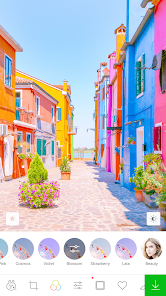
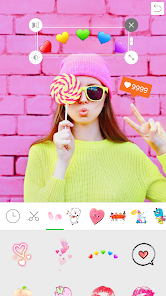
Once you actually start using LINE Camera, the experience is pretty straightforward. You either take a new photo or pick one from your gallery, and then the editing screen pops up with all the tools at the bottom. The interface is laid out with big icons for filters, stickers, text, frames, and makeup tools. The first time I used it, I tapped the sticker button immediately, and there's a massive library—some free, some locked behind a coin system. It's easy to feel lost at first because there are so many options, but after a couple of tries, you get the hang of it. A small tip: you can adjust the opacity of stickers and filters by pinching or sliding, which totally changes the look without having to restart. The makeup feature is actually pretty handy for quick touch-ups like smoothing skin or adding blush. One thing that threw me off was how the app would sometimes lag when loading sticker packs, but nothing too annoying. Overall, the daily flow is: snap, decorate, save, share—and it gets the job done smoothly once you know where everything is.
After using LINE Camera for a while, I think it's a solid pick if you're into playful, kawaii-style edits and don't need professional-grade tools. People who love adding bunny ears, speech bubbles, or themed frames will probably keep it installed for casual posts on Instagram or LINE itself. That said, if you're more into precise adjustments like curves, selective colors, or raw editing, this app will feel too limited. Compared to something like SNOW or B612, LINE Camera feels more focused on stickers and stickers rather than heavy beauty filters. What makes it stand out is the integration with LINE's character IP—Brown and Cony are everywhere, and fans of that universe will eat that up. But honestly, the in-app purchases for sticker packs and frames can add up fast, and that might push some users to simpler alternatives like Snapseed. I ended up keeping it on my phone because it's fun for quick edits, but I can see why someone might delete it if they just want a no-frills editor.
features
- 🐻 Sticker library tied to LINE's iconic characters like Brown and Cony — no other app offers this specific brand of cute. While SNOW has tons of stickers, they're generic AR effects. LINE Camera feels like you're decorating with your favorite plush toy.
- 💄 Built-in makeup tools that actually let you adjust skin tone, add blush, or whiten teeth without needing a separate beauty app. B612 has beauty modes, but they're often automatic and less customizable. Here, you control the intensity.
- 📐 Frame and collage options that are themed around holidays or seasons — great for quick social media posts. vs. Photoshop Express which has frames but they're boring. LINE Camera's frames feel like greeting cards.
- ✂️ Simple eraser tool for removing backgrounds — it's not as powerful as Remove.bg, but fine for casual use. The magic wand selection works well enough for profile pics.
pros
- 🆓 Completely free to download with a generous amount of free stickers and filters — unlike PicsArt which pushes a premium subscription after a few uses. You can edit a dozen photos before hitting any paywall.
- 📱 Lightweight app that doesn't drain battery as much as Instagram's built-in editing tools when you're in a rush. It loads faster than SNOW too.
- 🎨 The "mosaic" blur tool is smoother than many competitors — you can pixelate faces or objects without jagged edges. Better than YouCam Perfect's blur in my experience.
cons
- 💸 Too many sticker packs and frames are locked behind a coin system — you'll feel nickel-and-dimed after a few edits. SNOW gives more away for free, and even B612 has more unlocked content from the start.
- 🐌 Performance dips when loading large sticker collections — the app sometimes freezes for a second. PicsArt handles larger libraries smoother.
- 📸 No advanced editing like layers or curves — if you need to blend images, you're out of luck. Photoshop Express or even Snapseed are better for serious work.
- 🔒 Saving without watermark isn't possible unless you're logged in — minor annoyance if you just want to test the app quickly.
Recommended Apps
![]()
Daily Horoscope
KADO Apps4.4
![]()
FOX Sports: Watch Live Games
Fox Digital Services, LLC3.7
![]()
Fake Call from Santa Claus
ThunderClap4.2![]()
Google Maps
Google LLC4.2![]()
PhotoLayers-Superimpose,Eraser
handyCloset Inc.4.6![]()
Healthy Benefits+
Solutran, Inc.4.5![]()
SuperMe - Avatar Maker Creator
THE.DEMON3.7![]()
Air Horn
Tenoku4.8![]()
Football Wallpaper HD 4K
Orange Infotech Studio4.6![]()
Artplay - AI Photo & Video
Hideaway Technology Limited4.5![]()
Horoscopes – Daily Zodiac Horo
Mail.Ru Group4.1![]()
Passport Parking
Passport Labs, Inc.2.5![]()
ParkMobile: Park. Pay. Go.
Parkmobile, LLC4.3![]()
FestAI: Ghost Detector App
Now Tech3.2![]()
Photo Tool
COLIFER LAB4





























