
Mirror App: Magic Photo Editor

50M+
Installs
Lyrebird Studio
Developer
-
Video Players & Editors
Category
-
Rated for 3+
Content Rating
-
lyrebirdstudio@gmail.com
Developer Email
-
https://lyrebirdstudio.net/privacy_policy.htm
Privacy Policy
Screenshots

editor reviews
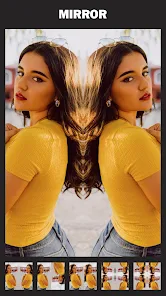
I've been messing around with Mirror App: Magic Photo Editor from Lyrebird Studio, and honestly, it's one of those photo tools you grab when you're bored of the basic filters everyone else uses. It's a mirror-effect photo editor, so the whole point is creating symmetrical, kaleidoscopic, or reflected images from your regular snapshots. You can find it on both Google Play and the App Store, and while I don't recall the exact install count, it seems pretty popular with the creative crowd. The download is free, but like most apps these days, you'll run into in-app purchases for the cooler effects and a few ads unless you pay up. My first impression after launching it was that the interface is super clean, almost minimalist, which was a relief since I expected some cluttered mess.
The actual hands-on experience starts with either taking a new photo or picking one from your gallery. The onboarding is quick—just a few swipes showing you how the mirror modes work. What I really liked was how straightforward the main actions are: you choose a reflection style like horizontal mirror, vertical mirror, or a more complex kaleidoscope pattern, and then you can rotate or zoom the image to adjust where the reflection center sits. There were a few moments where I swiped through effects and accidentally hit an ad pop-up, which was annoying, but the actual editing felt smooth. A small practical tip I picked up is to use photos with clear focal points, like a face or a landmark, because busy backgrounds can turn into a messy visual soup in mirror mode.
After using it for a while, I think Mirror App is perfect for people who love making trippy, artistic wallpapers or profile pictures. It's not for someone who just wants a quick color correction or a vintage filter, because that's not what it does. Compared to apps like PicsArt or Snapseed, Mirror App is much more niche—it's laser-focused on symmetrical reflections and kaleidoscopic effects, so you won't find general editing tools here. What makes it different is how intuitive the mirror controls are compared to similar mirroring tools in bigger apps. I'd probably keep it installed because when I want a quick, eye-catching effect for social media, it's way faster than fumbling through layers in a full editor. But if you rarely use mirror effects, you'll likely uninstall it after a week of playing around.
features
- 🎯 Smart Reflection Alignment: Unlike apps like MirrorLab that sometimes require manual adjustment for every single angle, Mirror App automatically detects the center of your subject and aligns the reflection axis. It's not perfect, but it saves a ton of time when you just want a quick symmetrical look without dragging sliders around.
- 🎯 Real-Time Preview Engine: The app renders your mirror effect instantly as you swipe through options, which is a big deal because I've used other apps where you have to wait a few seconds for each effect to load. This makes experimenting feel playful rather than tedious.
- 🎯 Layered Kaleidoscope Modes: While most mirror apps only offer basic horizontal or vertical flips, Mirror App includes multiple kaleidoscope patterns (like 4-way, 6-way, and 8-way symmetry) that you can combine with rotation. This gives you way more creative freedom than the standard two-option mirror tools in apps like Adobe Photoshop Express.
pros
- 👍 User-Friendly Onboarding: Compared to something like PicsArt, where the mirror effect is buried under a dozen menus, Mirror App puts the mirror options front and center. I could create a decent kaleidoscope in under 30 seconds the first time I opened it.
- 👍 No Watermark on Free Version: A lot of similar apps, like Photo Mirror, slap a watermark on your export unless you pay. Mirror App lets you save your creations without any branding, which is a huge plus for casual users who just want a clean image for Instagram.
- 👍 High-Resolution Export: The app allows you to export at full resolution, so your mirrored images don't look pixelated or compressed. Apps like Mirror Lab sometimes reduce quality unless you upgrade to premium.
cons
- 👎 Limited Editing Tools: If you want to adjust brightness, contrast, or crop before mirroring, you're out of luck. You'll need to use another app like Snapseed first, then import the edited photo into Mirror App, which is an extra step that kills the workflow.
- 👎 Frequent Ad Interruptions: The free version throws an ad after every 3-4 exports, which is more annoying than in apps like VSCO where ads are less intrusive. It got old fast when I was trying to batch-edit a few photos.
- 👎 No Undo Button for Single Steps: If you rotate the reflection and don't like the result, you can't just undo that one move. You have to reset the whole effect and start over, which feels clunky compared to the non-destructive editing in apps like Mirror Lab.
Recommended Apps
![]()
Daily Horoscope
KADO Apps4.4
![]()
FOX Sports: Watch Live Games
Fox Digital Services, LLC3.7
![]()
Fake Call from Santa Claus
ThunderClap4.2![]()
Google Maps
Google LLC4.2![]()
PhotoLayers-Superimpose,Eraser
handyCloset Inc.4.6![]()
Healthy Benefits+
Solutran, Inc.4.5![]()
SuperMe - Avatar Maker Creator
THE.DEMON3.7![]()
Air Horn
Tenoku4.8![]()
Football Wallpaper HD 4K
Orange Infotech Studio4.6![]()
Artplay - AI Photo & Video
Hideaway Technology Limited4.5![]()
Horoscopes – Daily Zodiac Horo
Mail.Ru Group4.1![]()
Passport Parking
Passport Labs, Inc.2.5![]()
ParkMobile: Park. Pay. Go.
Parkmobile, LLC4.3![]()
FestAI: Ghost Detector App
Now Tech3.2![]()
Photo Tool
COLIFER LAB4





























