

Photo Collage Editor

10M+
Installs
MeiHillMan
Developer
-
Video Players & Editors
Category
-
Rated for 3+
Content Rating
-
meihillman0831@gmail.com
Developer Email
-
http://privacypolicy-meihillman.blogspot.com
Privacy Policy
Screenshots

editor reviews
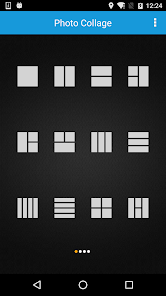
So I stumbled upon this app called Photo Collage Editor, made by MeiHillMan. It's basically one of those apps you grab when you want to throw a bunch of photos together into a single frame, maybe for Instagram or a quick memory card. You can download it from Google Play or the App Store, and it's free to install, though I noticed some optional in-app purchases and ads pop up now and then. The first time you launch it, the screen hits you with a bunch of layout grids and colorful templates, which immediately tells you it's built for quick collage work. Honestly, my first impression was a bit mixed; the interface felt a tad crowded, like too many options squeezed into one screen, but I figured I'd give it a shot for a simple project.
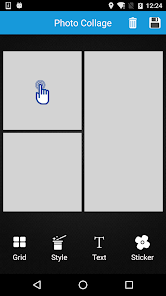
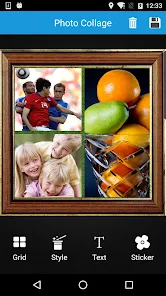
After using it for a while, the experience is pretty straightforward. You start by picking a layout or a template, then you tap to select photos from your gallery. The app lets you adjust borders, add stickers, or write some text on top of the collage. I found the drag-and-drop feature for rearranging photos a bit sluggish at first, but once you get the hang of it, it's functional. There's also a basic filter section, but don't expect pro-level edits; it's more for quick tweaks. One small tip: if you want to avoid ads interrupting your flow, try working offline. The onboarding process didn't really have a tutorial, so I spent a few minutes tapping around to figure out where everything was, especially the save button hidden in a corner.
After a few days of casual use, I think this app works best for someone who just wants to make fast collages without fussing over details. If you're into more polished, artistic layouts or advanced editing, you might find it lacking. Compared to something like PicCollage, it feels less refined and more cluttered, but it gets the job done when you're in a pinch. The free version has enough features for basic use, but the ads can get annoying after a while, which might push you to uninstall unless you pay up. For me, I kept it on my phone because it's handy for quick group photos, but I wouldn't say it's a must-have if you already have a solid photo editor.
features
- 🔥 Layout variety – The app offers a good range of grid styles and freeform templates, letting you mix different photo sizes in one collage, which beats the basic options in apps like Canva. You can adjust borders or round corners easily, though the preset themes feel a bit dated.
- 🔥 Sticker and text library – It comes with a decent collection of stickers and fonts, making it easy to add fun elements to your photos. Most sticker packs are free, but some require in-app purchases, which feels fair compared to apps like PicCollage that lock more behind paywalls.
- 🔥 Quick export options – You can save collages in high resolution without watermarks in the free version, which is a big plus since many similar apps force ads or logos on your final image. The export process is simple, just a couple of taps to save to your gallery or share directly.
pros
- 🌟 No watermark on free exports – Unlike apps like PicCollage or Layout from Instagram, this one lets you save collages without a watermark even without paying, which is rare and great for sharing directly.
- 🌟 Simple interface for beginners – The layout selection is upfront, so you don't have to dig through menus. This makes it easier for someone new to collage apps compared to more complex tools like Canva.
- 🌟 Customizable borders and frames – You can adjust border thickness and add rounded corners, which adds a personal touch that apps like FotoJet don't offer for free. The flexibility is nice without costing extra.
- 🌟 Offline functionality – Most features work without internet, so you can make collages anywhere. That's a practical advantage over apps that nag you to connect online, like Adobe Express.
cons
- ⛔ Frequent ads – The free version throws ads at you after almost every action, like saving or switching templates. PicCollage is more subtle with ads, while this app can be intrusive enough to slow you down.
- ⛔ Sluggish performance on older phones – Dragging photos or applying filters feels laggy on devices with lower specs. Apps like Layout from Instagram run much smoother even on budget phones.
- ⛔ Limited editing tools – You can't crop individual photos within a collage or adjust brightness per image. For basic tweaks, apps like Canva or PicsArt offer more control without being complicated.
- ⛔ No cloud backup or sync – If you switch devices or uninstall the app, your saved projects are gone. Competitors like PicCollage offer cloud saves, which is a major convenience missing here.
Recommended Apps
![]()
Daily Horoscope
KADO Apps4.4
![]()
FOX Sports: Watch Live Games
Fox Digital Services, LLC3.7
![]()
Fake Call from Santa Claus
ThunderClap4.2![]()
Google Maps
Google LLC4.2![]()
PhotoLayers-Superimpose,Eraser
handyCloset Inc.4.6![]()
Healthy Benefits+
Solutran, Inc.4.5![]()
SuperMe - Avatar Maker Creator
THE.DEMON3.7![]()
Air Horn
Tenoku4.8![]()
Football Wallpaper HD 4K
Orange Infotech Studio4.6![]()
Artplay - AI Photo & Video
Hideaway Technology Limited4.5![]()
Horoscopes – Daily Zodiac Horo
Mail.Ru Group4.1![]()
Passport Parking
Passport Labs, Inc.2.5![]()
ParkMobile: Park. Pay. Go.
Parkmobile, LLC4.3![]()
FestAI: Ghost Detector App
Now Tech3.2![]()
Photo Tool
COLIFER LAB4





























