
PREQUEL AI Filter Photo Editor

10M+
Installs
Prequel Inc.
Developer
-
Video Players & Editors
Category
-
Rated for 3+
Content Rating
-
support@prequelapp.com
Developer Email
-
https://prequel.app/privacy-policy/
Privacy Policy
Screenshots
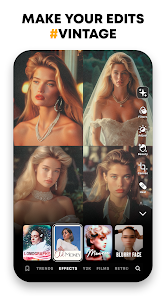
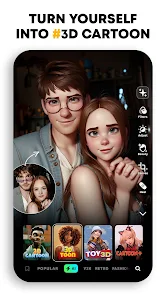
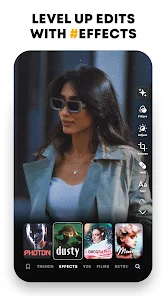
editor reviews
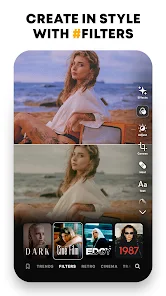
Prequel is a photo and video editing app that leans heavily into AI-powered filters and effects. It's one of those apps you stumble upon when you want to make your social media posts look a bit more polished or artsy without spending hours in something like Photoshop. People mainly use it for turning regular selfies into something that looks like it was taken with a retro film camera or adding those trendy neon glows you see everywhere on TikTok. I downloaded it from the App Store after seeing a friend's story, and the install count is pretty high, so it's clearly popular. The first impression after launching is that it's very visual and colorful, almost like stepping into a gallery of filters. There's no forced registration right away, which I appreciated, but some of the cooler effects are locked behind a subscription. It's free to download and play around with, but you will run into ads and prompts to upgrade after a few tries.
After opening the app, you're basically dropped into a feed of filter previews, and you tap one to start. The interface is clean and mostly intuitive, though I did feel a bit overwhelmed at first with how many options there are. You pick a photo from your camera roll, then swipe through different style categories like “Anime,” “Vaporwave,” or “Vintage.” The AI processing is fast, which is nice because you don't want to stare at a spinner for ten seconds. I tried a few filters on a blurry shot of my dog, and it actually sharpened it decently. One awkward moment was figuring out how to apply a filter to a video—it's hidden behind a separate tab. A practical tip I picked up is to crop your photo before applying a filter, because the AI seems to work better when the subject is centered. The onboarding is pretty minimal; you just skip through a few tooltips, and then you're editing. Overall, the app feels smooth for quick edits, but there's a learning curve for more advanced adjustments like layering effects.
After a couple of weeks of using it on and off, I can say it's fun for specific moods. If you're someone who posts a lot on Instagram or spends time curating a visual feed, you'll probably enjoy the variety. It's not really for people who want precise manual control over every pixel, because the AI does most of the heavy lifting, and you can't fine-tune things like curves or HSL. Compared to something like VSCO or Lightroom, Prequel feels more playful and less professional. The standout is definitely the AI-generated effects—some of them look genuinely artistic, like a cyberpunk city glow or a watercolor painting effect. But I can see myself uninstalling it after a month because the subscription price feels steep for what's essentially a filter library, and I'm not sure I want to pay every month just to make my brunch photos look dreamy. It's a keeper if you love experimenting, but not essential if you just want clean edits.
features
- 🎨 The AI filters are the main draw here, and they do a lot of heavy lifting. For example, the “Anime” effect turns a normal photo into a Ghibli-style scene, which is way more convincing than the cheap filters in apps like Meitu. The “Glitch” effect also stands out because it adds realistic scanning lines and color shifts without looking like a 2010 meme.
- ⚡ Speed is another strong point. Unlike some AI apps that take forever to render, Prequel processes most effects in under two seconds. This makes it great for batch editing a bunch of photos before posting, something that's a pain in apps like Lightroom where each adjustment requires waiting for a preview.
- 🎥 Video support is a feature that sets it apart from many pure photo editors. You can apply the same AI filters to short clips, and the motion tracking keeps the effect aligned with the subject. This is something you don't get in apps like VSCO, which still treats video as an afterthought.
pros
- 🎨 The variety of AI styles is honestly impressive. Where an app like Snapseed focuses on basic adjustments, Prequel gives you options like “Cyberpunk” or “Manga” that completely transform the mood of a photo. It feels less like editing and more like creating digital art.
- 🔧 The user interface is much more approachable than something like Lightroom. You don't need to understand histograms or curves—just pick a style and swipe. This makes it a better pick for casual users who want instant results without a learning curve.
- 🔄 The constant updates are a big plus. Prequel adds new filters pretty often, unlike apps like Afterlight that feel stagnant after a while. The developers seem to keep up with trends, which keeps the app feeling fresh.
cons
- 💸 The subscription is a hard sell. Many effects are locked behind a paywall, and the free version feels limited compared to something like VSCO, which offers more generous free tiers. You can try a filter once, but then it's teasing you to pay.
- 🔍 Manual controls are almost nonexistent. If you want to adjust exposure or white balance precisely, you're out of luck. Apps like Snapseed give you sliders for everything, whereas Prequel expects the AI to do all the work, which can feel frustrating when it guesses wrong.
- 📸 Export quality is slightly compressed on the free plan. I noticed some artifacts in saved photos, especially with heavy filters. Lightroom and even Instagram's built-in editor preserve detail better, which is a letdown if you care about image quality.
Recommended Apps
![]()
Daily Horoscope
KADO Apps4.4
![]()
FOX Sports: Watch Live Games
Fox Digital Services, LLC3.7
![]()
Fake Call from Santa Claus
ThunderClap4.2![]()
Google Maps
Google LLC4.2![]()
PhotoLayers-Superimpose,Eraser
handyCloset Inc.4.6![]()
Healthy Benefits+
Solutran, Inc.4.5![]()
SuperMe - Avatar Maker Creator
THE.DEMON3.7![]()
Air Horn
Tenoku4.8![]()
Football Wallpaper HD 4K
Orange Infotech Studio4.6![]()
Artplay - AI Photo & Video
Hideaway Technology Limited4.5![]()
Horoscopes – Daily Zodiac Horo
Mail.Ru Group4.1![]()
Passport Parking
Passport Labs, Inc.2.5![]()
ParkMobile: Park. Pay. Go.
Parkmobile, LLC4.3![]()
FestAI: Ghost Detector App
Now Tech3.2![]()
Photo Tool
COLIFER LAB4





























