

Love Collage & Picture Frames

50M+
Installs
eToolkit Inc
Developer
-
Video Players & Editors
Category
-
Rated for 3+
Content Rating
-
msupport@etoolkit.com
Developer Email
-
http://lovecollage.me/privacy
Privacy Policy
Screenshots
editor reviews
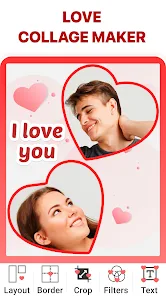
Love Collage & Picture Frames is a photo editing and layout app that lets you combine multiple images into a single frame. You grab it from the Google Play or the App Store, and the install count sits in the millions, which is pretty impressive for a free download. After launching it, you see the typical collage maker setup: a grid of templates, some background options, and stickers scattered around. The first impression is that it looks a bit cluttered, but you quickly realize it's designed for quick, casual projects rather than serious photo editing. The app doesn't need registration to start, which is a relief, and while there are in-app purchases for premium templates and no ads, the free version works fine for basic use.
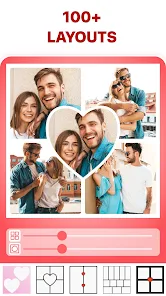
Using the app feels straightforward once you get past the initial overload of buttons. You pick a template, usually a 2x2 or 3x3 grid, and then tap each slot to add a photo from your gallery. The interface is a bit dated, with icons that don't always explain themselves, but you get the hang of it after a couple of tries. The main actions include resizing the photo within the slot, flipping or rotating it, and adjusting the frame border. A smooth moment is when you pinch to zoom in on a specific part of the image, but sometimes the app lags if you're working with high-resolution photos. A practical tip is to keep the aspect ratio locked, or you'll end up with stretched images. The onboarding doesn't offer much hand-holding, so trial and error is the name of the game here.
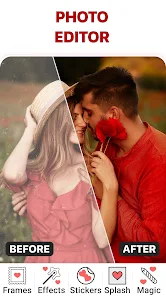
After using it for a week or two, I think this app suits people who want a no-fuss collage tool for social media posts or quick memory books. It's not for someone needing precise editing or complex overlays. Compared to apps like PicsArt or Canva, this one feels more like a niche tool focused on collages, lacking their flexibility. What stands out is how fast you can finish a project without digging through menus. That said, the ads pop up at annoying moments during saving, which might push you to upgrade. I kept it installed because it's handy for a quick Instagram story, but I can see casual users uninstalling it if they find the ads too intrusive or the template selection limited without payment.
features
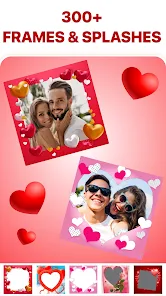
- 🖼️ Love Collage excels at its simplicity for basic collages, offering a wide variety of frame templates (like 2x2, 3x3, and heart-shaped) that you can customize with border widths and colors, something PicsArt doesn't focus on as heavily since it leans toward more complex editing.
- 🖼️ The app includes a huge sticker library and background patterns, which is great for adding quick flair to photos without needing to import external elements, unlike Canva where you often have to search for stickers within a broader design suite.
- 🖼️ A standout feature is the "Love" theme integration, with pre-made layouts including hearts and romantic borders that simplify creating Valentine's Day posts or anniversary collages, a niche that general apps like Adobe Express don't specialize in.
pros
- ❤️ The app is fast to use, finishing a collage in under a minute, which feels quicker than PicsArt where you need to navigate multiple tools to achieve a similar result.
- ❤️ It runs smoothly on older phones without crashes, unlike Canva which sometimes lags on low-end hardware due to its heavier design suite.
- ❤️ There's no need for an account to start editing, making it more accessible than apps like PicCollage that push sign-ups early on.
cons
- 💔 The free version shows intrusive ads that appear between steps, like after saving or switching templates, which is more annoying than PicsArt's occasional banner ads.
- 💔 The template variety is limited unless you pay for the premium pack, while similar apps like Canva offer a wider range of free layouts from the start.
- 💔 The editing tools are basic, lacking advanced features like text layering or blend modes, so it falls short compared to apps like Adobe Express for detailed photo projects.
Recommended Apps
![]()
Daily Horoscope
KADO Apps4.4
![]()
FOX Sports: Watch Live Games
Fox Digital Services, LLC3.7
![]()
Fake Call from Santa Claus
ThunderClap4.2![]()
Google Maps
Google LLC4.2![]()
PhotoLayers-Superimpose,Eraser
handyCloset Inc.4.6![]()
Healthy Benefits+
Solutran, Inc.4.5![]()
SuperMe - Avatar Maker Creator
THE.DEMON3.7![]()
Air Horn
Tenoku4.8![]()
Football Wallpaper HD 4K
Orange Infotech Studio4.6![]()
Artplay - AI Photo & Video
Hideaway Technology Limited4.5![]()
Horoscopes – Daily Zodiac Horo
Mail.Ru Group4.1![]()
Passport Parking
Passport Labs, Inc.2.5![]()
ParkMobile: Park. Pay. Go.
Parkmobile, LLC4.3![]()
FestAI: Ghost Detector App
Now Tech3.2![]()
Photo Tool
COLIFER LAB4





























