
PhotoFunia

10M+
Installs
Capsule Digital
Developer
-
Video Players & Editors
Category
-
Rated for 12+
Content Rating
-
support@photofunia.com
Developer Email
-
http://photofunia.com/privacy
Privacy Policy
Screenshots
editor reviews
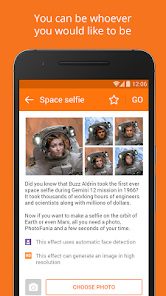
PhotoFunia is one of those apps you just grab when you want to quickly mess around with your photos without any hassle. It's basically a photo effects and montage app that lets you slap your pictures onto a huge library of templates - think magazine covers, movie posters, graffiti walls, or even turning your face into a Renaissance painting. I found it on Google Play with a solid install count in the tens of millions, and it's free to download. No forced registration either, which was nice. My first impression after launching it was that it looks a bit dated, like an app that hasn't had a major visual overhaul in a while. But honestly, that didn't bother me much because the whole point is just picking a template and seeing what sticks.
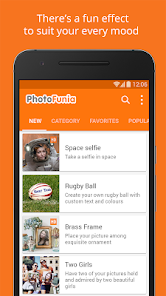
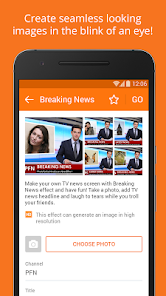
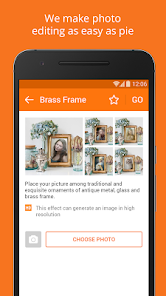
Once you open the app, the main screen shows you all the templates in a grid, categorized into stuff like "Funny," "Artistic," "Posters," and so on. The onboarding is basically nonexistent - you just pick a template, snap or upload a photo, and let the app do its thing. I found the process pretty straightforward: tap a template, align your face or object within the guide area, and boom, a few seconds later you get a result. No complicated sliders or layers here. A small tip I picked up is that photos with a clear subject work way better than cluttered ones, or else the edges look messy. Some templates are more forgiving than others. The smoothness of the whole thing surprised me, though I did hit a few moments where I had to wait a bit for processing, especially on older templates.
After using it for a while, I think PhotoFunia is perfect for someone who just wants a quick laugh or a unique profile picture without diving into a full editing suite. It's not for people who want fine control over every pixel - there's no brush tool, no layer editing, nothing like that. What sets it apart from apps like PicsArt or Adobe Express is its focus on premade scenarios rather than general editing. It feels more like a toy than a tool. I could see myself keeping it installed for those random "what if I was on a TIME cover" moments, but I also see why someone might uninstall it if they're not into the gimmicky side of photo editing. Compared to something like FaceApp, this one has way more variety in backgrounds, but far fewer fancy AI filters.
features
- 🎭 Huge template library – You get hundreds of scenes, from classic movie posters to funny cards and art reproductions. Unlike PiZap which focuses more on basic collage tools, PhotoFunia gives you prebuilt worlds to drop yourself into, which makes it feel like a creativity shortcut rather than a DIY project.
- ⚡ One-tap processing – No manual adjustments, no waiting for sliders to load. Just pick a template, align your photo, and the app renders the result in seconds. Compared to apps like Bazaart where you have to manually mask or cut out subjects, this is blazing fast for casual users.
- 📱 No account needed – Most apps today push you to sign up before you can even see the filters. PhotoFunia lets you jump straight into editing without creating an account or handing over your email, which is refreshing compared to Canva or PicsArt.
pros
- 🖼️ No learning curve – You don't need to watch a tutorial or understand layers. Just tap and go. That's a big win over something like Adobe Express, which still expects some basic design knowledge.
- 🔍 Smart face detection – The app does a decent job automatically detecting faces and fitting them into templates. It's not perfect, but it's better than old-school apps like PicCollage where you had to manually crop everything.
- 📥 Works offline for most templates – Once loaded, a lot of effects don't need an internet connection. That's rare these days and a clear advantage over web-based tools like Befunky.
cons
- 🧩 Outdated interface – The design feels like it's stuck in 2015. Scrolling through templates isn't as smooth as newer apps like Lensa, and the icons look pixelated on modern phones.
- ⚠️ Inconsistent output quality – Some templates produce crisp results, but others look soft or low-res, especially on high-resolution screens. Apps like PortraitAI handle this much better with consistent output.
- 🚫 No editing after the fact – Once you render a result, you can't tweak it further inside the app. You'd have to save it and open another editor. That's a step backward compared to PicsArt which lets you keep editing after applying effects.
Recommended Apps
![]()
Daily Horoscope
KADO Apps4.4
![]()
FOX Sports: Watch Live Games
Fox Digital Services, LLC3.7
![]()
Fake Call from Santa Claus
ThunderClap4.2![]()
Google Maps
Google LLC4.2![]()
PhotoLayers-Superimpose,Eraser
handyCloset Inc.4.6![]()
Healthy Benefits+
Solutran, Inc.4.5![]()
SuperMe - Avatar Maker Creator
THE.DEMON3.7![]()
Air Horn
Tenoku4.8![]()
Football Wallpaper HD 4K
Orange Infotech Studio4.6![]()
Artplay - AI Photo & Video
Hideaway Technology Limited4.5![]()
Horoscopes – Daily Zodiac Horo
Mail.Ru Group4.1![]()
Passport Parking
Passport Labs, Inc.2.5![]()
ParkMobile: Park. Pay. Go.
Parkmobile, LLC4.3![]()
FestAI: Ghost Detector App
Now Tech3.2![]()
Photo Tool
COLIFER LAB4





























