

Meitu- Photo Editor & AI Art

50M+
Installs
Meitu (China) Limited
Developer
-
Video Players & Editors
Category
-
Rated for 12+
Content Rating
-
app@meitu.com
Developer Email
-
https://pro.meitu.com/xiuxiu/agreements/gdpr.html?lang=en#en-policy
Privacy Policy
Screenshots

editor reviews
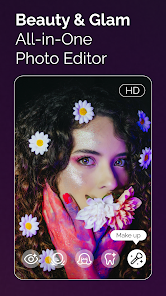
Meitu is a photo editing and AI art app from a Chinese developer that has been around for years, originally known for its beauty filters and skin retouching tools. On the surface, it falls into the crowded photo-editing category, but what sets it apart is how heavily it leans into AI-generated art and stylized portraits. Most people download it from Google Play or the App Store when they want to quickly turn a regular selfie into something that looks like an anime character or a painting. The first impression after launching is honestly a bit overwhelming — there are banners for AI features, templates, and social challenges all competing for attention. It is free to download with a ton of in-app purchases and ads that pop up frequently, so you definitely notice the monetization right away. Registration is optional but encouraged for saving edits, and the install count is in the hundreds of millions, which shows how popular it is in certain regions.
After using it for a while, the actual hands-on experience feels like a mixed bag. The interface is colorful but cluttered, and finding a specific tool means scrolling through several tabs. The onboarding walks you through an AI art feature first, which makes sense since that is the main draw. A common usage flow would be: snap a photo, upload it, then pick an AI style like "Cartoon" or "Oil Painting." The processing takes a few seconds, and the results can be surprisingly good or oddly distorted depending on the photo. The manual editing tools, like blemish removal and skin smoothing, work smoothly and feel intuitive — you just tap and brush. One practical tip I found is that the "Retouch" section under the "Beauty" tab works better for natural looks than the AI filters, which tend to overdo it. There were moments where I got confused by the menu labels, like "Magic Brush" doing something completely different than what I expected.
After a few weeks of testing, my personal judgment is that Meitu is great for casual users who want quick, dramatic transformations of their photos without learning complex software. It is not for people who need precise, professional-level editing or want a clean, ad-free experience. Compared to apps like PicsArt or FaceApp, Meitu stands out with its Chinese-style beauty algorithms that smooth skin and adjust facial proportions in a way that looks polished but sometimes unnatural. What makes it different is the sheer variety of AI art styles — you can turn a photo into a watercolor, sketch, or even a 3D cartoon. I kept it installed because it is fun for changing my profile picture or making memes, but I uninstalled it briefly when the ads became too intrusive during editing. It really depends on whether you can tolerate the upsells.
features
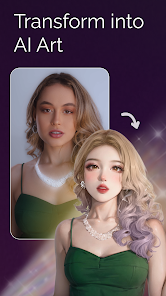
- 🎨 The standout feature is the AI art generator, which can transform ordinary selfies into anime-style portraits or classic paintings, something apps like Adobe Lightroom do not really offer at all. Meitu analyzes facial features and applies styles that feel tailored rather than just generic filters.
- 🎨 Unlike PicsArt, which relies more on manual layers and stickers, Meitu's "AI Cartoon" feature instantly converts photos into animated characters with consistent skin tones and expressions, making it much faster for social media content.
- 🎨 The beauty retouching tools, like skin smoothing and face slimming, are more aggressive than what you get in Snapseed, but they produce a very specific, polished look that is popular in East Asian markets. The "3D" filter is unique here and not commonly found elsewhere.
- 🎨 A less obvious but impressive feature is the "AI Restoration" for old photos, which enhances low-resolution images and adds realistic colorization, beating Google Photos' similar tool in detail and accuracy for faces.
pros
- ✅ The AI filters feel genuinely creative and produce results that look artistic rather than just fake, which FaceApp often fails at with its unnatural smiles and aging effects.
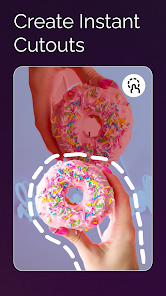
- ✅ The app handles portrait edges really well when swapping backgrounds or applying effects, better than YouCam Perfect where hair often gets cut off or blurred.
- ✅ Batch editing is supported for basic tasks like cropping and color adjustment, saving time compared to editing each photo individually in AirBrush.
- ✅ The "Skin Tone" adjustment is more nuanced than in most apps, letting you tweak undertones instead of just brightening or darkening.
cons
- ❌ The ads are aggressive and often pop up in the middle of editing, which disrupts workflow more than in PicsArt where ads are limited to banners at the bottom.
- ❌ Many of the best AI styles are locked behind a subscription or individual payments, making it feel pay-to-play compared to Snapseed which offers all tools for free.
- ❌ The app drains battery quickly when processing AI effects, and older phones lag or crash, unlike Adobe Lightroom which runs smoothly even on low-end devices.
- ❌ The interface is cluttered with Chinese-language promotions and challenges that are not relevant to Western users, creating confusion similar to what you see in B612 but worse.
Recommended Apps
![]()
Daily Horoscope
KADO Apps4.4
![]()
FOX Sports: Watch Live Games
Fox Digital Services, LLC3.7
![]()
Fake Call from Santa Claus
ThunderClap4.2![]()
Google Maps
Google LLC4.2![]()
PhotoLayers-Superimpose,Eraser
handyCloset Inc.4.6![]()
Healthy Benefits+
Solutran, Inc.4.5![]()
SuperMe - Avatar Maker Creator
THE.DEMON3.7![]()
Air Horn
Tenoku4.8![]()
Football Wallpaper HD 4K
Orange Infotech Studio4.6![]()
Artplay - AI Photo & Video
Hideaway Technology Limited4.5![]()
Horoscopes – Daily Zodiac Horo
Mail.Ru Group4.1![]()
Passport Parking
Passport Labs, Inc.2.5![]()
ParkMobile: Park. Pay. Go.
Parkmobile, LLC4.3![]()
FestAI: Ghost Detector App
Now Tech3.2![]()
Photo Tool
COLIFER LAB4





























