
Cartoon Photo Editor

10M+
Installs
Game Brain
Developer
-
Video Players & Editors
Category
-
Rated for 16+
Content Rating
-
gamebrain@isystem.gr
Developer Email
-
http://www.isystemgroup.org/gamebrain_policy.html
Privacy Policy
Screenshots
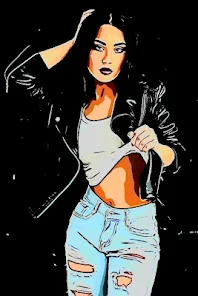
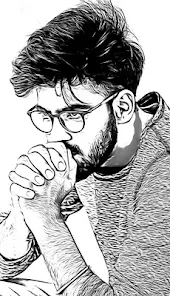
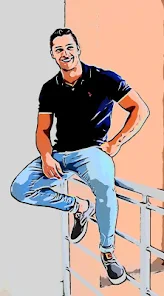
editor reviews
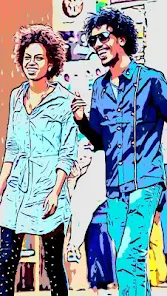
You know those apps that promise to turn your photos into cartoons but end up looking like creepy wax figures? Cartoon Photo Editor, from Game Brain, is thankfully not one of those. It's a straightforward photo editing tool that focuses on giving your pictures that hand-drawn, animated look. I noticed it's been downloaded over a million times on the Play Store and is free to install, though there are ads and a premium version that unlocks more styles. After launching it, the first thing that hit me was how simple the interface is, no fluff, just a big 'Select Photo' button right there. It felt reassuring, like an app that knows exactly what you came for and doesn't waste your time.
Once you pick a photo from your gallery, the real work begins. The app processes the image and applies a cartoon effect automatically, which took about five seconds on my phone. After that, you're dropped into an editing screen where you can tweak the intensity of the effect, change the style from 'Comic' to 'Sketch' or 'Watercolor', and adjust things like brightness and contrast. I spent a good ten minutes sliding bars and trying each preset on a picture of my dog. The interface is smooth, no lag, and every slider gives immediate visual feedback. One tip I picked up, portraits work best if you crop them close before applying the effect, otherwise the background can get a bit messy. There's also a simple crop tool and a few basic filters if you want to add a vintage vibe.
After using it for a week, I feel like Cartoon Photo Editor is perfect for people who want a quick, no-nonsense way to make their photos look like comic book panels or animation cells. It won't replace a full-powered editor like Photoshop or even PicsArt, because you can't add text, stickers, or do any detailed masking. But that's also its charm, it does one thing well and gets out of your way. I can see someone keeping it installed for whipping up fun profile pictures, but if you want precise control or a ton of creative options, you might find it limiting after a few tries. Compared to apps like ToonMe, this one feels less like a toy and more like a tool, which I personally prefer.
features
- 🎨 Style variety that packs a punch – Unlike something like Prisma, which focuses more on artistic painting effects, Cartoon Photo Editor gives you a dedicated set of cartoon and comic styles. The 'Comic Book' preset adds halftone dots and bold outlines that genuinely look like a printed panel, while the 'Sketch' mode turns your photo into pencil art. Each style has adjustable intensity, so you can go from subtle enhancement to full cartoon transformation.
- ⚡ Lightning-fast processing – One thing that stands out is how quickly it applies effects. I threw a 12-megapixel photo at it, and the result appeared in under three seconds. Apps like Remini take ages with their AI processing, but this one keeps things snappy. You can batch edit by just tapping 'Try Again' and picking another photo, no reloading needed.
- 📏 Simple slider-based adjustments – Instead of burying settings in menus, everything is right there. You get a single slider for 'Effect Strength' that goes from 0 to 100%, plus separate sliders for brightness, contrast, and saturation. It's way more intuitive than the confusing layer systems in apps like PicsArt, especially if you just want to tweak one thing quickly.
pros
- ✅ Zero learning curve – Compared to GIMP or even Snapseed, this app is refreshingly straightforward. You don't need to watch a tutorial or read a manual. Open, select, adjust, save. That's it.
- ✅ Offline functionality – A huge plus over many similar apps like ToonMe, which require an internet connection for their AI effects. Cartoon Photo Editor processes everything on your phone, so you can cartoonify photos anywhere, even on a plane.
- ✅ Low storage footprint – The app is under 30MB, unlike bloated editors like Photoshop Express that eat up hundreds of megabytes. It's a great option if your phone is running low on space.
cons
- ❌ Limited text and sticker options – Unlike PicsArt, you can't add captions, speech bubbles, or fun emojis to your cartoon creations. The app is purely about transforming photos, not decorating them further.
- ❌ No batch processing – You have to apply effects one photo at a time. Apps like FotoJet allow batch processing, which would be a time-saver if you're editing a whole album of vacation pics.
- ❌ Ads in the free version – After every save, a full-screen video ad pops up. It's not the end of the world, but it breaks the flow. The premium version removes them, but that costs money, unlike completely free apps like Canva.
- ❌ Output resolution could be higher – The exported images are capped at around 1080p, even if your original photo was 4K. For social media it's fine, but for printing, you'd notice the quality drop.
Recommended Apps
![]()
Daily Horoscope
KADO Apps4.4
![]()
FOX Sports: Watch Live Games
Fox Digital Services, LLC3.7
![]()
Fake Call from Santa Claus
ThunderClap4.2![]()
Google Maps
Google LLC4.2![]()
PhotoLayers-Superimpose,Eraser
handyCloset Inc.4.6![]()
Healthy Benefits+
Solutran, Inc.4.5![]()
SuperMe - Avatar Maker Creator
THE.DEMON3.7![]()
Air Horn
Tenoku4.8![]()
Football Wallpaper HD 4K
Orange Infotech Studio4.6![]()
Artplay - AI Photo & Video
Hideaway Technology Limited4.5![]()
Horoscopes – Daily Zodiac Horo
Mail.Ru Group4.1![]()
Passport Parking
Passport Labs, Inc.2.5![]()
ParkMobile: Park. Pay. Go.
Parkmobile, LLC4.3![]()
FestAI: Ghost Detector App
Now Tech3.2![]()
Photo Tool
COLIFER LAB4





























