
Perfect Me -Face & Body Editor

10M+
Installs
ryzenrise
Developer
-
Video Players & Editors
Category
-
Rated for 3+
Content Rating
-
ryzengchang@gmail.com
Developer Email
-
https://www.wisharcbuilder.com/privacy_perfectme.html
Privacy Policy
Screenshots
editor reviews
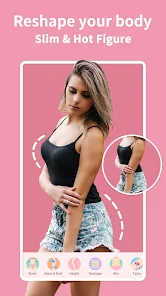
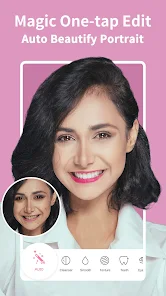
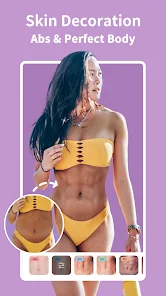
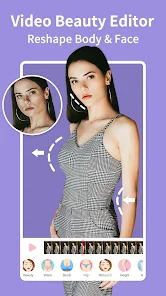
So Perfect Me is basically an AI-powered photo editor focused specifically on body and face retouching. You know those apps that let you smooth your skin or make your waist look smaller? That's exactly what this does. I downloaded it from Google Play one night when I was feeling particularly critical about some vacation photos. The install count showed a few hundred thousand, which seemed decent enough. It's free to download, but like most apps in this space, you quickly run into the "unlock with premium" roadblocks. The first thing I noticed after launching it was how clean the interface looked—no overwhelming clutter, just a simple button to import a photo. That initial simplicity was refreshing compared to some other editing apps that throw a dozen toolbars at you right away.
Using it felt pretty intuitive for the most part. After you pick a photo, the app scans your face and body, then gives you sliders for different adjustments—skin smoothing, waist trimming, jawline shaping, that kind of stuff. I spent maybe ten minutes tweaking a selfie where my arm looked weirdly positioned. The AI detection was accurate enough to isolate just the arm area without messing up the background, which surprised me. A small tip I picked up: go easy on the sliders because things can get uncanny fast if you push them too far. The only confusing part was figuring out how to save a copy without losing the original—turns out you have to manually hit the "save as new" option, otherwise it just overwrites. The editing interface is smooth on my mid-range phone, no lag or crashes.
After using it for a couple weeks, I think this app works best for someone who regularly posts photos on social media and wants quick touch-ups without learning Photoshop. The AI does a decent job at recognizing body shapes and facial features, which makes edits look more natural than older apps where you could clearly tell something was warped. What sets it apart from similar apps is how it handles group photos—it can individually adjust each person without messing up the people next to them. But honestly, if you're not someone who cares about perfecting every photo, you'll probably uninstall it after a week. It's not something you need daily. I kept it installed because my sister occasionally asks me to fix her photos before she posts them. Compared to Facetune, Perfect Me feels less bloated and more focused on the body-editing aspect rather than overwhelming you with filters and stickers.
features
- 🤖 The AI body detection in Perfect Me is noticeably better than what I saw in YouCam Perfect. It can identify individual body parts and edges more cleanly, which means less warped backgrounds when you slim your waist or reshape your arms. Backgrounds stay intact instead of bending weirdly.
- 📏 The adjustment sliders are more granular than what YouCam Perfect offers. Instead of just three presets like "slim, normal, curvy," Perfect Me gives you a continuous range so you can fine-tune exactly how much change you want per body part. This matters when you only need a tiny correction.
- 🖼️ The group photo editing feature actually works. Most apps struggle when multiple faces or bodies overlap, but Perfect Me handles individual adjustments in group shots without distorting the people standing next to the person you're editing. This is rare even in expensive apps.
pros
- 👍 The overall editing quality feels more natural than Facetune. The AI doesn't oversmooth skin into plastic texture, and body reshaping doesn't create that obvious "water ripple" distortion around edges. Results look like a good photo rather than an edited one.
- 👍 It loads and processes edits much faster than AirBrush. On my device, saving a fully edited photo takes maybe three seconds compared to AirBrush's eight to ten seconds. That speed makes a big difference when you're editing multiple photos in one session.
- 👍 The interface is cleaner than most competitors. No tutorial pop-ups every time you open it, no unnecessary filters taking up screen space. You just pick a photo and start editing, which is exactly what you want from a utility app.
cons
- 👎 The free version is quite limited. You only get access to the basic skin smoothing tool, and everything else is locked behind premium. Facetune at least lets you try waist slimming a few times before paying. Perfect Me just shows a "subscribe" screen after your first adjustment.
- 👎 There's no undo button. If you push a slider too far and save, you're stuck with that edit. You have to start over from the original photo. Facetune has a proper undo history, which feels like a basic feature that's missing here.
- 👎 The app doesn't let you export in high resolution without paying. Free exports are capped at 1080p, which is fine for social media but not great if you want to print photos. AirBrush and YouCam Perfect both offer full resolution exports for free users.
Recommended Apps
![]()
Daily Horoscope
KADO Apps4.4
![]()
FOX Sports: Watch Live Games
Fox Digital Services, LLC3.7
![]()
Fake Call from Santa Claus
ThunderClap4.2![]()
Google Maps
Google LLC4.2![]()
PhotoLayers-Superimpose,Eraser
handyCloset Inc.4.6![]()
Healthy Benefits+
Solutran, Inc.4.5![]()
SuperMe - Avatar Maker Creator
THE.DEMON3.7![]()
Air Horn
Tenoku4.8![]()
Football Wallpaper HD 4K
Orange Infotech Studio4.6![]()
Artplay - AI Photo & Video
Hideaway Technology Limited4.5![]()
Horoscopes – Daily Zodiac Horo
Mail.Ru Group4.1![]()
Passport Parking
Passport Labs, Inc.2.5![]()
ParkMobile: Park. Pay. Go.
Parkmobile, LLC4.3![]()
FestAI: Ghost Detector App
Now Tech3.2![]()
Photo Tool
COLIFER LAB4





























