Photo Frames

10M+
Installs
Csmartworld
Developer
-
Video Players & Editors
Category
-
Everyone
Content Rating
-
csmartworld@gmail.com
Developer Email
-
https://sites.google.com/view/csmartworld/home
Privacy Policy
Screenshots

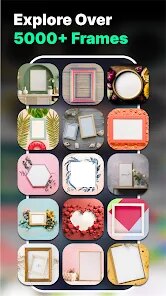
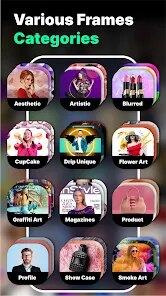
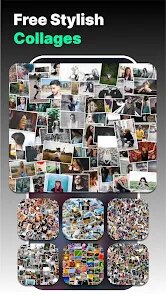

editor reviews
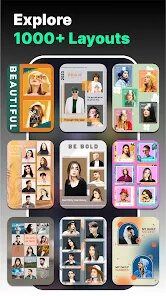
Photo Frames is a simple mobile app from Csmartworld that falls into the photo editing and decoration category. It helps users frame their pictures with a wide selection of pre-made borders, decorative stickers, and text overlays. People usually download it when they want to quickly dress up a photo for social media, a greeting card, or just to add some flair without opening heavy editing software. Seeing it on the Google Play store, the download count seems modest, and it appears to be a free install with some in-app purchases and occasional ads. The first impression after launching the app is pretty straightforward: a clean grid of frame options pops up, letting you tap and try instantly. It feels low-pressure and easy to get into, which matches the kind of casual user who just wants a fast result without reading a manual.
Once you start using it, the experience is mostly smooth. You pick a frame from the gallery, then load a photo from your camera roll. The app lets you pinch, zoom, and drag the image to fit within the chosen frame. After that, you can add stickers, text in various fonts and colors, or even apply simple filters. The buttons are labeled clearly and the layout is sensible. One small tip: the undo button sits right next to the save button, so be careful not to tap the wrong one if you're in a hurry. The onboarding is basically none, which means you just jump in and figure it out. Some frames look better than others, and the sticker pack feels a bit limited, but for quick tasks it works fine. There were no crashes during my test run, though loading a high-res image did cause a slight delay.
After using it for a while, I think this app fits people who want a no-fuss way to decorate photos without learning layers or masks. It's not for serious photographers or anyone needing advanced editing like background removal or layered blending. Compared to something like PicsArt, this app is much simpler — no social feed, no community, no complex tools. That can be a pro or a con depending on your goal. What makes it stand out is how fast and focused it is: pick a frame, place a photo, add some text, done. It's the kind of app you might keep installed if you often make quick collages or greeting images. But if you need more variety or frequent updates, you might delete it after a few uses because the content doesn't refresh very often.
features
- :clipboard: Photo Frames offers a large library of themed borders, from floral to holiday to geometric patterns, which is its core appeal. This beats apps like Canva because Canva buries frames inside templates, needing more taps. Here, the frames are front and center, so you get to the fun part faster.
- :clipboard: The app includes a built-in text tool with multiple fonts and bubble styles, which is handy for adding captions or names directly onto the framed photo. In comparison, Google Photos lets you add text but has very limited font variety, making Photo Frames a better choice for decorative word art.
- :clipboard: Stickers and cliparts are neatly organized by category (love, nature, emojis), so you don't have to scroll endlessly. Other apps like YouCam Perfect often scatter stickers across multiple menus, but here they are just a swipe away, saving time during a quick edit session.
- :clipboard: The one-tap save and share feature exports the final image instantly to your gallery or social apps like WhatsApp and Instagram. This is smoother than the multi-step export process in Adobe Lightroom, which is overkill for someone just decorating a birthday picture.
pros
- :bulb: The interface is incredibly lightweight — the app runs quickly even on older Android phones without lag, unlike heavy editors like PicsArt that can freeze on 2 GB RAM devices.
- :bulb: No sign-up is required to use the basic features, which is refreshing compared to apps like Fotor or BeFunky that nag you to create an account before letting you save anything.
- :bulb: The free frames selection is generous; you can make decent-looking collages without spending a coin. Pixlr, in contrast, locks many trendy frames behind a paid subscription wall.
cons
- :warning: The frame variety feels stagnant. Unlike Canva, which adds new themed frames weekly, this app doesn't seem to update its library often, so repeat users will see the same options every time.
- :warning: The text customization options are clunky. You cannot freely rotate or layer text over stickers — it snaps to the center — whereas apps like PicsArt let you drag text anywhere for more creative control.
- :warning: The ad placement is intrusive. Full-screen video ads pop up between editing steps, breaking the flow. In contrast, Snapseed runs no ads at all, making it a smoother experience for serious editing.
Recommended Apps
![]()
Daily Horoscope
KADO Apps4.4
![]()
FOX Sports: Watch Live Games
Fox Digital Services, LLC3.7
![]()
Fake Call from Santa Claus
ThunderClap4.2![]()
Google Maps
Google LLC4.2![]()
PhotoLayers-Superimpose,Eraser
handyCloset Inc.4.6![]()
Healthy Benefits+
Solutran, Inc.4.5![]()
SuperMe - Avatar Maker Creator
THE.DEMON3.7![]()
Air Horn
Tenoku4.8![]()
Football Wallpaper HD 4K
Orange Infotech Studio4.6![]()
Artplay - AI Photo & Video
Hideaway Technology Limited4.5![]()
Horoscopes – Daily Zodiac Horo
Mail.Ru Group4.1![]()
Passport Parking
Passport Labs, Inc.2.5![]()
ParkMobile: Park. Pay. Go.
Parkmobile, LLC4.3![]()
FestAI: Ghost Detector App
Now Tech3.2![]()
Photo Tool
COLIFER LAB4