
Lisa AI: Cartoonify Avatar Art

1M+
Installs
Convert Software
Developer
-
Generative AI
Category
-
Rated for 3+
Content Rating
-
support@inspire-ai.com
Developer Email
-
https://lisaai.app/privacy.html
Privacy Policy
Screenshots
editor reviews
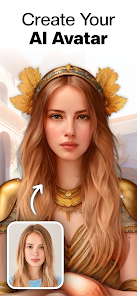
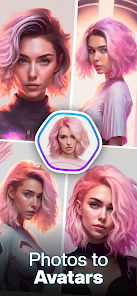
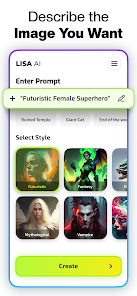
I first stumbled upon Lisa AI: Cartoonify Avatar Art when I was looking for a fun way to turn my selfies into something a bit more creative. It's essentially a photo editing and avatar creation tool that uses AI to transform regular photos into cartoon-style portraits, digital paintings, and anime-inspired avatars. The app is free to download on both Google Play and the App Store, with over a million installs showing its popularity. After launching it, the first thing that hit me was how clean and colorful the interface looked. It felt like opening a toy box for digital art, but without the overwhelming clutter you sometimes get with bigger editing apps like Picsart. No forced registration popped up immediately, which was a relief, though in-app purchases and occasional ads do appear once you start playing around.
Using Lisa AI felt surprisingly smooth from the start. Once you give it access to your photo gallery, the app walks you through a short, friendly tutorial that shows you how to pick a photo and apply a style. The main screen is simple: you tap 'Create,' select a photo, and then browse through a grid of cartoon, watercolor, or anime filters. I tried a couple of selfies, and the transformation took maybe 10 to 15 seconds each. The results weren't always perfect—some had weird eye shapes or blurry edges—but most of the time, the cartoon avatars came out genuinely charming. I also noticed a section for themed stickers and backgrounds, which I used to add a few silly touches before saving my creations. If there's one tip I'd give, it's to use well-lit, front-facing photos for the cleanest output, since darker images tended to produce messier results.
After spending a few evenings with Lisa AI, I can say it's a solid pick for anyone who enjoys quick, fun edits without wanting to learn complex software. It fills a nice niche between basic photo filters and full-blown painting apps. That said, I wouldn't recommend it if you need professional-grade editing or high-resolution outputs, because the free version caps downloads at a modest size. Compared to apps like Meitu or FaceApp, Lisa AI focuses more on cartoon and artistic styles rather than beauty retouching or aging filters, which makes it stand out for creative projects. I ended up keeping it installed because it's perfect for making profile pics or silly gifts for friends, but I could see someone removing it if they wanted more control or fewer ads.
features
- 🎨 The standout feature is definitely the cartoon and anime style filters. While big apps like Picsart or Prisma offer artistic effects, Lisa AI zeroes in on turning your face into a colorful, expressive character. It's not just one filter either; there are dozens of variations, from soft watercolor sketches to bold comic book outlines. I spent an hour just cycling through them with different photos.
- 🎨 Another area where it shines is the background removal and replacement tool. You can cut out the subject from your photo and drop them into a fantasy scene or a simple solid color, which makes your avatar pop. This works much better than similar tools in apps like Canva for mobile, which often leave jagged edges on hair.
- 🎨 The themed sticker packs are a fun extra. Instead of just creating a static avatar, you can slap on crowns, sunglasses, or speech bubbles. This turned my plain cartoon head into a little story scene, which feels more playful than what you get with apps like FaceApp's limited stickers.
pros
- 👍 Ease of use is its biggest strength. Unlike apps like Adobe Photoshop Express, which have a steep learning curve, Lisa AI is laughably simple. You pick a photo, pick a style, and get the result in seconds. There's almost no tapping around menus.
- 👍 The variety of artistic styles is impressive. While something like Meitu focuses mostly on beauty standards, Lisa AI offers a wider range of creative outputs, from retro comic styles to dreamy oil paintings, giving you more freedom for unique avatars.
- 👍 Frequent style updates keep the app feeling fresh. I noticed new cartoon filters and themed packs appearing every few weeks, which is more consistent than what I've seen with older apps like Cartoon Photo Lab.
cons
- 👎 The free version limits are frustrating. You can only do a few high-quality exports per day unless you pay for a subscription. With FaceApp, you get more free uses before hitting a paywall, which can make Lisa AI feel a bit stingy.
- 👎 Output resolution is noticeably lower than what you get from apps like Prisma. If you want to print your avatar as a poster or use it for a professional project, the picture quality just isn't there, and upscaling doesn't fix the blurriness.
- 👎 Occasional glitches with edge detection happen on complex hair or glasses. I had a photo with messy curly hair, and the app turned part of my head into a weird blob. Similar apps like Picsart handle messy hair much more gracefully with their refine tools.
Recommended Apps
![]()
Daily Horoscope
KADO Apps4.4
![]()
FOX Sports: Watch Live Games
Fox Digital Services, LLC3.7
![]()
Fake Call from Santa Claus
ThunderClap4.2![]()
Google Maps
Google LLC4.2![]()
PhotoLayers-Superimpose,Eraser
handyCloset Inc.4.6![]()
Healthy Benefits+
Solutran, Inc.4.5![]()
SuperMe - Avatar Maker Creator
THE.DEMON3.7![]()
Air Horn
Tenoku4.8![]()
Football Wallpaper HD 4K
Orange Infotech Studio4.6![]()
Artplay - AI Photo & Video
Hideaway Technology Limited4.5![]()
Horoscopes – Daily Zodiac Horo
Mail.Ru Group4.1![]()
Passport Parking
Passport Labs, Inc.2.5![]()
ParkMobile: Park. Pay. Go.
Parkmobile, LLC4.3![]()
FestAI: Ghost Detector App
Now Tech3.2![]()
Photo Tool
COLIFER LAB4





























