
ArtistA: Cartoon Photo Editor

10M+
Installs
Lyrebird Studio
Developer
-
Generative AI
Category
-
Rated for 3+
Content Rating
-
lyrebirdstudio@gmail.com
Developer Email
-
https://lyrebirdstudio.net/privacy_policy.htm
Privacy Policy
Screenshots

editor reviews
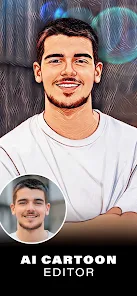
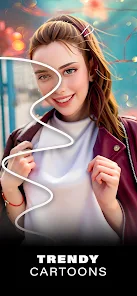
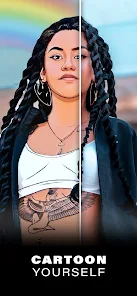
ArtistA is a photo editing app that turns your regular photos into cartoon-style illustrations, falling squarely into the category of creative filters and fun photo manipulation tools. You can use it to give your selfies that animated look, like stepping out of a comic book or a Saturday morning cartoon. A lot of people grab these apps just to change up their profile pictures or to send goofy versions of themselves to friends. When you first open it, the layout feels pretty straightforward, which is a relief since some photo editors throw a million buttons at you right away. You pick a photo, and within seconds you see the cartoon transformation start to render.
Actually using ArtistA is surprisingly fast. You tap the gallery button, select an image, and the app instantly shows you a few different cartoon styles. Each one applies a different level of boldness to the outlines, the brightness of the colors, and the overall shape of your face. The onboarding is quick, maybe a single swipe showing you how to save or share the result. You can then choose to adjust the intensity of the effect or apply a background blur to make the cartoon part stand out more. One small tip I noticed is that photos with good lighting and a simple background come out much cleaner, whereas messy group shots can look a bit chaotic after the filter hits.
After playing with it for a while, I can see that ArtistA is perfect for people who just want a quick, fun result without spending time learning complex layer tools or masking. It's not for someone trying to create a polished professional illustration or a perfect digital portrait. Comparing it to apps like Prisma or Picsart, ArtistA keeps things much more narrow and focused only on this cartoon look. I'd keep it on my phone because it's a one-trick pony that does that trick well whenever I need a laugh. People who prefer a more natural-looking but artistic filter might uninstall it after a week, since the novelty of seeing yourself as a cartoon does wear off after a few uses.
features
- 🖼️ ArtistA gives you multiple cartoon style presets right away, while many similar apps, including ToonApp, only offer one universal filter that can make every face look the same. This app lets you feel like you have more control over the vibe of the final image, which is a nice touch for just a simple editor.
- 🎨 The rendering speed is impressive. You tap and the transformation happens in seconds, not minutes. Other apps often require you to wait through a long processing bar or even force you to watch an ad before seeing the full effect. ArtistA skips that frustration and keeps the experience snappy.
- 🎯 It offers fine-tuning sliders for effect intensity and background blur, which is rare in such straightforward cartoon apps. Most of the time you are stuck with whatever the filter decides to give you. Having these small controls makes the result feel more personal and less like a generic sticker was slapped onto your face.
pros
- 👍 The interface is clean and uncluttered, so you are not wasting time hunting for the basic features. Apps like YouCam Perfect bury the cartoon filter behind three layers of menus, whereas ArtistA puts it up front.
- 👍 It does not require a sign-up or account creation to use the main function. That alone makes it better than many popular editors on the Play Store that force you to register before you can even try the filter.
- 👍 The app respects your privacy by processing images locally and not immediately uploading everything to a cloud server. That gives you more peace of mind compared to some free online tools that ask for full gallery access.
cons
- 👎 The app lacks a batch editing function. If you want to cartoonize ten photos from a party, you have to do each one separately. Rival apps like Picsart let you apply effects in bulk, which saves time.
- 👎 It does not let you manually adjust the outline thickness or the color palette. Even though the presets are decent, you are left wanting just a bit more creative freedom that some people expect from a photo editor today.
- 👎 There are occasional pop-up ads when saving or switching between styles. While the app is free, these interruptions feel a bit heavier compared to the smoother ad experience in FaceApp.
Recommended Apps
![]()
Daily Horoscope
KADO Apps4.4
![]()
FOX Sports: Watch Live Games
Fox Digital Services, LLC3.7
![]()
Fake Call from Santa Claus
ThunderClap4.2![]()
Google Maps
Google LLC4.2![]()
PhotoLayers-Superimpose,Eraser
handyCloset Inc.4.6![]()
Healthy Benefits+
Solutran, Inc.4.5![]()
SuperMe - Avatar Maker Creator
THE.DEMON3.7![]()
Air Horn
Tenoku4.8![]()
Football Wallpaper HD 4K
Orange Infotech Studio4.6![]()
Artplay - AI Photo & Video
Hideaway Technology Limited4.5![]()
Horoscopes – Daily Zodiac Horo
Mail.Ru Group4.1![]()
Passport Parking
Passport Labs, Inc.2.5![]()
ParkMobile: Park. Pay. Go.
Parkmobile, LLC4.3![]()
FestAI: Ghost Detector App
Now Tech3.2![]()
Photo Tool
COLIFER LAB4





























