
Learn to Draw Flower

5M+
Installs
Creative APPS
Developer
-
Video Players & Editors
Category
-
Rated for 3+
Content Rating
-
Drawapp.feedback@hotmail.com
Developer Email
-
https://sites.google.com/view/draw-apps-for-free/
Privacy Policy
Screenshots
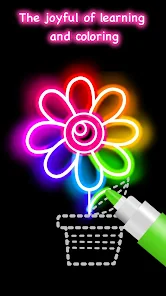
editor reviews
I guess a lot of people download apps like this hoping to unlock some hidden artistic talent. Learn to Draw Flower is exactly what it sounds like -- a straightforward drawing instruction app focused solely on floral illustrations. It's a niche educational tool rather than a full-featured art studio, meant for anyone who wants to sketch roses, tulips, daisies, or more exotic blooms on their phone. You can find it on the Google Play store, and it's free to install, though I can't say exactly how many downloads it has had. Once you launch it, the first impression is pretty simple. The interface is clean but nothing flashy, and it immediately tries to get you started on a lesson without much fuss.
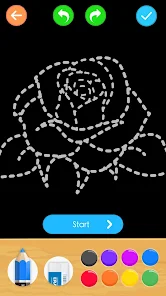
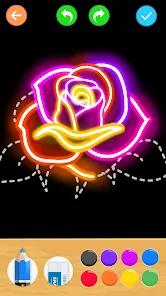
Working through the actual lessons felt pretty smooth once I got the hang of it. The app breaks down each flower into a series of numbered steps, so you're drawing one line at a time. I started with a basic daisy, and the app shows a faint overlay of each new stroke on top of your current sketch. You trace it with your finger, and it snaps into place if you're close enough. That snapping feature is actually a lifesaver for people like me who can't draw a straight line. The interface is straightforward -- you pick a flower from the gallery, then follow along step by step. There were a few moments where I got confused about which direction the next stroke should go, but the app lets you rewatch the animation for that step. One small tip: zoom in on the tricky petal details, because the detection can be a bit finicky with small curves.
After using it for a while, I think this app works best for total beginners or people who just want to kill some time with a relaxing, guided activity. If you already know how to draw or want more creative freedom, you will probably get bored fast. The real difference between this and something like Sketchbook or even Paper by WeTransfer is that this app holds your hand the whole time. There is no blank canvas anxiety, but there is also no room for your own style to shine. I kept it installed for about a week, drew maybe ten flowers, and then forgot about it. I can see someone uninstalling after finishing all the lessons, but for a quick stress reliever, it does the job without demanding much from you.
features
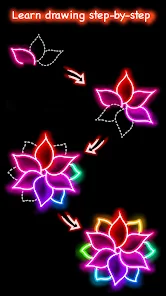
- 🌺 The step-by-step guided tracing system is the core hook here. Unlike drawing apps like Tayasui Sketches that let you start from scratch, this one builds your drawing one line at a time with on-screen guides. Each new stroke is highlighted, so you never feel lost or overwhelmed by a blank page.
- 🌺 It offers a diverse flower library, from simple wildflowers to complex roses. You are not stuck drawing the same basic shapes repeatedly. The variety keeps the learning process fresh, which is something missing from generic drawing tutorials on YouTube that only teach one or two styles.
- 🌺 The color and shading tools are integrated directly into the drawing steps. After finishing a line art flower, you can tap to auto-fill with suggested colors. This is way more beginner-friendly than apps like Procreate Pocket, where you have to figure out layer blending and brush opacity on your own.
- 🌺 There is a replay feature that lets you watch the entire drawing of a flower from start to finish. It helps you understand the overall construction before you even pick up your stylus. It is like having a time-lapse tutorial built right in, which is great for visual learners.
pros
- 🌟 The learning curve is almost nonexistent. Compared to Adobe Illustrator Draw, which bombards you with vectors and bezier curves, this app focuses purely on tracing and repetition. You literally follow numbered dots. It makes you feel successful after your first three minutes.
- 🌟 It works completely offline. You do not need Wi-Fi or mobile data to practice your sketches. For someone sitting on a bus or in a park with no signal, this is a huge plus over something like online tutorial apps that demand a constant internet connection for video lessons.
- 🌟 The pressure sensitivity support is decent for a free app. If you use a stylus on supported devices, the strokes actually respond to how hard you press. It gives the final drawing a more natural, pencil-like feel that you would normally only get in premium apps like Concepts.
cons
- 💥 There is a noticeable lack of free content. After drawing maybe three or four flowers, the app starts pushing premium packs heavily. Compare this to apps like Colorfy, where you get a much larger free library before hitting any paywalls. It feels a bit stingy.
- 💥 The undo button is not as forgiving as it should be. If you mess up a stroke, hitting undo sometimes deletes the last three steps instead of just the one you want. In drawing apps like Paper by WeTransfer, the undo feels much more precise and natural, which is frustrating here.
- 💥 No option to export as a transparent PNG. You can save your art to your gallery, but it always has a white background. For anyone who wants to use their flower drawings in other projects or collages, this is a limitation that apps like Autodesk Sketchbook handle way better with layer export options.
- 💥 The ads can interrupt the flow pretty badly. Right when you are focusing on a tricky petal, a 15-second video ad pops up. Free apps like Adobe Fresco on mobile have ads too, but they feel less intrusive because they tend to appear between sessions rather than mid-sketch.
Recommended Apps
![]()
Daily Horoscope
KADO Apps4.4
![]()
FOX Sports: Watch Live Games
Fox Digital Services, LLC3.7
![]()
Fake Call from Santa Claus
ThunderClap4.2![]()
Google Maps
Google LLC4.2![]()
PhotoLayers-Superimpose,Eraser
handyCloset Inc.4.6![]()
Healthy Benefits+
Solutran, Inc.4.5![]()
SuperMe - Avatar Maker Creator
THE.DEMON3.7![]()
Air Horn
Tenoku4.8![]()
Football Wallpaper HD 4K
Orange Infotech Studio4.6![]()
Artplay - AI Photo & Video
Hideaway Technology Limited4.5![]()
Horoscopes – Daily Zodiac Horo
Mail.Ru Group4.1![]()
Passport Parking
Passport Labs, Inc.2.5![]()
ParkMobile: Park. Pay. Go.
Parkmobile, LLC4.3![]()
FestAI: Ghost Detector App
Now Tech3.2![]()
Photo Tool
COLIFER LAB4





























