
Face Warp

10M+
Installs
Wombatica Software
Developer
-
Video Players & Editors
Category
-
Rated for 3+
Content Rating
-
apps@wombatica.app
Developer Email
-
https://wombatica.app/android-app-privacy-policy/
Privacy Policy
Screenshots
editor reviews
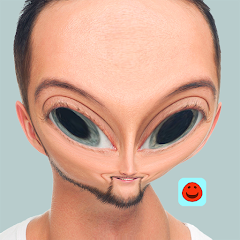
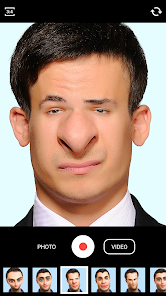
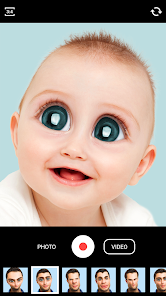
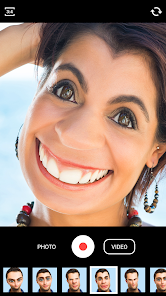
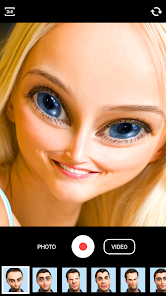
Face Warp is one of those playful photo editing apps you stumble upon when you're bored and want to mess around with your selfies. It falls squarely into the “funny face filter” genre, alongside tools like Snapchat or FaceApp, but with a much more niche focus. The main draw here is warping your face into ridiculous shapes—think huge eyes, tiny nose, or that elongated chin that makes you look like a cartoon villain. On Google Play, it's been downloaded over 10 million times, and it's free to install. You don't need to register to start, which is a relief, but there are ads that pop up occasionally. The first impression after launching the app is straightforward: a simple camera interface with a few warp tools on the bottom. It feels a bit dated compared to modern filter apps, but the novelty of twisting your face into a pretzel keeps it entertaining for a few minutes.
After you start using it, Face Warp is surprisingly simple. You snap a photo or pick one from your gallery, then you're dropped into the editing screen. The interface is bare-bones, with a slider for adjusting warp intensity and buttons like “expand,” “squeeze,” or “twist.” In daily use, you'd probably open it with a friend and take turns warping each other's faces—it's more of a social gag than a serious photo editor. The onboarding is non-existent; you just tap and drag on the face to warp, and the app responds instantly. A smooth moment comes when you double-tap to reset a face back to normal, which is handy after you've turned someone into a pufferfish. But there are confusing bits too—like how some warp tools only work in specific areas, so you might end up stretching the background instead of the face if you're not precise. A practical tip: use light touches because the default intensity is quite strong, and it's easy to overdo it.
After playing with it for a while, I think Face Warp is perfect for short bursts of laughter—like at a party or during a boring commute. Someone who loves quick goofy edits or pranking friends would get a kick out of it, but if you're looking for polished filters or professional retouching, this isn't it. Compared to FaceApp, which offers aging or gender swap filters, Face Warp feels much more limited but also more transparent—you don't have to worry about cloud processing. What makes it stand out is the hands-on manual warping, which feels more personal than automated filters. That said, the app's dated look and frequent ads might drive you to uninstall it after the novelty wears off. I'd keep it around just for the occasional laugh, but it's not something most people would use daily.
features
- 😜 Manual Warp Controls: Unlike FaceApp, which uses AI auto-filters, Face Warp puts a slider and drag tool in your hands. You can expand someone's forehead or squeeze their cheeks with a finger swipe. FaceApp does aging or beard filters automatically, but here, you're the artist—it feels more hands-on and silly, perfect for custom goofs.
- 😜 Instant Reset: Double-tap on the screen undoes all warps instantly. Snapchat requires you to re-select filters or go back to the camera, but Face Warp lets you wipe the slate clean in a second. So if you mess up, you're back to normal without losing the original photo.
- 😜 No Account Needed: You jump right into editing without signing up. Compared to FaceApp, which asks for a login and uses internet processing, Face Warp works offline and has zero account fuss. It's refreshing for a quick laugh without any registration baggage.
- 😜 Playful Presets: The options like “twist” and “bulge” are less common in other apps. While YouCam Perfect focuses on beauty enhancers, Face Warp leans into absurdity—like making your nose spiral or ballooning your eyes. It's not for serious edits, but for pure comedy, it's a winner.
pros
- 🌈 Fun Social Tool: Sharing a warped face on WhatsApp or Instagram stories gets big laughs. FaceApp looks more realistic, but Face Warp is so over-the-top that friends find it hilarious in group chats.
- 🌈 Offline Editing: You don't need Wi-Fi to warp faces, unlike Reface or FaceApp that upload photos to servers. It's a privacy perk and works anywhere—like on a plane or in a subway.
- 🌈 Beginner-Friendly: The interface has only a few buttons, so anyone can use it right away. Snapseed or PicsArt have many tools that overwhelm newbies, but Face Warp keeps it simple—tap, drag, and laugh.
- 🌈 No Watermark: Saved images don't have a brand stamp. Many free apps, like BeautyPlus, add a watermark unless you pay, but Face Warp saves clean copies immediately.
cons
- 🔴 Dated Graphics: The app's design looks from 2015 with pixelated icons. CapCut or YouCam Perfect has modern themes, but Face Warp feels old and less inviting.
- 🔴 Limited Use Cases: After five minutes, you've done all warps. FaceApp has dozens of filters, while Face Warp only distorts faces—no makeup, backgrounds, or stickers.
- 🔴 Frequent Ads: A 15-second ad plays every few edits. Snapchat's filters are ad-free between snaps, but Face Warp interrupts your flow, which gets annoying quickly.
- 🔴 No Undo Button: If you accidentally add a warp, resetting with double-tap removes entire edit. PicsArt has a layered undo system, but here, you lose all progress if you slip.
Recommended Apps
![]()
Daily Horoscope
KADO Apps4.4
![]()
FOX Sports: Watch Live Games
Fox Digital Services, LLC3.7
![]()
Fake Call from Santa Claus
ThunderClap4.2![]()
Google Maps
Google LLC4.2![]()
PhotoLayers-Superimpose,Eraser
handyCloset Inc.4.6![]()
Healthy Benefits+
Solutran, Inc.4.5![]()
SuperMe - Avatar Maker Creator
THE.DEMON3.7![]()
Air Horn
Tenoku4.8![]()
Football Wallpaper HD 4K
Orange Infotech Studio4.6![]()
Artplay - AI Photo & Video
Hideaway Technology Limited4.5![]()
Horoscopes – Daily Zodiac Horo
Mail.Ru Group4.1![]()
Passport Parking
Passport Labs, Inc.2.5![]()
ParkMobile: Park. Pay. Go.
Parkmobile, LLC4.3![]()
FestAI: Ghost Detector App
Now Tech3.2![]()
Photo Tool
COLIFER LAB4





























