

Emoji background changer

10M+
Installs
Judi Studio
Developer
-
Video Players & Editors
Category
-
Rated for 3+
Content Rating
-
judi.contact2@gmail.com
Developer Email
-
https://sites.google.com/view/emojibackgroundchangerprivatep/home
Privacy Policy
Screenshots



editor reviews
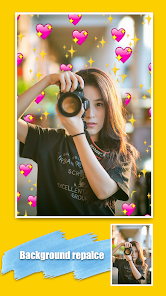
Have you ever looked at a photo and wished the background was different but didn't want to mess with complicated editing software? Emoji Background Changer by Judi Studio is exactly what it sounds like—a mobile tool that swaps the backdrop of your pictures in a few taps. It's available on both Google Play and the App Store, and when I first downloaded it (it's free, by the way), I was surprised it had over ten million installs. After launching it, the first impression is pretty straightforward: a clean screen with a "Gallery" button and a "Camera" button. You don't need to sign up for anything, which is nice, but there are banner ads at the bottom and occasional video ads after you save an image. I didn't mind them at first because the app itself loads fast and doesn't ask for unnecessary permissions.
Once you pick a photo from your camera roll, the app automatically detects the subject and cuts it out. It's not perfect—sometimes it misses a strand of hair or leaves a rough edge—but for a quick edit, it's surprisingly decent. After the cutout, you can choose a new background from a library of solid colors, gradients, fun patterns, or your own images. The interface is simple: you tap the "Background" tab, select what you want, and it replaces instantly. You can also resize or move the foreground subject with your fingers, which is handy. I found the processing time very fast, even on an older phone, and the app doesn't freeze or crash often. One small tip: if you're doing a portrait with flyaway hair, use a solid color or blur instead of a busy pattern, because the edge detection can get messy.
After using it for about two weeks, I think it's a solid tool for casual users who want to make memes, social media avatars, or just have fun with friends' faces. It's definitely not for professional photo editing—tools like Adobe Photoshop Express or Snapseed offer way more control, but they're also harder to learn. What keeps Emoji Background Changer on my phone is the sheer speed; I can change a background in under a minute. That said, the free version's ads can be annoying, and the background library isn't huge. People who already have a good photo editor probably won't need it, but if you're someone who likes quick, silly edits without learning layers and masks, this app will stick around on your home screen.
features
- 🔥 One-click cutout: The app automatically removes the background from any photo you import. Unlike a tool like Photoshop Express where you have to manually brush or use the "Select Subject" tool, Emoji Background Changer does it instantly with no extra steps. It's not as accurate, but for speed, it wins.
- 🔥 Fun background library: Instead of boring solid colors, you get a selection of emojis, festive patterns, and playful textures. The "Emoji Patterns" category is the standout feature—it fills the background with repeating smiley faces or hearts. No other simple background changer includes this without you manually adding them.
- 🔥 Resize and move the subject: After the cutout, you can pinch to zoom the subject bigger or smaller, or drag it around the frame. This is a smaller touch that apps like Remove.bg don't let you do; they just place the cutout in the center. Here, you have room to position your face wherever you want on the new background.
- 🔥 No sign-up required: You just download, tap, and start editing. A lot of similar apps force you to create an account or start a free trial before you can save an image. This one doesn't pull that nonsense, so I found it refreshingly straightforward.
pros
- 🚀 It's extremely fast: The entire process from selecting a photo to saving the edited image takes less than 30 seconds. Compared to something like YouCam Perfect, which has a steeper learning curve and more steps, this app is perfect for a quick joke edit or last-minute profile picture change.
- 🚀 Lightweight and low storage impact: The app size is tiny—just around 15 MB. Unlike PicsArt or Facetune, which take up hundreds of megabytes and often slow down your phone, this app runs smoothly even on budget devices.
- 🚀 No hidden watermark: Some free background changers (like the ones you find on random websites) add a watermark unless you pay. Emoji Background Changer does not do that. Your final image is clean, which is a huge plus for casual use.
- 🚀 Kids and beginners find it intuitive: Because the interface has only three main buttons (Gallery, Camera, Background), it's one of the rare editing apps I'd recommend to my grandmother or a nine-year-old. In contrast, apps like Adobe Photoshop Mix are way too complicated for non-techy users.
cons
- ❌ Background replacement accuracy is hit or miss: The automatic cutout struggles with complex edges like frizzy hair, glasses, or fluffy objects. If you need a clean, precise cutout (like for a professional profile picture), you're better off using Snapseed's "Selective" tool or the "Background Eraser" app, which lets you manually refine edges.
- ❌ Limited background categories: While the emoji patterns are fun, the solid colors and gradients are very basic. Other apps like Canva offer thousands of templates, textures, and stock photos as backgrounds. Here, you only get around 30 preset options unless you import your own.
- ❌ Banner ads interrupt the experience: The ad at the bottom of the screen doesn't go away, and a full-screen video ad pops up every time you save an image. Free alternatives like Remove.bg (web version) don't show any ads, though you need internet. This app's ad model feels a bit too aggressive.
- ❌ No undo or history feature: If you accidentally move the subject or choose the wrong background, there's no "Undo" button. You have to start over from the original photo. An app like Pixelcut lets you step back through changes, which saves time when you make a mistake.
Recommended Apps
![]()
Daily Horoscope
KADO Apps4.4
![]()
FOX Sports: Watch Live Games
Fox Digital Services, LLC3.7
![]()
Fake Call from Santa Claus
ThunderClap4.2![]()
Google Maps
Google LLC4.2![]()
PhotoLayers-Superimpose,Eraser
handyCloset Inc.4.6![]()
Healthy Benefits+
Solutran, Inc.4.5![]()
SuperMe - Avatar Maker Creator
THE.DEMON3.7![]()
Air Horn
Tenoku4.8![]()
Football Wallpaper HD 4K
Orange Infotech Studio4.6![]()
Artplay - AI Photo & Video
Hideaway Technology Limited4.5![]()
Horoscopes – Daily Zodiac Horo
Mail.Ru Group4.1![]()
Passport Parking
Passport Labs, Inc.2.5![]()
ParkMobile: Park. Pay. Go.
Parkmobile, LLC4.3![]()
FestAI: Ghost Detector App
Now Tech3.2![]()
Photo Tool
COLIFER LAB4





























