

AI Art Photo Editor, AI Filter

5M+
Installs
Smart AI DEV
Developer
-
Generative AI
Category
-
Rated for 3+
Content Rating
-
summerdaysc@outlook.com
Developer Email
-
https://coolsummerdev.com/avatar-privacy-policy
Privacy Policy
Screenshots



editor reviews
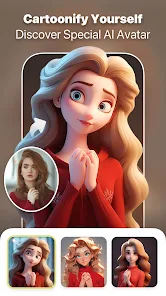
You ever open an app and instantly wonder if you've just walked into a futuristic photo studio? That's exactly how I felt when I first launched AI Art Photo Editor, AI Filter by Smart AI DEV. It's one of those image manipulation tools that leans heavily into artificial intelligence, promising to turn your ordinary snapshots into something that looks like it belongs in a gallery. The app is free to download on both Google Play and the App Store, and it has racked up a decent number of installs—though I couldn't nail down the exact count without diving into the store pages. Once you install it and open it up, you're greeted with a clean, mostly clutter-free interface that doesn't shove a dozen tutorials in your face. That first impression is refreshingly straightforward: pick a photo, and get started.
After I loaded a few of my own pictures, the real hands-on experience kicked in. The interface doesn't overwhelm you with buttons; instead, it offers a simple "Upload" action at the top, and once you select an image, a row of preset filters appears below. The onboarding is practically nonexistent, which I actually liked—I didn't want to sit through a guided tour. Moving through the app, you tap a filter, and the app processes it almost instantly. There's a slight delay on older phones, but nothing that broke my flow. I found myself tapping between the "Cartoon" and "Oil Painting" styles most often, and the results were surprisingly sharp, with the AI clearly doing the heavy lifting in the background. A small tip: if you tweak the brightness or contrast before applying a filter, the final output looks way more natural. The only slightly confusing moment came when I tried to undo a filter—there's no visible undo button, so I had to reload the original image. A minor hiccup, but not a dealbreaker.
After spending a solid week with it, I'd say this app is perfect for casual users who want quick, stylish edits without learning complex tools like Photoshop. It's not for photographers who need precise control over every pixel—you won't find layer masks or manual color grading here. What sets it apart from, say, Meitu or PicsArt is the AI-driven transformation. You don't pick a filter and pray it works; the AI actually adjusts the effect based on the photo's content, like recognizing a face in a portrait and applying a soft skin smoothing effect automatically. That said, I kept it installed because it's perfect for throwing a funky filter on a selfie before sharing it with friends. I'd probably only uninstall it if I ran out of storage, because it does the job without any fuss. It's not revolutionary, but it's definitely reliable for a quick art makeover.
features
- 🖼️ AI-driven filter adaptation — Unlike PicsArt where you manually tweak every slider, this app's AI analyzes your photo (like detecting faces or landscapes) and adjusts the filter's intensity automatically. For example, when I applied the "Sketch" filter to a portrait, it preserved facial details better than I expected, while a scenery shot got heavier line effects.
- ⚡ Real-time preview — Tap a filter and see the result in under 2 seconds. That's way faster than walking through the dozen menus in a tool like Snapseed, where you have to apply and then back out to compare.
- 🎨 Preset art styles — Options like "Anime," "Watercolor," and "Impressionist" are pre-trained and ready to go. In contrast, apps like Adobe Lightroom require you to build those looks from scratch using complex color curves and presets.
- 📱 Minimal learning curve — No layers, no masks, no jargon. Just upload an image and pick a style. That's the main edge over Photoshop Express, which feels like a maze if you're not used to it.
pros
- 🌟 Outstanding portrait handling — The AI recognizes faces and applies skin smoothing and eye enhancement automatically. Meitu does this too, but AI Art Photo Editor's results feel more natural without the “wax doll” look.
- 🌌 Versatile style selection — You get more unique styles (like "Comic Book" or "Glitch Art") than the standard filters found in the default iPhone or Samsung gallery editors.
- 🔄 Fast processing speed — Even on my 3-year-old phone, each filter applied within seconds. That's noticeably quicker than the processing times I've dealt with in Instagram's own edit tools.
- 🌐 Offline capability — Most art filters work without an internet connection, which is a big plus compared to apps like DeepArt that require cloud processing.
cons
- ❌ No manual adjustment sliders — Once the AI chooses how strong a filter is, you can't fine-tune it. Lightroom lets you control every aspect, but here you're stuck with the AI's default.
- 🔙 No undo button — If you apply a filter and don't like it, you have to reload the original photo instead of just hitting “Undo.” Meitu handles undo much more gracefully.
- 📸 Limited batch editing — You can't apply the same filter to multiple photos at once. If you have 10 selfies you want to style alike, you'll go through them one by one, which is tedious compared to Snapseed's copy-paste edit feature.
- 💸 Watermark in free version — Exported images come with a small watermark on the bottom right corner. To remove it, you need to pay, which feels restrictive next to apps like PicsArt that offer free watermark removal for basic edits.
Recommended Apps
![]()
Daily Horoscope
KADO Apps4.4
![]()
FOX Sports: Watch Live Games
Fox Digital Services, LLC3.7
![]()
Fake Call from Santa Claus
ThunderClap4.2![]()
Google Maps
Google LLC4.2![]()
PhotoLayers-Superimpose,Eraser
handyCloset Inc.4.6![]()
Healthy Benefits+
Solutran, Inc.4.5![]()
SuperMe - Avatar Maker Creator
THE.DEMON3.7![]()
Air Horn
Tenoku4.8![]()
Football Wallpaper HD 4K
Orange Infotech Studio4.6![]()
Artplay - AI Photo & Video
Hideaway Technology Limited4.5![]()
Horoscopes – Daily Zodiac Horo
Mail.Ru Group4.1![]()
Passport Parking
Passport Labs, Inc.2.5![]()
ParkMobile: Park. Pay. Go.
Parkmobile, LLC4.3![]()
FestAI: Ghost Detector App
Now Tech3.2![]()
Photo Tool
COLIFER LAB4





























