
Retake AI: Face & Photo Editor

1M+
Installs
Codeway Dijital
Developer
-
Video Players & Editors
Category
-
Rated for 3+
Content Rating
-
retake@codeway.co
Developer Email
-
https://static.selfai.art/retake-privacy-en.html
Privacy Policy
Screenshots

editor reviews
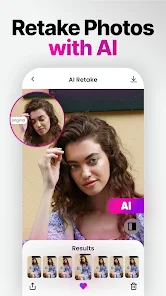
I first stumbled upon Retake AI when I was looking for something to clean up a batch of old family photos. It's a photo and face editor that uses generative AI to do things like restore blurry faces, change backgrounds, remove objects, and even colorize black-and-white shots. It's exactly the kind of app you download on a whim from the Google Play or App Store, expecting it to be a gimmick, but the first impression after launching is surprisingly polished. The app is free to download, though you quickly realize the heavy lifting is locked behind a subscription or credits. There are ads, but they aren't shoved in your face during the first few edits. The install count is significant, which makes sense because the premise alone—fixing a blurry face in a group photo—is something almost everyone has needed at least once.
After signing up (you need an account, which is a minor hurdle), the interface feels clean and modern. The onboarding screen walks you through the main tools: Face Enhancer, Restorer, Colorize, and Remove Object. My first test was a 2010 vacation photo where everyone's faces were slightly soft. I tapped the Face Enhancer, uploaded the image, and waited maybe 20 seconds. The result was subtle but real—eyes sharpened, skin smoothed without looking plastic, and the overall clarity went up. The Remove Object tool is also surprisingly accurate; I zapped a stray trash can from a street photo and the app filled in the gap with matching pavement texture. One small tip I picked up: if the background change looks off, try adjusting the mask brush size to be smaller around hair edges—it helps avoid those telltale cutout artifacts. The only confusing moment I had was during the export step; the app defaults to a lower resolution unless you pay, which feels a bit sneaky the first time.
After using Retake AI for a couple of weeks, I'd say it's a solid tool for casual users who want one-click fixes without opening Photoshop or even a desktop-class app like Remini. It's faster and more forgiving than Remini for face restoration, but it lacks the fine manual controls you'd get in a paid editor like Adobe Lightroom. The subscription feels a bit steep for occasional use, so I can see someone uninstalling after a few free credits run out. On the other hand, if you regularly deal with old, damaged, or poorly lit photos from family archives, this app earns its keep. It has a niche, and it does that niche well—no more, no less.
features
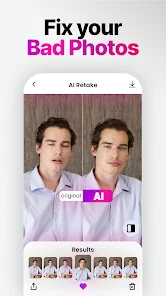
- ✨ Face Enhancer: This is the main draw. Unlike Google Photos' basic sharpening or Remini's aggressive smoothing, Retake AI hits a sweet spot. It reconstructs facial details from blurry images without making everyone look airbrushed. I tried it on a 2014 concert photo where faces were just blobs, and it actually brought out individual features.
- ✨ Object Removal: It works like Magic Eraser on Pixel phones but feels more refined for complex backgrounds. For example, removing a lamppost from a crowded skyline scene produced seamless texture filling, while Samsung's similar tool left a wavy blur.
- ✨ Background Change: The AI handles tricky hair edges better than FaceApp's background swap. I tested it on a windy portrait with flyaway hairs, and the cutout was 90 percent clean without manual tweaking.
- ✨ Batch Processing: You can queue multiple photos for the same enhancement. This is something you don't get in simpler editors like YouCam Perfect, and it saved me time when fixing a whole album of scanned prints.
pros
- 🎨 Higher quality restorations: Retake AI's face restoration is more natural than Remini's, which often overcooks skin texture and creates a shiny, almost plastic look. The colorization also avoids the muddy tones I've seen in apps like Colorize.cc.
- 🎨 Cleaner interface: Compared to Picsart's cluttered menus, Retake AI keeps things simple. You pick a tool, upload a photo, and get a result without digging through layers or confusing sliders.
- 🎨 Better free tier: While Adobe Photoshop Express locks most AI features behind a subscription, Retake AI gives you a handful of free credits to test each tool, which is more generous than most competitors.
cons
- ⚠️ Costly subscription: After a few free credits, you hit a paywall that feels expensive compared to Remini's lower annual plan. For someone who only edits a photo once a month, the subscription doesn't justify itself.
- ⚠️ No manual fine-tuning: Unlike Lightroom's masking or Snapseed's selective adjustments, Retake AI gives you one slider per tool. If the AI misreads your intent, you can't easily correct it.
- ⚠️ Export resolution gating: The app locks high-resolution exports behind the paywall. Free exports look fine on a phone screen but get pixelated when printed or zoomed, which feels like a bait-and-switch compared to FaceApp's more generous resolution policy.
- ⚠️ Limited editing history: You can't undo steps or compare before-and-after without going back to the main screen. Apps like Picsart let you stack edits non-destructively, which is much more flexible.
Recommended Apps
![]()
Daily Horoscope
KADO Apps4.4
![]()
FOX Sports: Watch Live Games
Fox Digital Services, LLC3.7
![]()
Fake Call from Santa Claus
ThunderClap4.2![]()
Google Maps
Google LLC4.2![]()
PhotoLayers-Superimpose,Eraser
handyCloset Inc.4.6![]()
Healthy Benefits+
Solutran, Inc.4.5![]()
SuperMe - Avatar Maker Creator
THE.DEMON3.7![]()
Air Horn
Tenoku4.8![]()
Football Wallpaper HD 4K
Orange Infotech Studio4.6![]()
Artplay - AI Photo & Video
Hideaway Technology Limited4.5![]()
Horoscopes – Daily Zodiac Horo
Mail.Ru Group4.1![]()
Passport Parking
Passport Labs, Inc.2.5![]()
ParkMobile: Park. Pay. Go.
Parkmobile, LLC4.3![]()
FestAI: Ghost Detector App
Now Tech3.2![]()
Photo Tool
COLIFER LAB4





























