

Photo Collage Maker, Editor

1M+
Installs
GAM Mobile App
Developer
-
Generative AI
Category
-
Rated for 3+
Content Rating
-
philiptran0308@gmail.com
Developer Email
-
https://sites.google.com/view/gampolicy2023
Privacy Policy
Screenshots

editor reviews
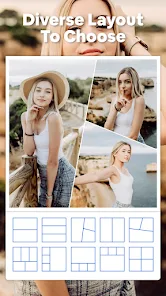
I've been messing around with this app called Photo Collage Maker, Editor from GAM Mobile App, and honestly, it's one of those photo editing tools that doesn't try to be a full-fledged Photoshop clone. It's specifically built for making collages and quick edits on your phone. You can download it for free from the Google Play or App Store, and it's something a regular person would grab when they need to stitch a few photos together for a social media post or a quick memory album. The first time I opened it, the interface felt pretty straightforward—no overwhelming sign-up screen or pushy ads right away, which was a relief. It's got a decent install count, and while there are in-app purchases for extra templates and stickers, the basic collage maker works just fine without paying a cent. The app doesn't force registration either, so you can start making collages immediately.
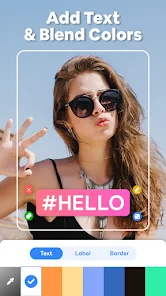
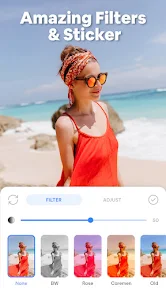
After using it for a bit, the hands-on experience is pretty smooth. Once you launch the app, you're greeted with a simple layout where you can pick a collage template or jump straight into editing a single photo. The onboarding is minimal, maybe a quick tip about how to drag photos around, but nothing that gets in your way. The main actions involve selecting images from your gallery, arranging them into preset grid layouts, and then tweaking things like borders, backgrounds, or adding text. I noticed the app handles multiple photos without lag, which is nice when you're working with a batch. There are moments when the interface feels a bit crowded with stickers and filters, but it's not a deal-breaker. A small tip: if you double-tap a photo within the collage, you can actually zoom or rotate it without messing up the layout, which I found out by accident. Daily use would be dragging images in, adjusting the spacing, and maybe slapping on a filter before saving.
After sticking with it for a while, my personal take is that this app nails the casual user's needs. If you're someone who likes to make quick collages for Instagram stories or family group chats without overcomplicating things, this is a solid choice. I wouldn't recommend it for professional editing or complex photo manipulation because it's just not built for that. Compared to something like Canva or Adobe Express, this app feels more stripped-down and focused—no fancy design tools, but also no learning curve. What makes it different is that it's almost exclusively about collages, while other apps spread themselves thin. I'd probably keep it installed for those random moments when I need a collage in under a minute, but if you're after advanced editing, you'll likely uninstall it pretty fast. It's a fair trade-off between simplicity and usefulness.
features
- 🖼️ The standout feature here is how fast you can combine multiple photos into a single collage. You just pick a layout, drop in your images, and it's done. Unlike PicsArt, which bombards you with layers and effects, this app keeps the core task simple and quick. It's great for someone who doesn't want to fiddle with complex tools.
- 🖼️ Another thing I really like is the border control. You can adjust the thickness and color of the gaps between your photos, which sounds small but actually changes how the whole collage looks. Canva has this too, but it's buried in menus. Here, it's right there in the edit screen, making it more accessible.
- 🖼️ The sticker and text library is decent too, and it doesn't feel like a cheap copy-paste job. The fonts are clean, and the stickers don't look pixelated when you scale them up. Compared to Layout from Instagram, which has almost no extras, this gives you more freedom to personalize your collage without going overboard.
pros
- 🌟 The biggest strength is its ease of use. You don't need a tutorial to figure out the basics, unlike Adobe Express which can feel intimidating. This app lets you make a collage in under a minute, which is perfect for quick updates.
- 🌟 Another plus is the offline functionality. You can use most features without an internet connection, which is handy when you're traveling or on a limited data plan. Snapseed, for comparison, also works offline, but it's more about photo editing than collages.
- 🌟 I also appreciate that the ads aren't intrusive. They pop up now and then, but they don't force you to watch a full video before saving your work. Fotor, on the other hand, can be annoying with its ad frequency.
cons
- ⚠️ The biggest weakness is the limited template variety. After a few uses, you'll notice the same grid layouts repeating themselves. Canva has hundreds of options, but this app feels like it's stuck with a bare minimum. It gets repetitive fast.
- ⚠️ The editing tools for individual photos are basic at best. You can't do advanced adjustments like curves or selective color changes. If you want that, you're better off using Lightroom or Snapseed separately, which kind of defeats the purpose of an all-in-one app.
- ⚠️ Another issue is the lack of cloud backup or project saving. If you close the app, your current collage is gone unless you saved it as a draft, and even then, it's not always reliable. PicsArt lets you save projects for later, which is a major advantage.
Recommended Apps
![]()
Daily Horoscope
KADO Apps4.4
![]()
FOX Sports: Watch Live Games
Fox Digital Services, LLC3.7
![]()
Fake Call from Santa Claus
ThunderClap4.2![]()
Google Maps
Google LLC4.2![]()
PhotoLayers-Superimpose,Eraser
handyCloset Inc.4.6![]()
Healthy Benefits+
Solutran, Inc.4.5![]()
SuperMe - Avatar Maker Creator
THE.DEMON3.7![]()
Air Horn
Tenoku4.8![]()
Football Wallpaper HD 4K
Orange Infotech Studio4.6![]()
Artplay - AI Photo & Video
Hideaway Technology Limited4.5![]()
Horoscopes – Daily Zodiac Horo
Mail.Ru Group4.1![]()
Passport Parking
Passport Labs, Inc.2.5![]()
ParkMobile: Park. Pay. Go.
Parkmobile, LLC4.3![]()
FestAI: Ghost Detector App
Now Tech3.2![]()
Photo Tool
COLIFER LAB4





























