
Ink AI – Tattoo design maker

500K+
Installs
RefaceEuropeUAB
Developer
-
Generative AI
Category
-
Rated for 3+
Content Rating
-
hey@ink-ai.app
Developer Email
-
https://ink-ai.app/privacy
Privacy Policy
Screenshots
editor reviews
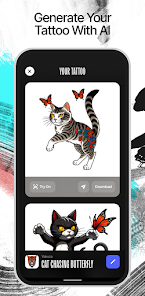
So I stumbled upon Ink AI – Tattoo design maker, which is essentially a generative AI tool built specifically for tattoo concepts. It's from RefaceEuropeUAB, the same folks behind those popular face-swap apps, so you know the tech side is solid. You download it from Google Play or the App Store – I think it's free to install, though like most apps of this kind, there are in-app purchases if you want the high-res exports or extra style packs. The first thing that hit me after launching it was how clean the interface looks. No cluttered menus or aggressive pop-ups asking for a subscription right away. Instead, you're greeted with a simple prompt bar and some trending designs. For someone like me who has zero drawing skills but has been mulling over a sleeve idea for months, that felt immediately welcoming.
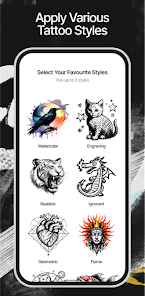
Once you start playing around, the experience is pretty straightforward. You type in what you're thinking – like "a geometric wolf with moon phases" – and within seconds, it spits out a handful of variations. The onboarding is smooth; there's a tiny tutorial that shows you how to adjust style sliders (realistic, watercolor, tribal, etc.) without overwhelming you. I spent a good half hour just feeding it random ideas, and honestly, the results were hit or miss. Some generations nailed the vibe perfectly, while others looked like weird smudges. A practical tip I picked up: keep your prompts specific but not too wordy. "Minimalist snake wrapping a dagger" worked way better than a paragraph description. The app also lets you save favorites and tweak them further, which is handy if you're indecisive like me.
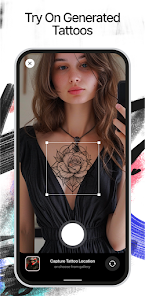
After using Ink AI for a few days, I'd say it's a solid tool for brainstorming but not a replacement for a real artist. If you're someone who wants to visualize a concept before committing to a studio appointment, this app is gold. It saves you from scrolling through Pinterest for hours. But if you're expecting ready-to-ink designs that respect anatomy and skin texture, you'll be disappointed. Compared to something like Tattoodo or even Pinterest, Ink AI feels more creative in a "what if" way, but less reliable for practical placement. I kept it installed because it's fun to play with during downtime, but I can see people uninstalling it once they've settled on a design. The free version gives you enough to explore, so at least you're not locked into a payment cycle.
features
- 🎨 The main draw is the AI generator itself. You type a description, pick a style like watercolor or traditional, and it creates unique tattoo designs in seconds. In contrast, apps like Tattoodo rely on artists uploading pre-made flash, so you're limited to existing work. Ink AI lets you generate something that's truly one-of-a-kind for your idea.
- ⚙️ The style customization sliders give you control over elements like line thickness, color saturation, and complexity. Most similar tools, like the basic Stable Diffusion interfaces, offer far less granular control for tattoo-specific aesthetics. This makes a big difference when you want a fine-line versus a bold traditional look.
- 💾 The save and refine feature is underrated. You can bookmark your favorite generations and then tweak the prompt slightly to get variations without losing the original. Apps like DALL-E or Midjourney don't have that same seamless workflow for saving and iterating within a mobile environment.
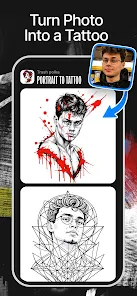
- 🔄 The app also includes a style transfer option where you can upload a sketch or photo and have it reimagined as a tattoo. This is something platforms like Canva or general photo editors don't offer, and it's surprisingly useful if you have a rough idea but need it cleaned up.
pros
- 👍 The AI generation speed is a standout. You get results in under 10 seconds, which is faster than manually searching through Pinterest or Instagram for hours. It's perfect for quick inspiration when you're stuck.
- 👍 The free tier actually lets you generate a decent number of designs before hitting a paywall. Compared to something like Leonardo AI, which throttles you quickly, Ink AI feels generous for casual exploration.
- 👍 The style variety is genuinely broad. From traditional American to Japanese to minimalist sketches, the model handles them all reasonably well. Apps like Inkbox focus only on stencil-style designs, so this feels more versatile for different tattoo tastes.
- 👍 The interface is beginner-friendly. There's no steep learning curve like you'd face with complex tools such as Procreate or Photoshop when trying to mock up a design. You just type, tap, and see results.
cons
- 👎 The output quality is inconsistent. Some generations look clean and professional, while others are blurry or anatomically weird. This isn't a problem with high-quality artist-designed flash on Tattoodo or Instagram, where every piece is curated.
- 👎 You can't directly adjust the composition or elements after generation. Unlike apps like Procreate, where you can manually edit lines and colors, Ink AI is a black box – you get what you get and have to regenerate if you want changes.
- 👎 The resolution on the free tier is limited. If you want a design printed or shown to a tattoo artist, you'll need to pay for the high-res export. Similar apps like Midjourney offer better base quality even on free trials.
- 👎 There's no community or social feed within the app. Unlike Tattoodo or Instagram pages, you can't browse what others are creating or get feedback on your designs, which makes the experience feel a bit isolated.
Recommended Apps
![]()
Daily Horoscope
KADO Apps4.4
![]()
FOX Sports: Watch Live Games
Fox Digital Services, LLC3.7
![]()
Fake Call from Santa Claus
ThunderClap4.2![]()
Google Maps
Google LLC4.2![]()
PhotoLayers-Superimpose,Eraser
handyCloset Inc.4.6![]()
Healthy Benefits+
Solutran, Inc.4.5![]()
SuperMe - Avatar Maker Creator
THE.DEMON3.7![]()
Air Horn
Tenoku4.8![]()
Football Wallpaper HD 4K
Orange Infotech Studio4.6![]()
Artplay - AI Photo & Video
Hideaway Technology Limited4.5![]()
Horoscopes – Daily Zodiac Horo
Mail.Ru Group4.1![]()
Passport Parking
Passport Labs, Inc.2.5![]()
ParkMobile: Park. Pay. Go.
Parkmobile, LLC4.3![]()
FestAI: Ghost Detector App
Now Tech3.2![]()
Photo Tool
COLIFER LAB4





























