

Chatbot AI & Smart Assistant

10M+
Installs
Codespace Dijital
Developer
-
Generative AI
Category
-
Rated for 3+
Content Rating
-
aichat@codespaceapps.co
Developer Email
-
https://static.chatbotaiapp.co/privacy-en.html
Privacy Policy
Screenshots


editor reviews
Chatbot AI & Smart Assistant is a mobile utility app designed to function as a conversational AI tool. You can talk to it, ask questions, get summaries, or have it help with small tasks like drafting messages or brainstorming ideas. I downloaded it from the Play Store after seeing it had a decent number of installs and was free to try. The first thing I noticed after launching it was the clean, minimal interface with a simple text input bar at the bottom. No flashy animations or cluttered menus — it felt more like a messaging app than a typical AI tool. There was no mandatory registration, so I could just start typing right away. That kind of instant access made a good first impression.
Once I started using it, the experience felt similar to chatting with a friend. I typed my first question about planning a weekend trip, and the assistant gave me a detailed itinerary with time slots and suggestions. The responses came fast, and I could keep the conversation going by asking follow-up questions. The app does have a premium plan, but I didn't feel pressured to upgrade during the first few uses. I tried asking it to rewrite a paragraph from my email, and it gave me a cleaner version without me having to explain the tone. A small thing I liked: each session stays separate, so you can switch between different topics without losing context. The keyboard integration also works well — when you tap the send button, the response pops up right there in the chat area as expected.
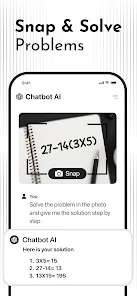
After using it for a while, I'd say this app works well for people who want a straightforward AI assistant without all the extra fluff. If you just need help with writing, answering questions, or bouncing around ideas, this fits nicely. But if you want something deeper — like voice cloning, document scanning, or advanced automation — this isn't that app. Compared to something like ChatGPT's mobile version, this one feels more streamlined but lacks the same depth in handling complex conversations. I can see myself keeping it installed for quick tasks, but I might switch to a more full-featured alternative when I need something more thorough. It's not mind-blowing, but for a free starter tool, it gets the job done.
features
- 😊 Natural conversation flow — The app understands context well and keeps a smooth back-and-forth chat going. You don't have to repeat yourself, and it adjusts to how you phrase things. ChatGPT also does this, but the assistant here feels slightly lighter and less pushy about upgrades.
- 😊 No sign-up required — Most AI assistants ask you to create an account or log in with Google. This one lets you start chatting instantly, which makes a huge difference when you just want to try something out quickly. AI Buddy, for comparison, forces registration right away.
- 😊 Session-based memory — Each chat stays in its own thread without mixing up topics. If you start talking about cooking and then ask about coding, the assistant doesn't confuse the two. Advanced AI on other platforms sometimes blends contexts by accident, which this handles better.
- 😊 Clean interface with fast responses — The app doesn't bombard you with buttons or options. It looks and feels like a simple messenger. Compared to Replika which leans more toward personality and looks, this one focuses purely on getting the job done with minimal distraction.
pros
- 💪 Instant access without registration — You don't have to hand over your email or phone number to start. Many apps like AI Chatbot ask for an account first, which can be annoying if you just want to test it out.
- 💪 Fast and responsive replies — The answers come in quickly without noticeable lag. Some assistants, like Genie AI, take a few extra seconds to load their response, so this feels snappier in regular use.
- 💪 Clean and intuitive UI — The layout is simple and doesn't distract you with unnecessary graphics. Bing Chat's mobile interface, for instance, has a lot of clutter from search suggestions and news tiles, making it less focused for pure conversation.
cons
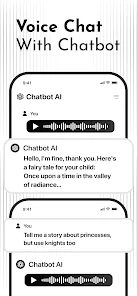
- 🔴 No voice input or hands-free mode — The app only works through typing. I miss being able to just speak my question, especially while driving or cooking. Apps like ChatGPT on mobile have voice input built right in.
- 🔴 Limited learning from user behavior — It doesn't seem to remember your preferences across sessions. You might tell it you prefer short answers, but it won't hold onto that the next time you open the app. AI Buddy remembers your tone and style better over time.
- 🔴 Free version has restricted access — After a handful of queries, you start hitting a wall where premium features are teased. Other assistants, like Microsoft Copilot, let you use more of the features for free before asking for payment.
Recommended Apps
![]()
Daily Horoscope
KADO Apps4.4
![]()
FOX Sports: Watch Live Games
Fox Digital Services, LLC3.7
![]()
Fake Call from Santa Claus
ThunderClap4.2![]()
Google Maps
Google LLC4.2![]()
PhotoLayers-Superimpose,Eraser
handyCloset Inc.4.6![]()
Healthy Benefits+
Solutran, Inc.4.5![]()
SuperMe - Avatar Maker Creator
THE.DEMON3.7![]()
Air Horn
Tenoku4.8![]()
Football Wallpaper HD 4K
Orange Infotech Studio4.6![]()
Artplay - AI Photo & Video
Hideaway Technology Limited4.5![]()
Horoscopes – Daily Zodiac Horo
Mail.Ru Group4.1![]()
Passport Parking
Passport Labs, Inc.2.5![]()
ParkMobile: Park. Pay. Go.
Parkmobile, LLC4.3![]()
FestAI: Ghost Detector App
Now Tech3.2![]()
Photo Tool
COLIFER LAB4





























