
LINE Sticker Maker

5M+
Installs
LINE (LY Corporation)
Developer
-
Video Players & Editors
Category
-
Rated for 3+
Content Rating
-
line-support@line.me
Developer Email
-
https://line.me/terms/policy/
Privacy Policy
Screenshots
editor reviews
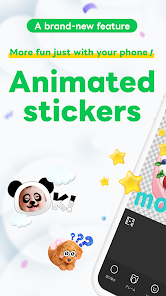
So I've been messing around with LINE Sticker Maker, which is an app developed by LINE Corporation that lets you create your own custom stickers for the LINE messaging platform. It's basically a tool for anyone who wants something more personal than the standard sticker packs, whether that's turning your cat photos into reactions or designing little doodles for friends. You grab it from Google Play or the App Store, install it, and it's free to download. They do have in-app purchases for some extra backgrounds or fonts, and there's the occasional ad, but nothing that gets in the way too much. First time you open it, it hits you with a simple tutorial, which I actually appreciated because the sticker creation rules can be a bit specific. The layout is clean, and you're immediately prompted to either start a new project or browse the community gallery.
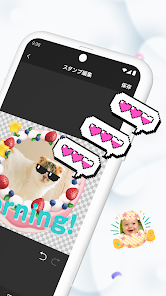
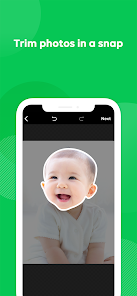
Once you're inside, the real hands-on experience begins. You start by picking an image from your camera roll or using the built-in drawing tools. The interface guides you through cropping, adding text, and applying effects like outlines or shadows, which is handy because stickers look weird without proper borders on chat backgrounds. The main actions are pretty intuitive: trim your image, slap on some text, pick a background color, and hit save. I did trip up a bit when trying to make a transparent background because the option is tucked away in a menu, but once you find it, it's smooth sailing. In daily use, you'd probably whip up a few stickers in like five minutes, test them in a chat, then go back to tweak sizes or expressions. A neat trick is to use images with clear edges, the app handles selection better that way.
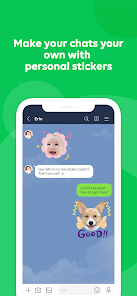
After using it for a while, I think this app is a solid pick for people who use LINE regularly and want to add a personal touch without spending money on premium packs. It's not for someone who just downloads the default store collections and never sends stickers, since the effort-to-joy ratio might feel off. What sets it apart from something like Sticker Studio is that LINE Sticker Maker is officially supported, so your creations sync seamlessly with the LINE app, no weird export steps. I kept it installed because it's handy for birthdays or inside jokes, but I could see someone uninstalling if they only make one batch and forget about it. The community gallery also gives you ideas, which helps if you're stuck.
features
- 😄 You can create stickers from your own photos or drawings, which makes every pack uniquely yours compared to something like Sticker Studio where templates feel more generic.
- 😄 The app offers built-in editing tools like cropping, text overlays, and outline effects, so you don't need to jump to another editor first, it's all in one place.
- 😄 Stickers export directly to LINE without extra steps, unlike third-party apps that require manual file transfers or screenshot hacks.
- 😄 A community gallery lets you browse user-created packs for inspiration, which isn't available in simpler sticker makers like Sticker.ly.
pros
- 👍 It's officially made by LINE, so updates and compatibility are guaranteed, unlike random sticker apps that break after a LINE update.
- 👍 The interface is straightforward and beginner-friendly, while alternatives like Sticker Maker Studio can feel cluttered with too many options upfront.
- 👍 You get decent customization with text effects, backgrounds, and sizes without needing premium purchases, whereas similar apps often lock these behind paywalls.
cons
- 👎 The app sometimes struggles with auto-selection when you upload complex images, forcing you to manually erase backgrounds, while Sticker Studio handles this more smoothly with AI.
- 👎 Ads can pop up between saving steps, which breaks the flow, while paid alternatives like Sticker Maker Pro offer an ad-free experience from the start.
- 👎 You need a LINE account to use the final stickers, so if you switch messaging apps, the stickers are useless, unlike standalone sticker apps that export as PNG files.
Recommended Apps
![]()
Daily Horoscope
KADO Apps4.4
![]()
FOX Sports: Watch Live Games
Fox Digital Services, LLC3.7
![]()
Fake Call from Santa Claus
ThunderClap4.2![]()
Google Maps
Google LLC4.2![]()
PhotoLayers-Superimpose,Eraser
handyCloset Inc.4.6![]()
Healthy Benefits+
Solutran, Inc.4.5![]()
SuperMe - Avatar Maker Creator
THE.DEMON3.7![]()
Air Horn
Tenoku4.8![]()
Football Wallpaper HD 4K
Orange Infotech Studio4.6![]()
Artplay - AI Photo & Video
Hideaway Technology Limited4.5![]()
Horoscopes – Daily Zodiac Horo
Mail.Ru Group4.1![]()
Passport Parking
Passport Labs, Inc.2.5![]()
ParkMobile: Park. Pay. Go.
Parkmobile, LLC4.3![]()
FestAI: Ghost Detector App
Now Tech3.2![]()
Photo Tool
COLIFER LAB4





























