

Christmas Photo Frames

1M+
Installs
PhotoFramesApps
Developer
-
Video Players & Editors
Category
-
Rated for 12+
Content Rating
-
z.awesome.995@gmail.com
Developer Email
-
https://docs.google.com/document/d/1tcQYc-r-IdjV_15L2ilYLybN-hbUPzAVlrf8bcZmBKg/edit?usp=sharing
Privacy Policy
Screenshots
editor reviews
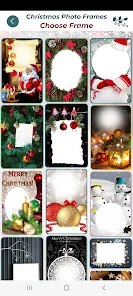
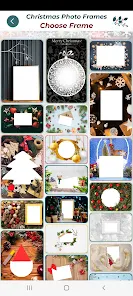
Christmas Photo Frames is essentially what it sounds like: a themed photo editing app from PhotoFramesApps. You pick one of the built-in frames, throw a picture into it, and save the result. It's the kind of app you'd search for if you wanted to send a festive greeting card from your phone without opening something heavy like Photoshop. The first time you launch it, the interface is pretty straightforward – a grid of Christmas borders with reindeer, snowflakes, and wreaths. You just tap one, choose a photo from your gallery, and the app fits it in. It felt more like a digital sticker book than a full editing tool, which makes sense because that's exactly what it is. You don't need to register or sign in, but there are ads that pop up now and then, and some fancier frames are locked behind a quick payment.
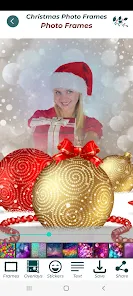
Once you start actually using it, the flow is simple. You pick a frame, crop your photo to fit the preview area, and either rotate or zoom the image slightly with pinch gestures. The app doesn't give you layers or filters – it's just frame, photo, done. Onboarding is basically one screen saying “Select a frame,” and you're off. In practice, I found it worked best when I already had a close-up shot, like a face, because wider photos got squeezed oddly by the frame cutouts. One small thing I noticed: the save button is a little slow after you tap it, so I almost hit it twice a couple of times. Also, the app doesn't automatically save to a separate album, so your Christmas creations just mix in with your regular camera roll, which gets messy fast.
After using it for a while, I think it's fine for what it is – a quick, no-brainer holiday tool. Someone who just wants to dress up a family photo for a WhatsApp status will probably get exactly what they need and delete the app by January. If you're someone who likes tweaking colors, adding text, or making collages, you'll feel limited here. Compared to something like Canva, which offers similar seasonal templates but with way more control, Christmas Photo Frames feels like a one-trick pony. The difference is that Canva requires an account and has a steeper learning curve, while this app is truly pick-up-and-go. I kept it installed just because it's festive and my mom likes sending framed photos, but I can see most people uninstalling it once the holidays are over.
features
- 🎄 Frame selection is the whole deal – you flip through a bunch of Christmas-themed borders with different shapes, like round windows or star cutouts. The app keeps it focused: pick a frame, drop in a photo, export. No clutter, no extra tabs.
- 🎄 Quick crop and zoom – once you choose a frame, you can pinch to resize your photo and drag to reposition it. It's basic but works fine for portraits. Compared to PicCollage, which lets you add stickers and text, this app only gives you the frame and nothing else – simpler but less flexible.
- 🎄 Instant save as JPEG – the app exports directly to your gallery without asking for file type, size, or watermark prompts. That's convenient compared to apps like PicsArt, which sometimes push premium exports. Here, you just tap save and it's done, even if the save button lag is a bit annoying.
pros
- No sign-up required – you don't need to create an account or give email access. So many holiday photo apps ask for registration before you even see a template, but here you start editing right after install. That's a big win over apps like Christmas Photo Collage Maker.
- Lightweight and fast to load – the app opens in under two seconds on my older phone, and the frames load immediately. Apps like Canva take longer to initialize and often require a data connection, while this one works fully offline after the initial download.
- Very intuitive for non-tech users – my mom, who struggles with most photo apps, figured it out in one try. The interface is just a grid and a “save” button. That's better than something like Adobe Express, which has too many options for a simple framed photo.
cons
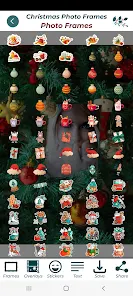
- No editing tools – you can't adjust brightness, contrast, or even add text to the image. If you want a custom message on your Christmas card, you'll need a second app. Apps like PicCollage let you do both in one place, so this feels barebones in comparison.
- Ads interrupt the flow – after saving each photo, a full-screen video ad plays before you can go back to the frame selection. Christmas Photo Frames isn't the only free app with ads, but the frequency here is higher than in something like Canva's free tier, which reserves ads for export only.
- Limited frame updates – the frame library seems fixed from the initial install. There's no new content added for other winter holidays or even different styles within Christmas. Competitors like Holiday Photo Booth regularly update their templates seasonally, so this app gets stale after a few uses.
Recommended Apps
![]()
Daily Horoscope
KADO Apps4.4
![]()
FOX Sports: Watch Live Games
Fox Digital Services, LLC3.7
![]()
Fake Call from Santa Claus
ThunderClap4.2![]()
Google Maps
Google LLC4.2![]()
PhotoLayers-Superimpose,Eraser
handyCloset Inc.4.6![]()
Healthy Benefits+
Solutran, Inc.4.5![]()
SuperMe - Avatar Maker Creator
THE.DEMON3.7![]()
Air Horn
Tenoku4.8![]()
Football Wallpaper HD 4K
Orange Infotech Studio4.6![]()
Artplay - AI Photo & Video
Hideaway Technology Limited4.5![]()
Horoscopes – Daily Zodiac Horo
Mail.Ru Group4.1![]()
Passport Parking
Passport Labs, Inc.2.5![]()
ParkMobile: Park. Pay. Go.
Parkmobile, LLC4.3![]()
FestAI: Ghost Detector App
Now Tech3.2![]()
Photo Tool
COLIFER LAB4





























