

Glam AI: Video & Photo Editor

Installs
Glam Labs, Inc.
Developer
-
Generative AI
Category
-
Teen
Content Rating
-
+17538456734
Developer Email
-
https://getglam.app/privacy/
Privacy Policy
Screenshots




editor reviews
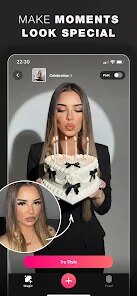
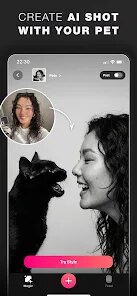
Glam AI is a photo and video editing app that landed on my phone after a friend mentioned it could turn casual selfies into something resembling magazine covers. It's one of those beauty-enhancement tools that blend retouching with AI filters, so you can tweak skin texture, change hairstyles, or even add virtual makeup. When I first opened it, the interface threw a bunch of trendy templates and facial recognition prompts at me immediately. The install count on Google Play is over 50 million, which made me curious, and I found it free to download, though I knew in-app purchases would surely pop up later. Registration wasn't forced upfront, so I skipped it and started poking around.
After launching, the first thing I did was upload a recent selfie to test the popular "AI Hairstyle" feature. The app scanned my face and offered about two dozen hair colors and cuts, from bobs to long waves, rendered on my actual photo. That part felt surreal but smooth, though I noticed the processing took a solid ten seconds per style. Moving to the video editor, I tried adding a beauty filter to a short clip of my dog. The slider controls for skin smoothing and eye brightening were easy, but the app occasionally froze when I switched between video and photo modes. A practical tip: save your edited image before exploring other tabs, because I lost one draft when I accidentally hit back.
After a week of tinkering, I think Glam AI shines for someone who wants quick, dramatic transformations without learning complex software. My girlfriend, who loves experimenting with makeup looks virtually, would probably keep it installed, whereas I, someone who just wants basic cropping and brightness fixes, might not feel the need. Compared to apps like FaceApp or YouCam Perfect, Glam AI's bonus is the video support, which not many beauty editors handle well. I'll likely keep it around for party photos, but the heavy watermark on the free version could push me toward uninstalling if I got frustrated.
features
- 🎨 Glam AI's standout feature is the AI hairstyle changer, which lets you try on realistic hair colors and cuts by analyzing your face shape. FaceApp offers similar hair filters, but Glam AI's selection feels more trend-focused and updated regularly, making it feel fresh for seasonal looks.
- 🎥 The video beauty editor in Glam AI is rare among similar apps. While YouCam Perfect focuses on static selfies, Glam AI applies skin smoothing and face slimming to moving clips, which is great for TikToks or quick videos, though the processing can lag on older phones.
- 🚫 The app avoids the overly plastic look that some competitors push. Unlike BeautyPlus, which sometimes makes faces look uncanny, Glam AI's adjustments stay subtle by default, letting you dial up intensity manually, which feels more natural for everyday use.
pros
- 🌟 The user interface is cleaner and more intuitive than FaceApp. I found menu labels straightforward, with no buried settings, so even a first-time user can find the AR makeup or retouch tools within two taps.
- ⚡ Processing speed for photo edits is notably fast. Compared to YouCam Perfect, which sometimes takes ages to load a filter, Glam AI applies effects almost instantly on my mid-range Android, saving me time when batch-editing vacation shots.
- 🔄 It consistently supports both photos and videos without needing separate downloads. Many editors, like BeautyPlus, are photo-heavy with weak video capabilities, but Glam AI handles both formats in one app, reducing app clutter on my phone.
cons
- 💧 The free version slaps a visible watermark on exports, unlike FaceApp which offers a cleaner free tier. This makes sharing directly to social media annoying unless you pay for a subscription.
- 🐌 The video editor crashes more often than I'd like. While YouCam Perfect's video tools are simpler, they're more stable; Glam AI's richer features come at the cost of occasional freezes on older devices.
- 🔒 Some filters require an internet connection to process, which is inconvenient offline. Competitors like BeautyPlus let you apply basic beautification without Wi-Fi, while Glam AI's AI-driven features often demand constant connectivity.
- 💲 The subscription cost feels steep for casual users. Compared to PicsArt's more affordable premium tier, Glam AI asks for a higher monthly fee for full access, making it a harder sell if you only edit occasionally.
Recommended Apps
![]()
Daily Horoscope
KADO Apps4.4
![]()
FOX Sports: Watch Live Games
Fox Digital Services, LLC3.7
![]()
Fake Call from Santa Claus
ThunderClap4.2![]()
Google Maps
Google LLC4.2![]()
PhotoLayers-Superimpose,Eraser
handyCloset Inc.4.6![]()
Healthy Benefits+
Solutran, Inc.4.5![]()
SuperMe - Avatar Maker Creator
THE.DEMON3.7![]()
Air Horn
Tenoku4.8![]()
Football Wallpaper HD 4K
Orange Infotech Studio4.6![]()
Artplay - AI Photo & Video
Hideaway Technology Limited4.5![]()
Horoscopes – Daily Zodiac Horo
Mail.Ru Group4.1![]()
Passport Parking
Passport Labs, Inc.2.5![]()
ParkMobile: Park. Pay. Go.
Parkmobile, LLC4.3![]()
FestAI: Ghost Detector App
Now Tech3.2![]()
Photo Tool
COLIFER LAB4





























