

AI Hug Video Maker: JoyTu

100K+
Installs
JoyTu AI
Developer
-
Generative AI
Category
-
Rated for 12+
Content Rating
-
dreamerstudiodev@gmail.com
Developer Email
-
https://sites.google.com/view/avatarme/
Privacy Policy
Screenshots



editor reviews
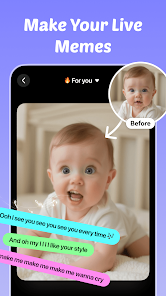
So I stumbled upon this app called AI Hug Video Maker: JoyTu — yeah, it's exactly what it sounds like, an AI-driven tool that turns static photos into hugging video clips. It belongs to that growing category of generative AI apps that focus on personalized, emotional content creation, which is kind of a weird niche honestly. The main draw is you upload a picture of yourself or someone else, and the app generates a short video where that person appears to hug someone or something, based on templates. I found it on Google Play with over 500K downloads, free to install, though it does push some in-app purchases pretty aggressively. First impression after launching it? The UI is clean but a bit overwhelming — lots of pop-ups about premium trials right away, which made me roll my eyes a little. You definitely feel like you're using a very polished but slightly pushy product from the start.
After getting through the initial onboarding fluff, you land on a main screen where you choose a hug template. There are maybe around 15-20 options, ranging from romantic hugs to friendly ones. The process is simple: pick a template, upload a front-facing photo, wait for about 15-20 seconds for the AI to process, and then watch your photo get animated into a hugging motion. The movements are surprisingly smooth — not like those janky deepfake videos you see elsewhere. However, I did run into a few hiccups: one photo with a side angle resulted in a weirdly distorted face, and the app asked me to crop the face area more precisely. A small tip: use high-resolution, straight-on photos for the best results. The app also allows you to add background music from its library, which is a nice touch if you plan to share the video on social media. Overall, the flow is intuitive, but the constant prompts to upgrade to the paid version can kill the mood quickly.
After using it for a week, I'd say JoyTu is fun but feels more like a gimmick than a daily driver. If you're someone who enjoys sending personalized, goofy or sweet messages to friends or partners, this could be a hit at parties or for special occasions like anniversaries. But if you're looking for serious video editing or deep customization, this isn't it. It's different from apps like Reface or Zao, which focus more on face-swapping into existing clips — JoyTu is more about creating new content from scratch, which feels unique. Yet, the quality of the final output isn't always consistent, and the watermark is a bit intrusive unless you pay. I can see people keeping it installed for occasional laughs, but the ads and premium nagging will probably make most users uninstall after a month. It's a neat toy, but not a tool you'll rely on.
features
- 🎯 The biggest standout feature is turning a single static photo into a full-body hugging animation with fairly realistic motion — no need for video clips or multiple angles, just one clear face shot and the AI does the rest. Compared to something like Reface, which swaps faces into existing videos, JoyTu actually generates new movement, which feels more like creating something original rather than just overlaying a face onto a pre-recorded clip.
- 🎯 It offers a variety of hugging templates categorized by mood — romantic, friendly, family, even humorous ones — which gives you more control over the emotional tone of the output. That's something I haven't seen in similar generative face apps like Lensa or Avatarify, which stick to static portraits or simple head movements.
- 🎯 The built-in music library syncs automatically with the video length, so you can instantly export a clip with background audio that fits the hugging gesture. This makes it super easy to share directly to TikTok or Instagram without needing extra editing software, which is a major plus for casual users who want quick results.
pros
- ✨ The animation quality is noticeably smoother than apps like FaceDance or Wombo AI, which often produce jerky or unnatural movements — JoyTu's hugging motion actually looks fluid and keeps the original facial features intact.
- ✨ It's extremely beginner-friendly: no complex settings, no timeline editing, just upload and generate. That makes it more accessible than something like Kling AI or Pika Labs, which require prompt engineering and parameter tweaks.
- ✨ The output video can be exported in HD resolution without a strong compression artifact, which is a rare find among free AI video generators that often downgrade quality to push paid versions.
- ✨ It supports batch processing for multiple photos at once, so you can quickly create a series of hugging videos for different people in one session — a time-saver compared to manually repeating the process in other apps.
cons
- 🚫 The free version places a huge watermark right in the center of the video, which ruins the shareability — unlike apps like Reface, which place a smaller logo at the corner, JoyTu's watermark feels intentionally obstructive to force premium upgrades.
- 🚫 Face detection fails often with non-frontal angles, glasses, or heavy shadows — while apps like Zao handle side profiles reasonably well, JoyTu requires near-perfect lighting and straight-on shots to avoid distortion.
- 🚫 The subscription model is pricey for what it offers — around $9.99 per month — and there's no one-time purchase option, unlike some competing tools that offer lifetime access. For a novelty app, that feels steep.
- 🚫 There's no manual editing for the hugging motion or body positioning — you're stuck with the template's default movement, so if the AI misaligns the arm or hand placement, there's no way to fix it without starting over with a new photo.
Recommended Apps
![]()
Daily Horoscope
KADO Apps4.4
![]()
FOX Sports: Watch Live Games
Fox Digital Services, LLC3.7
![]()
Fake Call from Santa Claus
ThunderClap4.2![]()
Google Maps
Google LLC4.2![]()
PhotoLayers-Superimpose,Eraser
handyCloset Inc.4.6![]()
Healthy Benefits+
Solutran, Inc.4.5![]()
SuperMe - Avatar Maker Creator
THE.DEMON3.7![]()
Air Horn
Tenoku4.8![]()
Football Wallpaper HD 4K
Orange Infotech Studio4.6![]()
Artplay - AI Photo & Video
Hideaway Technology Limited4.5![]()
Horoscopes – Daily Zodiac Horo
Mail.Ru Group4.1![]()
Passport Parking
Passport Labs, Inc.2.5![]()
ParkMobile: Park. Pay. Go.
Parkmobile, LLC4.3![]()
FestAI: Ghost Detector App
Now Tech3.2![]()
Photo Tool
COLIFER LAB4





























