

Peachy - AI Face & Body Editor

5M+
Installs
InShot Video Editor
Developer
-
Generative AI
Category
-
Everyone 10+
Content Rating
-
peachy.android@inshot.com
Developer Email
-
https://inshot.cc/peachy/android/terms/privacy_policy.html
Privacy Policy
Screenshots


editor reviews
Peachy is an AI-powered photo editing tool that focuses specifically on reshaping and retouching faces and bodies. Unlike full-featured editing suites that try to do everything, this app zeroes in on aesthetic adjustments like slimming, skin smoothing, facial contouring, and body shaping. Most people download it because they want quick edits for social media posts without having to learn complex software. The first time you open Peachy, it feels surprisingly straightforward — bright icons, a simple camera roll prompt, and almost no clutter. You're basically one tap away from editing your selfies. On Google Play and the App Store, it sits under photo editing categories with installs in the tens of millions, and it's free to download, though the free version shows ads and locks the more dramatic edits behind a paywall. There's no forced sign-up at launch, which feels like a small victory compared to some apps that block everything until you register.
After you pick a photo, the editing process moves fast. The interface presents a row of tools at the bottom: Face, Body, Skin, and Makeup. Tapping each one brings up sliders or simple buttons. For example, under Body, you can adjust waist, hips, legs, or shoulders just by dragging a slider left or right — and the AI updates the preview in real time. It's almost spooky how smooth the morphing looks. Onboarding is minimal; there is no tutorial, just a short tooltip that fades. I found myself guessing my way through at first, but it becomes intuitive within a minute. A small tip: if you're editing someone else in the photo, zoom in on their face before using the Face tool, because the AI sometimes misidentifies the wrong person in group shots. That was the only moment I felt a bit confused. Otherwise, common usage is just: import, adjust, export. No layers, no masks, no manual brushes — which makes it hard to fine-tune edges but keeps everything beginner-friendly.
After spending a few days with Peachy, I can see who would love it and who might get annoyed. If you post selfies frequently and want that polished, slightly edited look without spending 20 minutes per photo, this app is for you. But if you prefer realistic portraits or hate the idea of algorithmic body standards, you'll probably uninstall it quickly. Compared to apps like Facetune, Peachy feels more streamlined — less feature creep — but also less precise. Facetune gives you more manual control over specific areas, while Peachy relies heavily on AI automation. What makes Peachy stand out is how fast and convincing the results look for casual use. The free version frustrates you with watermarks and ads after every edit, which is why many users eventually pay for the premium tier. I personally kept it installed because it's useful for quick fixes before posting stories, but I can imagine deleting it if I ever decide I want more natural-looking photos.
features
- 🪄 AI Body Shape Adjustment – Peachy lets you reshape body proportions with simple slider controls. Compared to FaceApp, which focuses mainly on face edits, Peachy gives you full torso and limb control. The real-time preview updates as you drag, which makes it feel responsive and precise, although it lacks the manual pinching tool that older apps like Facetune offer.
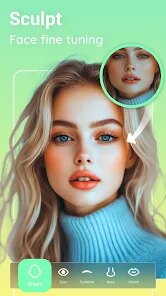
- 🪄 Face Contouring and Symmetry – The face tool can slim cheeks, adjust jawlines, and even out asymmetrical features. It's more aggressive than what you get in PicsArt's face tools, but the AI does a better job of keeping edges looking natural instead of blurry. Still, if you overdo it, the result can look plastic — a common issue across all similar editors.
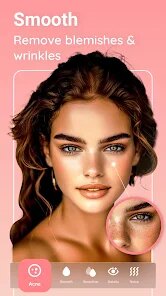
- 🪄 Skin Smoothing with Hair Preservation – The skin tool removes blemishes and texture while trying to keep hair strands sharp. That's something many rival editors mess up — Snapseed's healing brush sometimes blurs everything. Peachy's AI is noticeably better at distinguishing skin from hair edges, though it still struggles with strong shadows or busy backgrounds.
pros
- ✅ Super Fast Processing – Edits apply instantly without rendering delays. In contrast, YouCam Perfect often shows a loading spinner for several seconds after each slider move.
- ✅ Very Easy for Beginners – The whole app is built around single-slider controls and presets. No one needs to learn curves or layering like in Lightroom.
- ✅ AI Handles Complex Poses – Even if you're twisting or leaning, the algorithm adjusts body lines without obvious warping. Many cheaper apps fail when the photo isn't a straight-on standing pose.
cons
- ❌ Watermark and Ads in Free Version – Every export has a Peachy logo unless you pay. Plus, ads pop up after almost every edit. Facetune also ads, but at least you get more uninterrupted editing time there.
- ❌ Limited Manual Control – You can't precisely paint or mask areas. If the AI misdetects your body part, you cannot fix it easily. Snapseed's selective edits offer far more granularity.
- ❌ Over-Editing is Too Easy – The default slider sensitivity makes it tempting to push too far. The preview looks good on the small phone screen, but when you export and view it on a larger display, the change is often cartoonish.
- ❌ No Background Replacement – You cannot swap or blur backgrounds within this app. If that's what you need, you'll have to use separate tools like PicsArt or a dedicated background eraser.
Recommended Apps
![]()
Daily Horoscope
KADO Apps4.4
![]()
FOX Sports: Watch Live Games
Fox Digital Services, LLC3.7
![]()
Fake Call from Santa Claus
ThunderClap4.2![]()
Google Maps
Google LLC4.2![]()
PhotoLayers-Superimpose,Eraser
handyCloset Inc.4.6![]()
Healthy Benefits+
Solutran, Inc.4.5![]()
SuperMe - Avatar Maker Creator
THE.DEMON3.7![]()
Air Horn
Tenoku4.8![]()
Football Wallpaper HD 4K
Orange Infotech Studio4.6![]()
Artplay - AI Photo & Video
Hideaway Technology Limited4.5![]()
Horoscopes – Daily Zodiac Horo
Mail.Ru Group4.1![]()
Passport Parking
Passport Labs, Inc.2.5![]()
ParkMobile: Park. Pay. Go.
Parkmobile, LLC4.3![]()
FestAI: Ghost Detector App
Now Tech3.2![]()
Photo Tool
COLIFER LAB4





























