Prank Call: Fake Video Prank

1M+
Installs
MoranJiyounge
Developer
-
Video Players & Editors
Category
-
Everyone
Content Rating
-
basaramorane@gmail.com
Developer Email
-
https://moranjiyoungestudiokr.web.app/privacy-policy
Privacy Policy
Screenshots



editor reviews
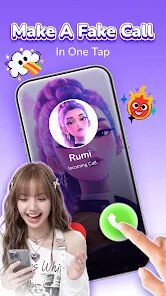
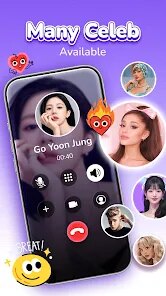
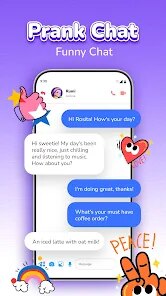
Prank Call: Fake Video Prank is exactly what the name suggests, a fun little tool that lets you simulate incoming video calls from celebrities, fictional characters, or even made-up people. It lives comfortably in the entertainment and fun zone of the app store, not really a utility but more of a party trick you can keep in your pocket. I downloaded it on a whim during a group chat where everyone was sharing silly apps, and honestly, the first time I opened it, I was surprised by how polished the whole thing felt for a prank app. There's no heavy registration wall, just a quick permission check for notifications and camera, which makes sense since it needs to mimic a real incoming call screen. The install count is solid, and while it's free to download, there are plenty of in-app purchases tucked away if you want the premium callers, and a few banner ads pop up when you're browsing, though not during the actual prank calls. My first impression was that this could either be a brilliant way to mess with friends or a complete dud, but the setup was so straightforward that I was ready to test it within two minutes.
The hands-on experience is where this app actually shines as a prank tool, because it doesn't just show a fake call screen; it lets you play pre-recorded video clips or even loop a static image while the "caller" pretends to talk. When I set up my first call with a fake celebrity, I chose the video from the built-in library, picked how long I wanted the call to last, and then handed my phone to a friend. The screen looked so convincing that my friend actually started answering it before realizing it was fake. I did a few more tests, and I noticed that the transition from the fake call to the real app screen is smooth, which is important because a jarring cut would give the whole game away. One tip I picked up is to set the volume low before handing over the phone, because the video audio can be a bit loud and might tip someone off. The interface is clean and the main menu is simple, but finding the exact video clip you want takes a little scrolling. I also found that scheduling a prank call for a later time works better than doing it instantly, as it feels more natural when you're not obviously fiddling with the phone right before.
After using it for a few weeks, I think this app is perfect for someone who loves pulling light-hearted, harmless tricks at parties or with close friends, but it's probably not something you'll use every day. It's different from apps like Fake Call or Prank Dial because those often just rely on text or voice, whereas this one adds the visual element, which makes it a step more convincing. I can see why someone would keep it installed for the occasional laugh, but I also get why others might uninstall it after a week once the novelty wears off. The in-app purchases can get a bit annoying if you want the better videos, and the ads do interrupt the browsing experience, which takes away from the fun a little. Still, it does what it promises, and the quality of the simulation is genuinely better than I expected. For a free app, it's one of those weird little gems that you'll pull out once a month and be glad you have it.
features
- 🎥 The video call simulation is the standout feature here, and it's light-years ahead of the typical static fake call screens you see in other prank apps. Unlike Fake Call, which just shows a contact name on a black screen, this one plays actual video clips, so the person on the receiving end sees a moving, talking "caller." It's that motion that sells the illusion completely.
- ⏰ The scheduling mechanic is surprisingly robust. You can set a prank call to trigger at a specific time, which is perfect for when you want to set up a joke on someone without being anywhere near their phone. Most apps like Prank Dial only work if you initiate them live, which is a dead giveaway if you're sitting right next to the person.
- 🖼️ If you want to personalize things, you can upload your own images to act as the caller's "video." This lets you use a photo of a mutual friend or a pet, making the prank feel way more targeted and personal than the default celebrity options. It's a small touch, but it makes each prank unique.
- 🛡️ The fake call screen is built to be realistic, with working buttons for the camera and mic icons that react to touch. Even if the person playing along tries to press the mute or video-off buttons, the screen responds, which keeps the illusion going for those extra few seconds of hesitation.
pros
- 👍 The ad placement is smart; you only see them in the menu, never during the fake call, which is a huge win compared to apps like Prank Call Simulator that pop ads right in the middle of the prank, ruining the whole moment.
- 👍 The download size is tiny, so it doesn't bloat your phone like some other video-heavy prank apps that take up hundreds of megabytes. It loads fast, which is crucial when you need to set something up quickly before the moment passes.
- 👍 It doesn't require any sign-up or profile creation, unlike Prank Dial which asks for a phone number. You just open it and go, which lowers the barrier for a spontaneous prank.
- 👍 The free version gives you enough content to make the app fun without feeling like you're locked out of everything, whereas similar apps like Fake Video Call usually make you pay before you can even do a basic test.
cons
- 👎 The video library is pretty limited, and the best clips are locked behind the paid tier. After a few pranks, you'll notice all the free videos start to feel repetitive, which makes them less effective if you pull pranks on the same group of people often.
- 👎 There's a noticeable delay when the app is first loading the video from storage, which creates a split-second of black screen before the fake call appears. That tiny pause can be enough for a sharp-eyed person to realize it's not a real call.
- 👎 Once you've made one successful prank, the element of surprise is gone. The app doesn't have a way to randomize the video plays, so it's a one-trick pony compared to something like Moron, which has more interactive scenario-based pranks.
- 👎 The audio quality on the pre-recorded videos is a bit tinny and sounds clearly like it's coming from a speaker, not a phone's earpiece. This can be a red flag if the person is paying attention to the sound details.
Recommended Apps
![]()
Daily Horoscope
KADO Apps4.4
![]()
FOX Sports: Watch Live Games
Fox Digital Services, LLC3.7
![]()
Fake Call from Santa Claus
ThunderClap4.2![]()
Google Maps
Google LLC4.2![]()
PhotoLayers-Superimpose,Eraser
handyCloset Inc.4.6![]()
Healthy Benefits+
Solutran, Inc.4.5![]()
SuperMe - Avatar Maker Creator
THE.DEMON3.7![]()
Air Horn
Tenoku4.8![]()
Football Wallpaper HD 4K
Orange Infotech Studio4.6![]()
Artplay - AI Photo & Video
Hideaway Technology Limited4.5![]()
Horoscopes – Daily Zodiac Horo
Mail.Ru Group4.1![]()
Passport Parking
Passport Labs, Inc.2.5![]()
ParkMobile: Park. Pay. Go.
Parkmobile, LLC4.3![]()
FestAI: Ghost Detector App
Now Tech3.2![]()
Photo Tool
COLIFER LAB4