Prank Zone - Hilarious Call

10M+
Installs
Allegany Boys Camp Inc
Developer
-
Video Players & Editors
Category
-
Everyone
Content Rating
-
tinaklein654@gmail.com
Developer Email
-
https://prank-zone-hilarious-call.netlify.app/privacy
Privacy Policy
Screenshots




editor reviews
Prank Zone - Hilarious Call is a mobile app that lets you set up realistic fake incoming calls to get out of awkward situations or just mess with your friends. It's the kind of utility you download on a whim from Google Play or the App Store, usually when you're bored or anticipating a dull evening. The install is quick, it's free to grab, and you don't even need to register an account to start using it. My first impression after launching it was that it looks a bit dated, like a tool from the early smartphone era, but the concept is straightforward enough that you overlook the rough edges right away.
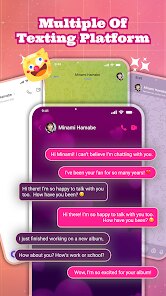
Getting into the actual experience, the app throws you straight into a simple setup screen. You pick a fake caller name, choose the number that shows up, and even select what the "caller" will say when you answer. The onboard wallpapers and sound options are basic, but they do the job. In daily use, the flow is pretty simple: you schedule a prank for a specific time or trigger it instantly, then put your phone on speaker. The call screen looks convincingly real, with the right interface elements and a decent ringtone. I did find the menu layout slightly clunky at first, especially when trying to customize the voice clips, but after a couple of tries it becomes muscle memory. A small tip is to pre-record your own audio lines instead of using the built-in robotic voices, because that makes the prank way more believable when you're actually in the middle of a conversation.
After spending some time with it, I'd say this app is great for teenagers pulling quick jokes on friends or for someone who genuinely needs a fake excuse to escape a boring meeting. It's not something you'll open every day, and the novelty wears off fast once your contacts start recognizing the trick. Compared to similar apps like Fake Call Full Screen or Prank Caller, Prank Zone feels less polished but slightly more flexible with its timer options. I kept it installed because it's tiny and harmless, but I can see why many people would delete it after a week. It's a fun toy, not a serious tool, and that's exactly what it promises to be.
features
- 🎭 The standout feature is the ability to schedule a fake call to ring during a specific meeting or class. You can set the exact minute, which makes it perfect for timed escapes. Other apps like Fake Call Full Screen usually just offer an instant button, so this planning angle is a definite edge.
- 📞 You can fully customize the caller ID, including the name and number, so it looks like your boss or mom is calling. The app even saves your last few setups, letting you switch between different personas without re-entering details every time. This level of quick switching feels smoother than what I have seen in Prank Caller.
- 🔊 The built-in sound library has a few pre-recorded voice lines, but the real winner is the option to import your own audio. Recording a specific phrase and attaching it to the fake call adds a personalized touch that generic text-to-speech options in similar tools simply cannot match.
- ⏰ A quick-launch widget lets you trigger the fake call from your home screen in one tap. That instant access is handy when a conversation is already going sideways, and you need an interruption right now. Not many prank call apps bother with a widget, so this is a nice practical bonus.
pros
- ⚡ It is incredibly lightweight and loads almost instantly. Even on an older phone, the app opens without lag, which is more than I can say for the heavier, ad-laden alternatives like Prank Dial. This makes it a reliable backup for emergencies.
- 🔒 There is no account requirement or unnecessary permission requests. You just install and use it. Apps like Fake Caller often ask for contact and microphone access upfront, but Prank Zone keeps things private until you actually want to record something.
- 🔄 The recent calls log integrates nicely with your phone's notification bar, so the fake call looks and feels like a real interruption. The visual polish is not perfect, but the behavior is close enough to the real system UI that it fools people most of the time.
cons
- 🐢 The interface looks quite outdated, with low-resolution icons and a clunky font. Using it after a modern app like Fake Call Full Screen feels like stepping back five years, which might put off younger users who care about aesthetics.
- 🔇 The built-in ringtone options are limited and sound a bit robotic. They work for a quick joke, but they are not convincing enough for a serious escape attempt. You really need to bring your own audio or accept a lower quality sound.
- ❌ The app occasionally fails to trigger a scheduled call if your phone is in deep sleep mode or if you have battery optimization active. This glitch can ruin a carefully planned prank, and it requires fiddling with system settings to fix, which is not ideal.
- 📅 There is no recurring schedule option. You can only set a one-time call, whereas some competitors allow weekly or daily fake calls for repeated jokes. This limits its usefulness for someone who wants to prank the same friend every morning.
Recommended Apps
![]()
Daily Horoscope
KADO Apps4.4
![]()
FOX Sports: Watch Live Games
Fox Digital Services, LLC3.7
![]()
Fake Call from Santa Claus
ThunderClap4.2![]()
Google Maps
Google LLC4.2![]()
PhotoLayers-Superimpose,Eraser
handyCloset Inc.4.6![]()
Healthy Benefits+
Solutran, Inc.4.5![]()
SuperMe - Avatar Maker Creator
THE.DEMON3.7![]()
Air Horn
Tenoku4.8![]()
Football Wallpaper HD 4K
Orange Infotech Studio4.6![]()
Artplay - AI Photo & Video
Hideaway Technology Limited4.5![]()
Horoscopes – Daily Zodiac Horo
Mail.Ru Group4.1![]()
Passport Parking
Passport Labs, Inc.2.5![]()
ParkMobile: Park. Pay. Go.
Parkmobile, LLC4.3![]()
FestAI: Ghost Detector App
Now Tech3.2![]()
Photo Tool
COLIFER LAB4