Idol Prank Call - Video & Chat

1M+
Installs
LeafMotion Software
Developer
-
Video Players & Editors
Category
-
Everyone
Content Rating
-
buihieu2568@gmail.com
Developer Email
-
https://leafmotion-software.vercel.app/privacy.txt
Privacy Policy
Screenshots

editor reviews
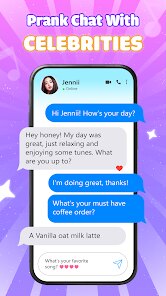
Idol Prank Call - Video & Chat is essentially a simulation app that lets you stage fake video calls with virtual celebrity-like characters. It's the kind of thing you download for a laugh with friends, not for any serious communication. After grabbing it from the Google Play or App Store, the download is free, and it installs in under a minute. The first launch gives you a flashy, colorful interface that feels more like a toy than a tool, which honestly sets the right expectation. You pick a character, set up the prank, and then hand the phone to someone to see their reaction. It's a niche form of entertainment, but it does what it promises without making you register or deal with a confusing setup. There are in-app purchases and occasional ads, but they don't interrupt the main flow too much.
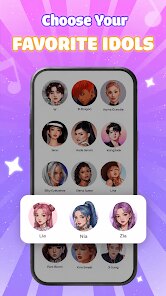
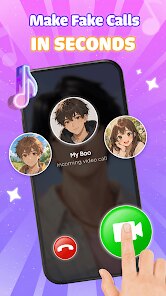
When I actually used it, the experience was smoother than I thought it would be. The onboarding is a quick swipe-through of tips, which takes about ten seconds. Then you're on the home screen with a grid of characters, each with a name and a few short video clips. To run a prank, you pick a character, choose a scenario like "calling to say hi" or "angry fan," and then hit start. The call screen mimics a real video app, with the character moving and speaking on loop while a timer runs. One thing that caught me off guard was that the character's lips don't always sync with the audio, but for a prank, it doesn't really matter. I found a practical tip: keep the volume low if you're using it in a quiet room, otherwise the fake dialog gives the joke away immediately. The controls are straightforward, and I didn't hit any confusing menus or crashes during my session.
After spending a week with it, I can say it's fun in short bursts, but it's not something you'll use daily. It's great for parties, sleepovers, or anytime you want to break the ice with a ridiculous moment. Someone who expects a deeper experience or real interaction will be disappointed, but that's not the point of this app. Compared to something like FaceTime or even a joke app like Fake Call Me, this one stands out because of the production quality of the video clips, but it lacks the customization that other apps offer, like letting you upload your own photos. I'll probably keep it installed for the occasional laugh, but I can see how someone might delete it after a week to free up storage. It's a well-made toy, just don't expect it to be anything more than that.
features
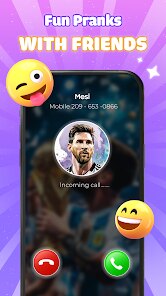
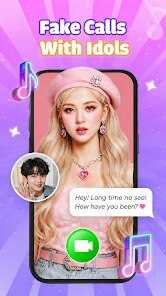
- 🎭 Realistic call simulation: The app runs a full-screen video call interface with a timer and a "hang up" button, which makes the prank feel authentic. The characters have multiple short loops that play in sequence, so it doesn't look like a static image. This beats the basic fake call apps that just show a photo with a name.
- 🎬 Scenario variety: There are several pre-scripted scenarios for each character, ranging from casual chats to dramatic confrontations. You can pick the tone before the call starts, which adds flexibility that many similar tools lack. For instance, the angry fan clip is noticeably different from the sweet greeting one.
- 🧩 No setup friction: You can start a call within five seconds of opening the app. There's no account creation, no permission requests beyond the necessary ones, and the recent calls list saves your last pranks for quick replay. That's a huge convenience compared to other apps that force you through a tutorial every time.
pros
- ⚡ Instant engagement: Unlike Prank Dial or Fake Call, this one doesn't lag when switching between characters. The video clips load fast, and the transition from menu to call screen is near instantaneous, which keeps the joke springing.
- 🎨 Visual polish: The character designs and background sets are noticeably higher quality than the typical low-effort clones you see on the Play Store. The lighting and camera angles mimic real social video apps, which sells the illusion much better.
- 🔁 Replay value: Each character has at least four distinct clips, so you can run the same prank twice without it feeling stale. That's something many competitors, like Fake Video Call, fail to deliver since they often recycle the same three videos.
cons
- 📉 Limited character roster: There are only about a dozen characters, and none of them are customizable. After a few days, you'll have seen every clip, and the app doesn't add new content regularly, which caps its longevity.
- 🔇 Audio sync issues: The lip movement doesn't always match the spoken lines, and in a quiet room, that becomes obvious. It breaks the illusion if the person you're pranking is paying close attention to the screen.
- 💸 Paywall for extras: While the base app is free, the best scenarios and ad removal are locked behind in-app purchases. The free version throws an ad after every two calls, which gets annoying when you're trying to chain pranks back to back.
- 🪫 Battery drain: Running the video loops at full brightness eats up your battery noticeably faster than a standard fake call app, so it's not something you want to open on a low charge.
Recommended Apps
![]()
Daily Horoscope
KADO Apps4.4
![]()
FOX Sports: Watch Live Games
Fox Digital Services, LLC3.7
![]()
Fake Call from Santa Claus
ThunderClap4.2![]()
Google Maps
Google LLC4.2![]()
PhotoLayers-Superimpose,Eraser
handyCloset Inc.4.6![]()
Healthy Benefits+
Solutran, Inc.4.5![]()
SuperMe - Avatar Maker Creator
THE.DEMON3.7![]()
Air Horn
Tenoku4.8![]()
Football Wallpaper HD 4K
Orange Infotech Studio4.6![]()
Artplay - AI Photo & Video
Hideaway Technology Limited4.5![]()
Horoscopes – Daily Zodiac Horo
Mail.Ru Group4.1![]()
Passport Parking
Passport Labs, Inc.2.5![]()
ParkMobile: Park. Pay. Go.
Parkmobile, LLC4.3![]()
FestAI: Ghost Detector App
Now Tech3.2![]()
Photo Tool
COLIFER LAB4