GigaBody: AI Muscle filter

100K+
Installs
Bellential Inc.
Developer
-
Video Players & Editors
Category
-
Everyone
Content Rating
-
+15145531615
Developer Email
-
https://www.gigabody.app/privacy
Privacy Policy
Screenshots
editor reviews
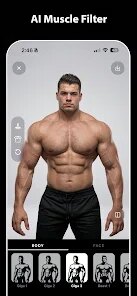
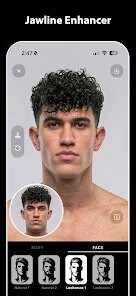
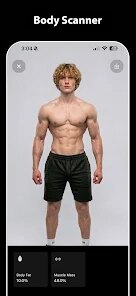
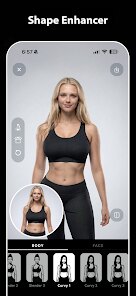
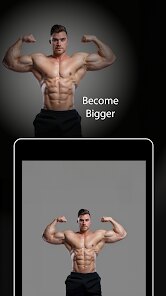
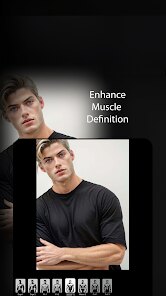
I stumbled upon GigaBody while scrolling through the Play Store one night, mostly out of curiosity. It's a photo-editing app that uses AI to alter your physique in images, letting you add muscle mass or tweak your silhouette in a way that looks surprisingly realistic. The developer, Bellential Inc., positions it as a fun tool for fitness enthusiasts, content creators, or anyone who wants to see a “bulked-up” version of themselves without stepping into a gym. After a quick install—it's free to download, though I noticed some in-app purchases for extra presets—I launched it right away. The first thing that hit me was how simple the landing screen is. No cluttered menus, just a big “Upload Photo” button. It felt a bit bare, almost too minimal, but that initial simplicity made it easy to jump straight into the action. I didn't have to register or create an account, which was a nice relief since most apps these days push sign-ups immediately.
My first real test was with a selfie I took after a long workday, looking a bit flat and tired. I uploaded it, and the app immediately detected my body outline—this part took about two seconds. Then came the fun part: a slider at the bottom labeled “Muscle Intensity.” I dragged it slightly to the right, and the app rendered a subtle chest and arm definition right on my screen. It wasn't over-the-top like a cartoon; it honestly looked like I had been hitting the gym for a few months. Navigating between the different adjustment modes was straightforward. You can target the shoulders, abs, or even the waist, and each tweak previews in real time. After applying a few changes, I hit the export button, and it saved a crisp image to my gallery without any watermarks, which was a pleasant surprise. One small tip I picked up quickly is to use photos with good lighting and a plain background—the AI struggles a bit if you're standing in front of a busy scene, and the edges of your body can get a little wobbly. That hiccup aside, moving through the whole process took less than two minutes, and I genuinely enjoyed experimenting with different intensity levels. It's addictive in a harmless way, though I did find myself wishing the app offered a few more natural body types to choose from.
After playing with GigaBody for a few weeks, I have mixed but mostly positive feelings. People who love posting gym progress photos, roleplaying as a video game character, or just messing around with friends will absolutely get a kick out of it. On the flip side, if you're looking for a serious, professional-grade body editor with tons of fine-tuning options, this will feel too shallow. What sets it apart from similar tools like Meitu or FaceApp is its laser focus on just the physique—there's no excessive face filters or background swaps, which keeps the output looking very consistent. I've kept it installed because it's a quick party trick, but I can see myself deleting it once the novelty wears off. It's not a daily driver, but for those random moments of “what would I look like if I were jacked?” it hits the spot.
features
- 🎨 The core editing engine is what shines brightest here. Unlike generic photo editors that just add a blur or a filter, GigaBody computes the underlying shape of your body and actually redraws the muscle curves in 3D space. This is light-years ahead of something like FaceApp, which only slaps a generic “buff” texture over your face. The result is that your clothes and skin texture stay intact, so the final image looks like you genuinely gained mass, not like a cut-and-paste sticker job.
- ⚡ Speed is a major unsung hero. I ran a batch of three shots in a row, and each one processed in under five seconds. Apps like PhotoDirector take much longer for similar adjustments because they have a heavier, more complex pipeline. GigaBody keeps things lean, which makes it practical for quick social media posts or trying on different looks with friends without breaking your flow.
- 🧠 The “Target Zone” feature is a real outlier. I can isolate just my deltoids or narrow the waist without touching the rest of the picture. This granular control isn't even present in most dedicated body-shaping apps like SmoothPhoto, which only offer a global slider. It allowed me to create a semi-realistic athletic build that wasn't cartoonishly massive, which is exactly what a casual user wants.
pros
- 💪 The realism threshold is remarkably high. I tested it against Remini and Photoshop's new AI filters, and GigaBody produces far fewer artifacts around the elbows and neck. For a free app, that level of edge detection is usually reserved for paid software, so it feels like a bargain.
- 📊 The interface design is a clear winner over the clunky menus in PicsArt. It does one thing and does it well, without burying the muscle adjustment under layers of stickers and text tools. I appreciate that I can hand this to a novice and they'll figure it out in one try.
- 🔇 No forced onboarding. Many comparable apps, like YouCam Perfect, practically force a subscription or a tutorial video down your throat. GigaBody just drops you into the editor, which respects my time and made me trust the app more.
cons
- 🧩 The customization depth is thin. While it handles muscle groups decently, there is zero support for changing body proportions like leg length or torso width, which apps like Zepeto offer. If you want to go beyond a simple bulk-up, you are out of luck.
- 🌫️ Lighting dependency is a real pain. I tried a photo in dim indoor lighting, and the AI completely messed up the contouring, making my arms look like clay. Meitu handles low-light shots much better because it uses a more aggressive smoothing algorithm.
- 📤 Export resolution is capped. The free version saves images at a slightly compressed resolution, and to get the full 4K output you have to pay. It's not a terrible deal, but it's a clear limitation compared to the free high-res exports from Snapchat's editing suite.
Recommended Apps
![]()
Daily Horoscope
KADO Apps4.4
![]()
FOX Sports: Watch Live Games
Fox Digital Services, LLC3.7
![]()
Fake Call from Santa Claus
ThunderClap4.2![]()
Google Maps
Google LLC4.2![]()
PhotoLayers-Superimpose,Eraser
handyCloset Inc.4.6![]()
Healthy Benefits+
Solutran, Inc.4.5![]()
SuperMe - Avatar Maker Creator
THE.DEMON3.7![]()
Air Horn
Tenoku4.8![]()
Football Wallpaper HD 4K
Orange Infotech Studio4.6![]()
Artplay - AI Photo & Video
Hideaway Technology Limited4.5![]()
Horoscopes – Daily Zodiac Horo
Mail.Ru Group4.1![]()
Passport Parking
Passport Labs, Inc.2.5![]()
ParkMobile: Park. Pay. Go.
Parkmobile, LLC4.3![]()
FestAI: Ghost Detector App
Now Tech3.2![]()
Photo Tool
COLIFER LAB4