


500,000,000+
Installs
Pinterest
Developer
-
Video Players & Editors
Category
-
Rated for 12+
Content Rating
-
help@pinterest.com
Developer Email
-
https://policy.pinterest.com/privacy-policy
Privacy Policy
Screenshots

editor reviews
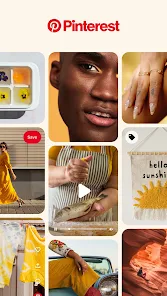
Pinterest is basically a visual discovery engine, more than just a social media app. You use it to find ideas, like recipes, home decor, fashion outfits, or DIY projects, and save them onto digital boards. It's the kind of app you download when you're planning something big, like a wedding or a kitchen renovation, or even just to collect weekend inspiration. After installing it from the app store, you're asked to pick a few topics you like, so the feed starts off feeling pretty tailored. The free download gets you in the door, and you can start browsing right away without making an account, though saving anything does require signing up. The very first impression is just a massive grid of images, each one tied to a source link, which feels like flipping through an endless magazine that actually knows what you're into.
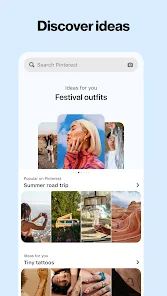
Once you start using it, things get more layered. The home feed bombards you with pins based on your picks, but the real magic happens when you search for something specific, like "small balcony garden." The results show not just images but related keywords and subcategories that help you narrow things down. Tapping a pin opens it up, and you can see the webpage it came from, similar pins, and any related boards from other users. The flow is pretty intuitive: you save a pin, create a board, maybe name it "Someday," and just keep collecting. A tip I picked up is to type in a vague idea and let the visual suggestions guide you, rather than overthinking keywords. Occasionally, the app feels crowded with promoted pins, but you can usually spot them by the "Promoted" label. Thumbs scrolling, pausing at something interesting, and pinning it to a board becomes a satisfying little cycle.
After using it for a while, Pinterest feels like a useful tool for project planning, but not something you check daily just for fun. It's perfect if you are a visual planner, like someone redecorating, a bride-to-be, or a photographer looking for mood boards. If you just want quick entertainment or social interaction, though, it might not hit the spot compared to something like Instagram. What sets it apart is the organization feature; that board system lets you actually structure your inspiration, not just like and forget. Plenty of people download it, use it heavily for a few months during a project, and then let it sit until they start the next thing. It's less about keeping a social presence and more about collecting ideas for real life, which is why it sticks around for those specific moments.
features
- 🏷️ Visual search is where this app really stands out. You can snap a photo of a piece of furniture you see in a store and find similar items online instantly. Something like Etsy doesn't offer this from your camera roll, while Pinterest's lens tool feels pretty handy for real-world shopping inspiration.
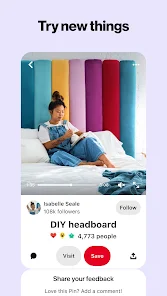
- 🏷️ The idea pin format lets you upload multiple images and short videos into one pin, complete with text and links. This is cleaner than dumping a bunch of photos into an Instagram carousel, since Pinterest organizes them as a cohesive idea rather than a post.
- 🏷️ Collaborative boards are a lifesaver for group planning. Say you're handling a family trip or a friend's baby shower, you can all add pins to the same board in real time. Apps like Instagram lack any structured sharing like this; it's mostly DMs or group chats that get messy.
- 🏷️ The algorithm feels spookily accurate after a while. Once you pin a few specific things, the home feed becomes a treasure trove of relevant stuff, way more tailored than scrolling through generic feeds on platforms like Tumblr.
pros
- 👍 The unlimited storage for pins and boards is a real win. You can save thousands of ideas without hitting a limit, which beats something like We Heart It that often feels restrictive with collections.
- 👍 It's completely free to use, no paywalls for saving links or using the search tools. Compared to apps like Canva, where you need a subscription for decent templates, Pinterest gives you full access to browsing and organizing without asking for your wallet.
- 👍 The shopping integration is subtle but effective. You spot a pair of boots in a pin, click on it, and it often leads directly to the seller's site. Unlike Instagram shopping, which feels pushy, Pinterest lets you discover products naturally through ideas.
cons
- 👎 The app gets heavy on promoted pins over time. You'll see "Promoted" entries mixed into your feed way more often than on apps like Etsy, where ads at least feel more product-focused and less intrusive.
- 👎 Downloading images isn't straightforward. You have to take a screenshot or use workarounds, while platforms like Unsplash let you save high-res photos directly without hassle.
- 👎 The search can feel flooded with low-quality or clickbait pins. You search for a recipe, and half the results are recycled images from spammy blogs, which isn't as common on curated apps like Food Network Kitchen.
- 👎 Editing boards after creating them isn't super flexible. Rearranging pins or renaming a board takes more taps than it should, especially when compared to the drag-and-drop simplicity of something like Milanote.
Recommended Apps
![]()
Daily Horoscope
KADO Apps4.4
![]()
FOX Sports: Watch Live Games
Fox Digital Services, LLC3.7
![]()
Fake Call from Santa Claus
ThunderClap4.2![]()
Google Maps
Google LLC4.2![]()
PhotoLayers-Superimpose,Eraser
handyCloset Inc.4.6![]()
Healthy Benefits+
Solutran, Inc.4.5![]()
SuperMe - Avatar Maker Creator
THE.DEMON3.7![]()
Air Horn
Tenoku4.8![]()
Football Wallpaper HD 4K
Orange Infotech Studio4.6![]()
Artplay - AI Photo & Video
Hideaway Technology Limited4.5![]()
Horoscopes – Daily Zodiac Horo
Mail.Ru Group4.1![]()
Passport Parking
Passport Labs, Inc.2.5![]()
ParkMobile: Park. Pay. Go.
Parkmobile, LLC4.3![]()
FestAI: Ghost Detector App
Now Tech3.2![]()
Photo Tool
COLIFER LAB4





























