
Bird — Ride Electric

10,000,000+
Installs
Bird Rides, Inc.
Developer
-
Travel & Local
Category
-
Rated for 3+
Content Rating
-
hello@bird.co
Developer Email
-
http://www.bird.co/privacy
Privacy Policy
Screenshots

editor reviews
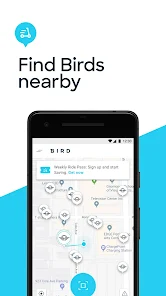
Bird — Ride Electric is a micromobility app that lets you locate, unlock, and pay for electric scooters and bikes scattered around city streets. It belongs to the ride-sharing or e-scooter rental genre, and people mainly use it for short trips where walking feels too slow but a car or taxi feels excessive. You might download Bird from Google Play or the App Store because you spot one of its black-and-white scooters on a sidewalk and want to try it, or because your city has limited transit options and you need a fast way to cover a few miles. After installing, the first thing you notice is a map showing scooter availability, battery levels, and pricing, which feels clean and straightforward. Registration asks for a phone number and payment method, but you can skip giving a driver's license until your first ride. The app is free to download, though each ride costs money, and you may encounter ads for monthly passes or membership deals. The install count is high in urban areas, so it's clearly a go-to for many commuters.
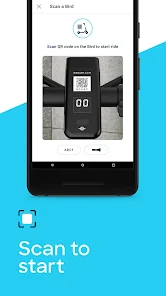
When you actually use Bird, the hands-on experience starts with scanning a QR code on the scooter's handlebar through the app. The interface is dominated by that live map, with a large “Unlock” button that turns green when a scooter is nearby. Onboarding is quick: you snap a photo of your ID, agree to some safety rules, and then you're ready to ride. The main actions are finding a scooter, unlocking it (which costs a base fee, like $1, plus per-minute charges), riding, and then parking it in an approved spot. A common usage step is checking the battery level on the map to avoid getting stranded with a dead scooter. The app feels smooth when unlocking, but sometimes the GPS lags, showing scooters that aren't actually there, which is a bit frustrating. A practical tip is to use the “Reserve” feature to hold a scooter for 10 minutes while you walk to it, though that costs a small extra fee. The braking is responsive, but the app doesn't give real-time speed tracking unless you enable it, which feels like a missed opportunity for safety-conscious riders.
After using Bird for a while, I think it's best for tourists or city dwellers who need a last-mile solution, like getting from a train station to an office. Someone who bikes daily might skip it because the per-minute cost adds up fast, making it pricier than owning a bike. What sets Bird apart from similar apps like Lime or Spin is its “Bird Pay” feature, which lets you pay for rides with a linked bank account directly, bypassing credit card fees. But the app also has annoying quirks: you sometimes find scooters in bad spots, like blocking sidewalks, and Bird charges a $5 fee if you don't park in a designated zone, which can be tricky in dense areas. I'm on the fence about keeping it installed because while it's convenient for emergencies, the cost and parking hassles make me reach for my own bike more often. Overall, it's a solid tool for spontaneous trips, but not something you'll use daily without planning ahead.
features
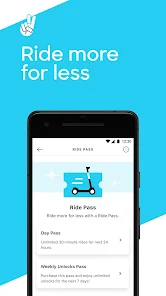
- 🔑 Pay-as-you-go unlock: Bird lets you unlock a scooter for a small base fee (around $1) plus a per-minute charge, similar to Lime's pricing model. However, Bird's per-minute rate is often slightly lower in many cities, making it a cheaper option for longer rides. You don't need a subscription unless you ride daily, but casual users appreciate the straightforward pricing.
- 🛴 Bird Pay: This integrated payment system links directly to your bank account, like how Venmo works within an app. Unlike Lime, which only accepts credit cards or Google Pay, Bird Pay avoids card transaction fees, so your rides cost a bit less. It's a standout perk for budget-conscious riders who want to squeeze savings out of every trip.
- 🗺️ Real-time scooter map: The app shows scooter locations with battery levels and pricing overlays, similar to Spin's map. But Bird's map updates faster and includes a “Reserve” option that holds a scooter for 10 minutes, which Spin lacks. This prevents the annoyance of walking to a scooter only to find it taken, a common issue with competitors.
pros
- ✅ Low unlock fee: Bird's $1 unlock fee is cheaper than Lime's $1.15 in some markets, so you save a few cents per ride. Over a week of daily trips, that adds up, especially for short hops where the unlock fee is a big chunk of the cost.
- ✅ Wide availability: In cities like Los Angeles or Paris, Bird has more scooters than Spin often does, so you rarely walk far to find one. This beats the frustration of opening Spin's map and seeing only three scooters blocks away.
- ✅ User-friendly interface: The Bird app feels less cluttered than Lime's, which has too many tabs for passes and promotions. You just see the map, unlock button, and ride history—simple and efficient for quick trips.
cons
- ❌ Parking penalty: Bird charges a $5 fee if you don't park in a designated zone, which is stricter than Lime's more lenient rules. This can catch you off guard in areas with few designated spots, adding unexpected costs.
- ❌ GPS inaccuracy: The map sometimes shows scooters that aren't physically there, leading to wasted walks. Lime's GPS is slightly more reliable, based on my experience in San Francisco.
- ❌ No speed limiter toggle: Bird caps scooters at 15 mph by default, while Spin allows you to enable a slower mode for beginners. This lack of a safety option makes Bird less appealing for new riders who want more control.
Recommended Apps
![]()
My Name Meaning
KDR Games4
![]()
Find my Phone - Clap, Whistle
FunGear inc4.4![]()
Pet To Human - Pet into Human
Applax Pte. Ltd.4.2![]()
Custom Kicks
Sneakerz4.5
![]()
Italian Brainrot: Quiz & Wiki
EDEO TECH LIMITED0![]()
PrankGen - Funny Prank Sounds
DATONG FUN3.8![]()
Opera Mini: Fast Web Browser
Opera4.3![]()
Artimind: AI Art Generator
Apero Vision Lab4.3![]()
Prediction 2026: Savage Reveal
LKPixel0![]()
Ghost detector radar camera
Prank apps & Joke apps - Herdoza Studio3.9![]()
Imagine : AI Art Generator
Vyro AI3.6![]()
BitMind: AI Detector & Creator
BitMindAI2.8![]()
Number Locator - Phone Tracker
Allegany Boys Camp Inc4.6![]()
myChevrolet
General Motors (GM)4.6![]()
Version AI: AI Photo Generator
Apptribe Dijital4.5












Disclaimer
1.Apklifts does not represent any developer, nor is it the developer of any App or game.
2.Apklifts provide custom reviews of Apps written by our own reviewers, and detailed information of these Apps, such as developer contacts, ratings and screenshots.
3. All trademarks, registered trademarks, product names and company names or logos appearing on the site are the property of their respective owners.
4.Apklifts abides by the federal Digital Millennium Copyright Act (DMCA) by responding to notices of alleged infringement that complies with the DMCA and other applicable laws.
5.If you are the owner or copyright representative and want to delete your information, please contact us info@Apklifts.com.
6.All the information on this website is strictly observed all the terms and conditions of Google Ads Advertising policies and Google Unwanted Software policy.
7.Apklifts.com is an independent, information-only website which is 100% free to all the users.