
Transit: Bus & Subway Times

10,000,000+
Installs
Transit, Inc.
Developer
-
Travel & Local
Category
-
Rated for 3+
Content Rating
-
info@transitapp.com
Developer Email
-
https://transit.app/privacy
Privacy Policy
Screenshots
editor reviews
Transit is a real-time public transportation app that helps you figure out when your next bus, subway, or train is actually coming. It's one of those essential tools if you live in a city or rely on public transit to get around. You can download and install it for free from both Google Play and the App Store, and it has millions of downloads, which already tells you something about how useful people find it. After you launch the app, the first thing you notice is how clean and uncluttered it looks. It asks for your location right away to show nearby stops and routes, which feels pretty natural for this type of app. You don't absolutely need to create an account to use the basic features, which is nice, but you do get a better experience if you register. There are some in-app purchases for premium features, and I saw a few ads, but they weren't too intrusive.
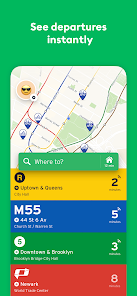
When you actually start using the app, it feels like it was designed by people who actually ride the bus every day. The main screen lists all the nearby stops based on your current location, and tapping on any one of them shows you the upcoming departures. The times are color-coded: green means on time, yellow means a little delayed, and red means something's off. It's super easy to get the hang of. You can also search for a specific route number or a destination. One of the first things I did was set up a few favorite stops, which made my morning commute way less stressful. Instead of standing at the bus stop wondering if I missed it, I just glance at my phone. There's also a neat feature where the app shows you how full the bus is based on crowdsourced data from other riders, which is surprisingly accurate. Sometimes the live location can lag behind by a few seconds, but it's nothing major.
After using Transit for a while, I honestly don't see myself switching to another transit app anytime soon. It's perfect for daily commuters who just want to know when their ride is coming without a bunch of extra fluff. People who only take public transit once in a blue moon might not need something this detailed, but for regular riders, it's a game changer. What makes it stand out from something like Google Maps is that it's specialized, so the transit information feels more accurate and native to the experience. Google Maps does a fine job for general navigation, but Transit feels more personal and community-driven, especially with the crowdsourced data. I've kept it installed, and I can see why so many other people have too. The only reason someone might uninstall it is if they move to a smaller city that isn't well covered, but if you're in a major metro area, it's a keeper.
features
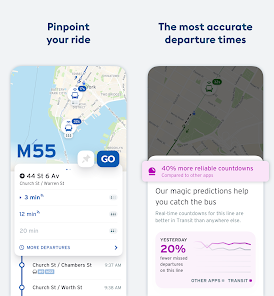
- 🚍 Real-time vehicle location: Unlike Google Maps, which relies on scheduled times and can be trickier to use for live tracking, Transit shows you exactly where your bus is on a map so you know if it's running behind or ahead of schedule. This is especially helpful during rush hour when delays are common.
- 🚍 Crowdsourced occupancy data: The app lets other riders report how full the bus or train is. This is something you won't get with most other transit apps out of the box, and it helps you decide if you want to wait for a less crowded vehicle, which is great during flu season or just if you need some personal space.
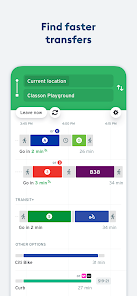
- 🚍 Seamless trip planning with alarms: When you plan a route, the app can set a smart alarm that goes off when it's time to leave for your stop, taking into account any delays. This is way more useful than setting your own manual timer, which is what you'd have to do with a simple schedule app.
- 🚍 Offline mode for schedules: You can download route and schedule data ahead of time, which means you don't need a data connection on the subway or in areas with spotty cell service. Most competing apps require a live internet connection for any useful functionality.
pros
- ⚡ Incredibly fast and lightweight: The app opens and loads your nearby stops almost instantly, which is a big deal when you're in a hurry. Google Maps can feel a bit bloated for just checking a bus time, but Transit is purpose-built and snappy.
- ⚡ Integrated with local transit authorities: Transit works with hundreds of transit agencies worldwide, so you don't have to download separate apps for each city. In many places, you can even buy tickets or passes directly through the app, which is something Moovit doesn't do as consistently.
- ⚡ Clean and intuitive design: The interface prioritizes the information you actually need, like departure times and delays, without overwhelming you with ads or unrelated features. It's much nicer to look at than older apps like Citymapper in my opinion.
cons
- 🐌 Coverage can be spotty in smaller cities: While Transit is great in major metropolitan areas, it falls short in smaller towns where the data isn't as reliable or the features are limited. Apps like Google Maps have broader coverage, even if the details aren't as precise.
- 🐌 Relies heavily on user contributions: Some features, like the occupancy data and live delay reports, only work well if enough people in your area are using the app and contributing. If you're in a less populated area, these features might be useless.
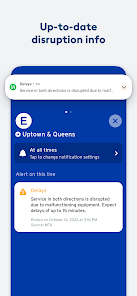
- 🐌 Occasional data inaccuracies: I've noticed that the real-time location can sometimes be a bit off, especially for buses that are running out of service or on a detour. A traditional paper schedule or agency app can be more trustworthy in those rare cases where the tech fails.
Recommended Apps
![]()
My Name Meaning
KDR Games4
![]()
Find my Phone - Clap, Whistle
FunGear inc4.4![]()
Pet To Human - Pet into Human
Applax Pte. Ltd.4.2![]()
Custom Kicks
Sneakerz4.5
![]()
Italian Brainrot: Quiz & Wiki
EDEO TECH LIMITED0![]()
PrankGen - Funny Prank Sounds
DATONG FUN3.8![]()
Opera Mini: Fast Web Browser
Opera4.3![]()
Artimind: AI Art Generator
Apero Vision Lab4.3![]()
Prediction 2026: Savage Reveal
LKPixel0![]()
Ghost detector radar camera
Prank apps & Joke apps - Herdoza Studio3.9![]()
Imagine : AI Art Generator
Vyro AI3.6![]()
BitMind: AI Detector & Creator
BitMindAI2.8![]()
Number Locator - Phone Tracker
Allegany Boys Camp Inc4.6![]()
myChevrolet
General Motors (GM)4.6![]()
Version AI: AI Photo Generator
Apptribe Dijital4.5















Disclaimer
1.Apklifts does not represent any developer, nor is it the developer of any App or game.
2.Apklifts provide custom reviews of Apps written by our own reviewers, and detailed information of these Apps, such as developer contacts, ratings and screenshots.
3. All trademarks, registered trademarks, product names and company names or logos appearing on the site are the property of their respective owners.
4.Apklifts abides by the federal Digital Millennium Copyright Act (DMCA) by responding to notices of alleged infringement that complies with the DMCA and other applicable laws.
5.If you are the owner or copyright representative and want to delete your information, please contact us info@Apklifts.com.
6.All the information on this website is strictly observed all the terms and conditions of Google Ads Advertising policies and Google Unwanted Software policy.
7.Apklifts.com is an independent, information-only website which is 100% free to all the users.