

Picsart AI Photo Editor, Video

1B+
Installs
PicsArt, Inc.
Developer
-
Video Players & Editors
Category
-
Rated for 12+
Content Rating
-
support@picsart.com
Developer Email
-
https://picsart.com/privacy-policy
Privacy Policy
Screenshots
editor reviews
PicsArt is essentially a full-blown creative suite hidden inside a mobile app. It belongs to the photo and video editing category, but honestly, it stretches way beyond that — you can use it for graphic design, collage making, and even some light animation. Most people download it because they want to tweak their selfies, add cool filters, or put together a quick story for social media without jumping between different tools. When you first launch it, the homepage is a little overwhelming because there's just so much going on — templates, trending edits, community posts, and a big “Edit” button staring at you. I remember thinking, “Okay, where do I even start?” But after poking around for a minute, it starts to make sense. It's free to download, but you'll bump into in-app purchase prompts for the premium version pretty quickly. According to the Google Play store, it's passed the billion-install mark, so clearly a lot of people have found their way around it.
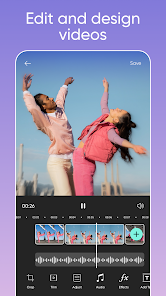
Once you actually start using it, the hands-on experience is surprisingly smooth despite the cluttered first impression. You tap the big purple plus icon, pick a photo from your gallery, and boom — you're in the editor. The toolbar at the bottom has all the essentials: crop, adjust, effects, stickers, text, and that famous “Remove Background” tool. I spent a good ten minutes just trying out different AI filters, and the results were honestly pretty decent — the skin smoothing thing is dangerously good, almost too good. Moving around the interface felt intuitive after the first few taps. One small tip: if you're making a collage, use the “Grids” option instead of manually arranging things — it saves a lot of headache. The video editing part works about the same way, though I found it a bit less responsive when trimming longer clips. Ads pop up occasionally, which is annoying, but not as frequent as some other free editing apps I've tried.
After spending a couple of weeks with PicsArt on and off, I'd say it's the kind of app that sticks around if you regularly post on Instagram or TikTok and want to keep things fresh without learning Photoshop. People who just need simple cropping and brightness adjustments might find it too bloated. What sets it apart from something like Canva or Snapseed is the community aspect — you can browse edits other users made and literally remix them, which feels pretty social for an editing app. But honestly, the subscription price for the premium version ($55 a year last I checked) made me pause. Is it worth it over free alternatives? If you're a heavy user who loves experimenting with AI tools and effects, sure. But for someone like me who just wants clean edits occasionally, I ended up keeping the free version and just dealing with the ads. It's a capable tool, just maybe a bit too much for casual use.
features
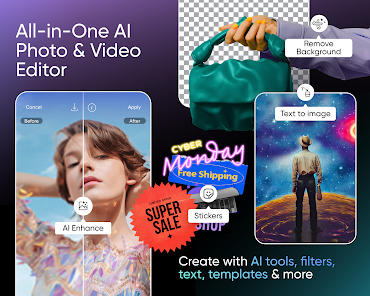
- 🎨 PicsArt's standout feature is the AI-powered “Remove Background” tool. One tap and it's done — no fiddling with brushes or layers like you'd have to in Adobe Express. It sometimes messes up on fine hair edges, but it's honestly quicker than the manual lasso tools in most mobile editors.
- ✂️ The “Cutout” tool lets you combine parts of multiple photos seamlessly. Compared to Canva, where you're limited to their stock images, PicsArt gives you total freedom to blend your own shots. It's perfect for those silly meme-style edits or double-exposure effects.
- 🤖 The AI “Enhance” feature is another winner. It automatically fixes lighting, sharpness, and color balance in one tap. VSCO has better manual controls, but PicsArt's AI does a decent job fixing poorly lit selfies — great for when you can't be bothered with sliders.
pros
- 👍 The sheer variety of filters and effects makes PicsArt feel like a full creative playground. Snapchat filters are fun but limited to selfies — here you can apply those same vibes to any photo or video creatively.
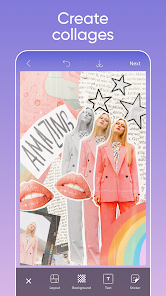
- 👍 It doubles as a collage maker without needing a separate app. Canva does collages better with proper templates, but PicsArt offers more flexible layout adjustments for custom sizing.
- 👍 The “Remix” feature lets you build on someone else's edit, which is great for learning new styles. No other editing app has a community this active for sharing and tweaking edits.
cons
- 👎 Free version ads are constant and intrusive. Every few edits, a video ad breaks your flow. Snapseed offers all tools ad-free, making it much less annoying for quick edits.
- 👎 The interface feels cluttered with sponsored content and trending posts. You're here to edit, but the homepage pushes community stuff in your face. VSCO keeps it cleaner and more focused on editing.
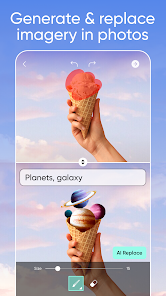
- 👎 Some AI tools, like the object removal, require the paid subscription. Free users get a watered-down experience. TouchRetouch is a separate app that does object removal without locking features behind a paywall.
- 👎 Exporting high-resolution images sometimes compresses quality unless you pay. CapCut for video editing doesn't have this limitation on the free tier.
Recommended Apps
![]()
Daily Horoscope
KADO Apps4.4
![]()
FOX Sports: Watch Live Games
Fox Digital Services, LLC3.7
![]()
Fake Call from Santa Claus
ThunderClap4.2![]()
Google Maps
Google LLC4.2![]()
PhotoLayers-Superimpose,Eraser
handyCloset Inc.4.6![]()
Healthy Benefits+
Solutran, Inc.4.5![]()
SuperMe - Avatar Maker Creator
THE.DEMON3.7![]()
Air Horn
Tenoku4.8![]()
Football Wallpaper HD 4K
Orange Infotech Studio4.6![]()
Artplay - AI Photo & Video
Hideaway Technology Limited4.5![]()
Horoscopes – Daily Zodiac Horo
Mail.Ru Group4.1![]()
Passport Parking
Passport Labs, Inc.2.5![]()
ParkMobile: Park. Pay. Go.
Parkmobile, LLC4.3![]()
FestAI: Ghost Detector App
Now Tech3.2![]()
Photo Tool
COLIFER LAB4





























