
Booking.com: Hotels and more

500M+
Installs
Booking.com Hotels & Vacation Rentals
Developer
-
Travel & Local
Category
-
Rated for 3+
Content Rating
-
customer.service@booking.com
Developer Email
-
http://www.booking.com/content/privacy.html
Privacy Policy
Screenshots

editor reviews
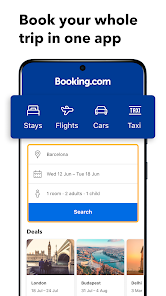
Booking.com is a travel booking app that falls squarely into the travel and hospitality genre. You use it to search for and reserve hotels, hostels, apartments, villas, and even flights or rental cars, all in one place. Most people download it because they are planning a trip and want to compare prices across thousands of properties without having to visit each hotel's own website. The first impression after launching the app is clean and pretty straightforward: a search bar sits at the top, and the home screen shows you recent deals or saved destinations. It feels professional right away, like a tool built for people who travel frequently, not just once a year. There is no need to create an account just to browse, which is nice, though you do need one to actually book anything. The app is free to download on both Google Play and the App Store, and it has a massive install count, easily in the hundreds of millions.
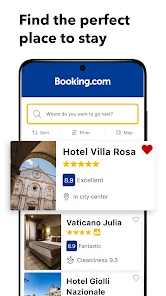
Once you start using it, the whole process is surprisingly smooth. You pick your destination, dates, and number of guests, then the app spits out a list of options with filters for price, rating, distance, and amenities like free Wi-Fi or breakfast. Tapping a property shows you high-res photos, guest reviews, and a map view so you can see where it sits relative to landmarks. The booking flow itself is quick: you select a room, check the cancellation policy (which varies a lot by property), and then confirm with a credit card or PayPal. A small but useful thing is the app remembers your past searches and presents them as suggestions on the home screen, so you can jump back into a trip you were planning days earlier. On the downside, sometimes the filtering can be a bit clunky, like when you select “free cancellation” but still see fully non-refundable rates mixed in. But overall, moving from search to confirmation feels natural, and you rarely get lost in menus.
After using it for a while, I think Booking.com is best for travelers who want flexibility over brand loyalty. If you are the type who stays at Marriotts or Hiltons every time, their own apps might suit you better because they offer loyalty points and member perks. But if you just want the best deal on a random apartment in Barcelona or a boutique hotel in Tokyo, this app is hard to beat. What sets it apart is the sheer volume of listings, including many smaller properties that big hotel chains ignore completely. Some people might uninstall it after a single trip, but I keep mine installed because it makes spontaneous weekend planning so easy. The few ads that appear are for promotions or deals, not intrusive banners. It is not perfect, but for a general travel app, it does what it promises, and that is more than enough.
features
- 🏨 The app shows you an incredible range of properties, from hostels to five-star resorts. You will find places here that simply do not show up on competitors like Expedia or Hotels.com. For instance, I once booked a small guesthouse in rural Portugal that had only two rooms, and it was only listed on Booking.com.
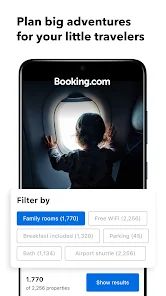
- 🔍 The search and filter system is one of the best. You can narrow down by free parking, pet-friendly, private bathroom, or even property type like apartment or lodge. Expedia has filters too, but they feel less granular; Booking.com lets you get really specific, which saves a ton of scrolling time.
- 💬 The user reviews are genuinely helpful because they come with breakdowns by solo traveler, couple, or family. You can see whether a hotel is noisy for single travelers but quiet for couples. That level of detail is something you do not get on comparison sites like Trivago.
- 🆓 The app does not charge any booking fees, so the price you see is the price you pay. Some other platforms, like Agoda, sometimes sneak in service charges at checkout. On Booking.com, the total is upfront, and that transparency makes a big difference when you are budgeting a trip.
pros
- 🌟 The Genius loyalty program gives you discounts just for booking a few times, and it does not cost anything. Compared to Hotels.com which requires a certain number of nights to get a free stay, Booking.com rewards you faster and more consistently.
- 📱 The app remembers your past trips and shows them neatly organized by date. You can pull up a booking from two years ago to remember the hotel name for a friend. Expedia has a similar feature, but Booking.com's interface for this feels less cluttered and easier to navigate.
- 🔄 Free cancellation is common on many listings, sometimes up to 24 hours before check-in. Hotels.com and others offer this too, but Booking.com seems to have more properties with generous cancellation windows, which is a huge bonus for indecisive planners like me.
cons
- ⚠️ The prices can sometimes jump unexpectedly when you scroll through room options. You see a nice rate, click to select it, and suddenly the total is higher because of taxes that were not clearly shown in the list view. Expedia handles this more transparently by showing the full breakdown earlier in the process.
- 📉 Customer support is hit or miss. Once I had a booking issue where the hotel double-charged me, and it took three calls and two emails to get it fixed. Agoda's support is somewhat similar, but Hotels.com has a more responsive chat system that resolves things faster.
- 🔔 The notification system can get a bit spammy after a while. It sends you deal alerts, price drops, and reminders about unfinished bookings almost daily. You can turn them off, but out of the box, it feels pushy compared to Expedia which is more conservative with notifications.
Recommended Apps
![]()
My Name Meaning
KDR Games4
![]()
Find my Phone - Clap, Whistle
FunGear inc4.4![]()
Pet To Human - Pet into Human
Applax Pte. Ltd.4.2![]()
Custom Kicks
Sneakerz4.5
![]()
Italian Brainrot: Quiz & Wiki
EDEO TECH LIMITED0![]()
PrankGen - Funny Prank Sounds
DATONG FUN3.8![]()
Opera Mini: Fast Web Browser
Opera4.3![]()
Artimind: AI Art Generator
Apero Vision Lab4.3![]()
Prediction 2026: Savage Reveal
LKPixel0![]()
Ghost detector radar camera
Prank apps & Joke apps - Herdoza Studio3.9![]()
Imagine : AI Art Generator
Vyro AI3.6![]()
BitMind: AI Detector & Creator
BitMindAI2.8![]()
Number Locator - Phone Tracker
Allegany Boys Camp Inc4.6![]()
myChevrolet
General Motors (GM)4.6![]()
Version AI: AI Photo Generator
Apptribe Dijital4.5














Disclaimer
1.Apklifts does not represent any developer, nor is it the developer of any App or game.
2.Apklifts provide custom reviews of Apps written by our own reviewers, and detailed information of these Apps, such as developer contacts, ratings and screenshots.
3. All trademarks, registered trademarks, product names and company names or logos appearing on the site are the property of their respective owners.
4.Apklifts abides by the federal Digital Millennium Copyright Act (DMCA) by responding to notices of alleged infringement that complies with the DMCA and other applicable laws.
5.If you are the owner or copyright representative and want to delete your information, please contact us info@Apklifts.com.
6.All the information on this website is strictly observed all the terms and conditions of Google Ads Advertising policies and Google Unwanted Software policy.
7.Apklifts.com is an independent, information-only website which is 100% free to all the users.