American Airlines

10M+
Installs
American Airlines, Inc.
Developer
-
Travel & Local
Category
-
Everyone
Content Rating
-
aa.mobile@aa.com
Developer Email
-
https://www.aa.com/i18n/customer-service/support/privacy-policy.jsp
Privacy Policy
Screenshots

editor reviews
American Airlines' official app, developed by American Airlines Inc., falls under the travel and utility category. It's the kind of app you grab before a trip, not for fun but for necessity. A lot of people download it from Google Play or the App Store to manage their flights without talking to a human. My first impression after launching it was that it looked polished and corporate, but in a good way, not cluttered with flashy banners. It felt like opening a mobile version of their website, which isn't a bad thing since the website works fine. The app is free to download and install, but obviously you need an AAdvantage account or a booking to get much out of it. Registration is just a few taps if you already have an account.
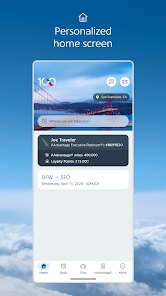
Once I logged in, the home screen immediately showed my upcoming trip with the check-in button right there. That's the main thing you'll do: check in 24 hours before departure, pull up your boarding pass, and maybe check gate changes. Navigating was surprisingly straightforward. I tapped on my trip, and it showed the seat map, flight status, and baggage info. One smooth moment was how fast the boarding pass loaded in QR form no spinning wheel or lag. A small practical tip: you can set notifications for gate changes, which saved me once when they switched gates at DFW. The interface isn't flashy, just clean and functional. I did hit a confusing moment when trying to change seats mid-booking the option was buried under a "Manage" tab, not on the main trip card. Still, overall, the daily use flow from check-in to boarding feels well thought out.
After using it for a few trips, I think it's a solid app for anyone who flies American regularly, but for occasional flyers, it's not a must-have. What makes it different from, say, Delta's app is that American's feels more stripped down and less social. You won't find fancy trip-sharing features or deep airport maps. Who might enjoy it? Business travelers who just want quick check-in and digital boarding passes. Who might uninstall it? People who only fly once a year and prefer using the airline's website. I kept it installed because it beats digging through emails for confirmation numbers, and the push notifications for delays are genuinely useful. Compared to Southwest's app, which has that quirky boarding position feature, American's offers more straightforward flight management. It's not exciting, but it does the job without getting in your way.
features
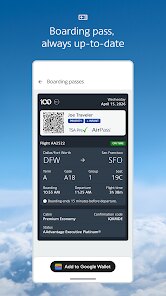
- ✈️ Integrated boarding pass feature is a clear standout. Unlike Delta's app where you have to dig through multiple menus to access your pass, American's places it front and center once you check in. One tap and the QR code fills the screen, ready for scanning at the gate. No fiddling with wallets or screenshots.
- ✈️ Real-time flight status updates are surprisingly accurate and push instantly. I've compared it against third-party trackers like FlightAware, and American's app sometimes beats them by a minute or two. This really matters when you're sprinting between gates.
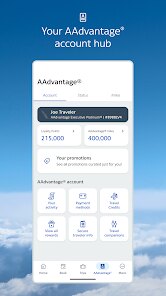
- ✈️ AAdvantage account management is streamlined. You can see your miles balance, pending flights, and elite status progress all on one dashboard. United's app makes you jump between tabs for the same info, which gets annoying.
- ✈️ Baggage tracking after check-in lets you see exactly when your bag was loaded and unloaded. It's not revolutionary, but it's more reliable than the vague "in transit" status you get on JetBlue's app.
pros
- 👍 The app loads faster than Southwest's app and uses less battery in the background. I've left it open during a three-hour layover without noticeable drain.
- 👍 Push notifications for gate changes are way more precise than generic alerts from TripIt. American's app sends a specific new gate number and terminal within seconds of the change.
- 👍 The seat map is interactive and updates in real time, which beats Delta's app that sometimes shows stale seat availability.
- 👍 Customer support chat is embedded directly, so you don't get bounced to a website. I used it once for a missed connection and got a rebooked ticket within five minutes through the chat.
cons
- 👎 The app crashes occasionally when switching between Wi-Fi and cellular data. It's not common, but when it happens right before boarding, it's a headache. Southwest's app handles network transitions more smoothly.
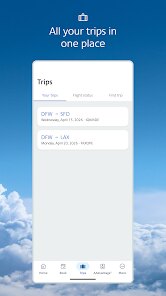
- 👎 The "My Trips" screen doesn't always update instantly after booking. Sometimes you have to force-close and reopen to see the new itinerary, which is clunky compared to Delta's seamless sync.
- 👎 In-app seat selection is limited compared to the website. On certain aircraft, you can't access Preferred Seat options from the app, which forces you back to a browser. United doesn't have this gap.
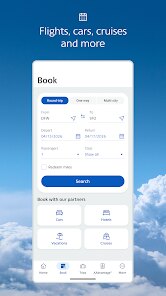
- 👎 The flight search feature buries advanced filters like layover duration and aircraft type. JetBlue's app lets you filter by these directly, making planning easier.
Recommended Apps
![]()
My Name Meaning
KDR Games4
![]()
Find my Phone - Clap, Whistle
FunGear inc4.4![]()
Pet To Human - Pet into Human
Applax Pte. Ltd.4.2![]()
Custom Kicks
Sneakerz4.5
![]()
Italian Brainrot: Quiz & Wiki
EDEO TECH LIMITED0![]()
PrankGen - Funny Prank Sounds
DATONG FUN3.8![]()
Opera Mini: Fast Web Browser
Opera4.3![]()
Artimind: AI Art Generator
Apero Vision Lab4.3![]()
Prediction 2026: Savage Reveal
LKPixel0![]()
Ghost detector radar camera
Prank apps & Joke apps - Herdoza Studio3.9![]()
Imagine : AI Art Generator
Vyro AI3.6![]()
BitMind: AI Detector & Creator
BitMindAI2.8![]()
Number Locator - Phone Tracker
Allegany Boys Camp Inc4.6![]()
myChevrolet
General Motors (GM)4.6![]()
Version AI: AI Photo Generator
Apptribe Dijital4.5















Disclaimer
1.Apklifts does not represent any developer, nor is it the developer of any App or game.
2.Apklifts provide custom reviews of Apps written by our own reviewers, and detailed information of these Apps, such as developer contacts, ratings and screenshots.
3. All trademarks, registered trademarks, product names and company names or logos appearing on the site are the property of their respective owners.
4.Apklifts abides by the federal Digital Millennium Copyright Act (DMCA) by responding to notices of alleged infringement that complies with the DMCA and other applicable laws.
5.If you are the owner or copyright representative and want to delete your information, please contact us info@Apklifts.com.
6.All the information on this website is strictly observed all the terms and conditions of Google Ads Advertising policies and Google Unwanted Software policy.
7.Apklifts.com is an independent, information-only website which is 100% free to all the users.