
Photo Editor Picsa: Collage

100M+
Installs
Lyrebird Studio
Developer
-
Video Players & Editors
Category
-
Rated for 3+
Content Rating
-
lyrebirdstudio@gmail.com
Developer Email
-
https://lyrebirdstudio.net/privacy_policy.htm
Privacy Policy
Screenshots
editor reviews
Photo Editor Picsa: Collage is an image editing app from Lyrebird Studio. It sits in the crowded space of photo editors and collage makers, meant for anyone who wants to quickly throw together a few pictures, add some filters, or slap on some text without opening something heavy like Photoshop. A lot of people probably grab it off Google Play or the App Store because it's free to download and claims to offer a ton of tools in one place. The install count seems decent, though I don't have the exact number. After launching it for the first time, the immediate impression is that it's packed to the brim—buttons, icons, and options are everywhere, which feels a bit overwhelming. There's no mandatory registration, which is a nice touch, but you do get hit with occasional ads unless you pay for the premium version. In-app purchases pop up now and then, pushing for more templates or no watermark.
Once you start using it, the experience gets mixed. The interface isn't the cleanest—things feel jammed together, and you might tap the wrong thing a few times. Onboarding is basically nonexistent; it just throws you into the main screen with a bunch of templates and tools. For a basic collage, you pick a layout, drop in images from your gallery, and adjust borders or backgrounds. The main actions like cropping, adding filters, or drawing are straightforward but sometimes laggy on older phones. A smooth moment comes when you use the background blur tool—it works surprisingly well. But confusing moments pop up when you try to save your work; the export button is hiding in a corner. A small tip is to explore the “magic” effects, which can turn a plain photo into something artsy quickly during daily use.
After sticking with it for a while, this app feels like a decent tool for casual hobbyists who don't mind ads and want variety without paying. Someone who just needs a quick collage for a social media post might enjoy it, but serious photographers or designers will find it too clunky. What makes it stand out from similar apps like Canva or PicsArt is the sheer number of preloaded frames, stickers, and fonts—it's a lot for free. But that's also a double-edged sword because the jam-packed interface can ruin the experience. I'd keep it installed if I wanted a quick fix for collages, but I'd likely uninstall it later because alternatives like Snapseed or Adobe Express feel smoother and less intrusive with ads. It does its job, but it doesn't shine.
features
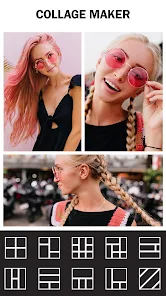
- 😎 Its collage maker is genuinely versatile. Unlike Canva, which often pushes you into paid templates, Picsa gives you a mountain of free layout options with adjustable borders, backgrounds, and spacing. You can mix square, portrait, and landscape grids without fighting the app, which is rare in free tools.
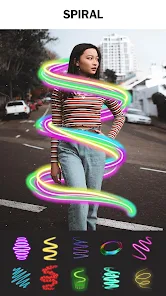
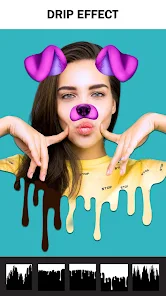
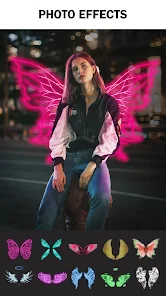
- 😎 The filter and effect library feels like a hidden gem. Where apps like PicsArt limit the good filters behind a paywall, Picsa offers a solid set of retro, vintage, and cinematic looks for free. The “glitch” effect is especially fun for adding a cyberpunk vibe to photos quickly.
- 😎 Drawing and doodling tools are surprisingly deep for a collage app. You get multiple brush types, opacity control, and even a smudge tool. This is far better than Snapseed, which barely has any freehand options, making Picsa a win for creative decoration.
pros
- 💪 The free version offers an unusually big selection of stickers and text fonts without nagging you to upgrade constantly. While PicsArt bombards you with pop-ups, Picsa just lets you use them, which feels generous.
- 💪 Saving high-resolution images is allowed without a subscription. Many alternatives like Photo Editor by dev.macgyver compress free exports, but Picsa retains decent quality, which is a big plus for casual users.
- 💪 Batch editing is possible for collages, letting you tweak multiple photos at once. This is rare in mobile tools and speeds up the workflow dramatically compared to using separate editors.
cons
- 😫 The interface is overcrowded and confusing. Icons have no clear labels, and finding basic tools like rotation or mirroring takes a lot of tapping. Canva is far more intuitive with its organized menu hierarchy.
- 😫 Ads interrupt the workflow constantly. A 10-second video plays after almost every save, and banners flash at the bottom. Snapseed has zero ads and feels much cleaner.
- 😫 Performance is sluggish on older devices. Applying filters can freeze the app for seconds, and exporting a collage sometimes crashes. PicsArt runs smoother even on budget phones.
- 😫 Advanced adjustments like curves or selective color are missing. For serious editing, Lightroom Mobile offers far more precision without this cluttered mess.
Recommended Apps
![]()
Daily Horoscope
KADO Apps4.4
![]()
FOX Sports: Watch Live Games
Fox Digital Services, LLC3.7
![]()
Fake Call from Santa Claus
ThunderClap4.2![]()
Google Maps
Google LLC4.2![]()
PhotoLayers-Superimpose,Eraser
handyCloset Inc.4.6![]()
Healthy Benefits+
Solutran, Inc.4.5![]()
SuperMe - Avatar Maker Creator
THE.DEMON3.7![]()
Air Horn
Tenoku4.8![]()
Football Wallpaper HD 4K
Orange Infotech Studio4.6![]()
Artplay - AI Photo & Video
Hideaway Technology Limited4.5![]()
Horoscopes – Daily Zodiac Horo
Mail.Ru Group4.1![]()
Passport Parking
Passport Labs, Inc.2.5![]()
ParkMobile: Park. Pay. Go.
Parkmobile, LLC4.3![]()
FestAI: Ghost Detector App
Now Tech3.2![]()
Photo Tool
COLIFER LAB4





























