

FaceArt: Filters for Pictures

50M+
Installs
Lyrebird Studio
Developer
-
Video Players & Editors
Category
-
Rated for 3+
Content Rating
-
lyrebirdstudio@gmail.com
Developer Email
-
https://lyrebirdstudio.net/privacy_policy.htm
Privacy Policy
Screenshots
editor reviews
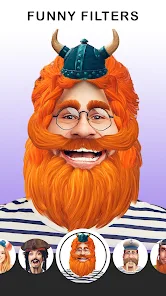
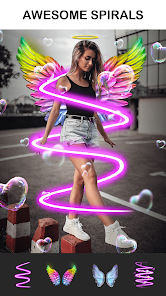
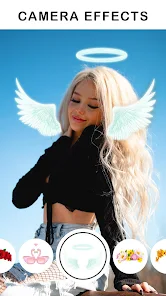
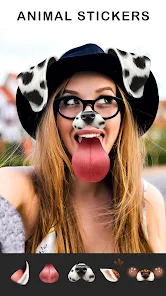
FaceArt: Filters for Pictures is a photo editing app that focuses specifically on turning your selfies and portraits into stylized versions with filters that mimic artistic effects, like oil paintings, sketches, or cartoons. It sits in the crowded photo retouching space on Google Play and the App Store. You download and install the app for free, and the first thing you notice after launching it is how bright and playful everything looks—tons of filter previews pop up immediately, making you want to try them out. The install count is decent, and while registration is optional, a lot of the more interesting filters are locked behind in-app purchases. Ads pop up occasionally, which is a bit annoying, but they aren't too aggressive during your first few edits.
Once you start using FaceArt, the interface feels pretty straightforward. You hit the main button to upload a photo from your gallery or take a new one. The app then scans for faces and applies a filter preview in real time, which is honestly the smoothest part of the experience. After picking a filter, you can adjust the intensity with a simple slider, which is nice if you want a subtle effect rather than a full-blown cartoon look. One minor hiccup I ran into was that some filters take a good 5-10 seconds to process, and during that time the app freezes a bit. A practical tip: if you want to avoid the watermark, you'll need to watch an ad or pay up for the premium version. For daily use, you just swipe through the filter carousel, tap your favorite, and save—it's that simple for basic edits.
After spending a few days with FaceArt, I'd say it's great for people who want quick, fun filters without diving into complex editing tools like Adobe Photoshop or Lightroom. Someone who loves sharing stylized selfies on Instagram or Snapchat will probably keep this installed. On the flip side, if you're looking for professional-grade retouching or detailed manual controls, this app will feel too limited and gimmicky. Compared to apps like PicsArt or YouCam Perfect, FaceArt focuses almost entirely on artistic filters, so it feels more specialized but also less versatile. I ended up keeping it because the "sketch" filter genuinely impressed me, but I can see others uninstalling it after a week when the novelty wears off.
features
- 😍 Filter Preview: You upload a photo and the app instantly shows a live preview of each filter. No waiting around to see what something looks like. Most similar apps make you apply the filter first, then undo if you hate it.
- 😍 Intensity Slider: You can dial back the filter's strength to keep your face looking natural. For example, the "Crayon" effect is fun, but at 100% it makes you look like a clown. You slide it to 60% and it looks way better.
- 😍 Face Detection: It nails facial features every single time. I tried it on a group photo and it correctly detected all five faces without glitching—something you don't see in every random filter app out there, like Filterit.
- 😍 Cross-Platform Performance: The app handles both iOS and Android smoothly. Filters apply nearly identical across devices, which is not always the case with similar apps that look worse on Android.
pros
- 👍 Ease of Use: It's incredibly simple. You open the app, pick a photo, choose a filter, and save. No learning curve. Comparable to apps like PicsArt that can feel cluttered and overwhelming, FaceArt keeps things minimal.
- 👍 Unique Artistic Filters: The "Oil Painting" and "Comic" filters are unlike anything in apps like YouCam Perfect. They genuinely feel handcrafted and not just generic overlays. I got comments on my edited photos asking how I did it.
- 👍 Speed for Basic Edits: When you just want a quick stylized portrait, FaceArt processes in under 10 seconds. In contrast, Prisma can sometimes take 30 seconds for a similar look, especially if your internet connection is slow.
cons
- 👎 Limited Editing Options: You can't crop, adjust brightness, or remove blemishes. You're stuck with just filters. Apps like PicsArt or Snapseed offer way more control if you need anything beyond a filter.
- 👎 Aggressive Watermarks: Even basic filters leave a watermark unless you watch an ad or pay. That's a bit greedy. Snapseed gives you full export for free, no strings attached.
- 👎 Occasional Lag: Some high-resolution photos cause the app to hang for a good 10 seconds. On my Galaxy S23, it's not a huge deal, but on older phones it's frustrating. Prisma handles heavy images better.
- 👎 In-App Purchase Pressure: You get maybe 10 free filters, and the rest sit behind a paywall. The subscription price is comparable to premium apps, but you get way less functionality. Not exactly a bargain.
Recommended Apps
![]()
Daily Horoscope
KADO Apps4.4
![]()
FOX Sports: Watch Live Games
Fox Digital Services, LLC3.7
![]()
Fake Call from Santa Claus
ThunderClap4.2![]()
Google Maps
Google LLC4.2![]()
PhotoLayers-Superimpose,Eraser
handyCloset Inc.4.6![]()
Healthy Benefits+
Solutran, Inc.4.5![]()
SuperMe - Avatar Maker Creator
THE.DEMON3.7![]()
Air Horn
Tenoku4.8![]()
Football Wallpaper HD 4K
Orange Infotech Studio4.6![]()
Artplay - AI Photo & Video
Hideaway Technology Limited4.5![]()
Horoscopes – Daily Zodiac Horo
Mail.Ru Group4.1![]()
Passport Parking
Passport Labs, Inc.2.5![]()
ParkMobile: Park. Pay. Go.
Parkmobile, LLC4.3![]()
FestAI: Ghost Detector App
Now Tech3.2![]()
Photo Tool
COLIFER LAB4





























