
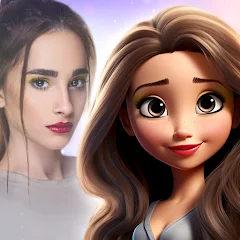
ToonApp: Cartoon Photo Editor

50M+
Installs
Lyrebird Studio
Developer
-
Video Players & Editors
Category
-
Rated for 3+
Content Rating
-
lyrebirdstudio@gmail.com
Developer Email
-
https://lyrebirdstudio.net/privacy_policy.htm
Privacy Policy
Screenshots
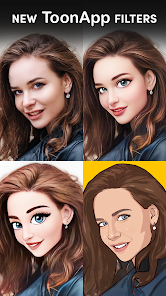
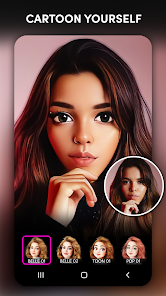
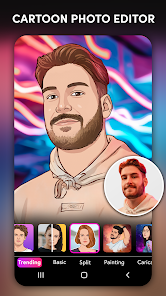
editor reviews
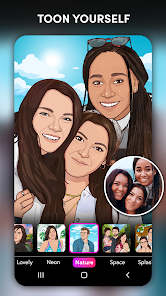
ToonApp is a photo editing tool that turns your regular photos into cartoon-style avatars and portraits. It's one of those fun, one-trick apps that focuses entirely on the cartoon filter effect, and you can grab it for free on both Google Play and the App Store. People usually download this when they want to create a unique profile picture or just mess around with realistic cartoon versions of themselves or their friends. Opening it for the first time feels pretty straightforward — the interface is colorful and aimed at making the process simple. You're basically hit with a big "upload photo" button right away, and there's no annoying sign-up or registration blocking you from trying it out. That quick, no-commitment start is honestly what makes you want to stick around for a few minutes to see what it can do.
Once you start using it, the hands-on experience is pretty mixed but generally smooth for basic tasks. You pick a photo from your gallery, and within seconds, the app spits out a cartoon version of it. The magic happens in the background through AI processing, and you can browse through different cartoon styles like comic, anime, or sketch. There's also a batch of background filters and minor tweaks you can apply, though the main star is obviously the cartoon transformation itself. Navigating between styles is easy, but I noticed that swiping through the previews sometimes lags on older phones. A practical tip if you're trying it out: use a well-lit, front-facing photo for the best results — side profiles or dim shots tend to turn out a bit wonky. The app also includes an in-app purchase for removing the watermark, which is a common annoyance for free users. For someone just trying to make a couple of goofy avatars for WhatsApp, the free version does the job fine, but the watermark gets old fast if you plan to share them seriously.
After using it for a bit, I think ToonApp is perfect for casual users who want a quick, funny cartoon version of themselves without diving into complex editing apps. It's not something you'd keep installed for daily use unless you're really into changing your profile picture every week. Compared to something like Prisma or PicsArt, ToonApp is far more limited — it does one thing (cartooning) and does it decently, but it doesn't offer the broad editing tools those apps do. The lack of layers, text tools, or an advanced editor means you'll uninstall it once the novelty wears off. On the flip side, it's way easier to use than those alternatives for this single task, so if you just need a quick cartoon portrait for a social media update and don't care about extra bells and whistles, it's a fine download. I'd say it's a fun little app to have for a week, but not one that'll stay on your home screen for long.
features
- 🎨 Cartoon Style Variety – ToonApp offers multiple cartoon styles like anime, sketch, comic, and more. You can flip through them instantly once your photo is uploaded. Compared to Prisma, which focuses on artistic paint-style filters, ToonApp is more about the cartoon aesthetic specifically. It gives you a handful of distinct looks in one place without needing to jump between different apps.
- 🖼 Instant AI Transformation – The core feature is the one-tap AI cartoon conversion. You select an image, and within seconds it's processed. It uses AI to turn faces into cartoons with pretty accurate outlines. Apps like FaceApp or PicsArt require more manual steps for similar cartoon effects. Here, the speed and simplicity are its biggest selling points.
- 💧 Background Filters and Overlays – Beyond the cartoon style, you can also add background textures, gradient overlays, and some light effects. This is handy if you want the final image to look more polished for a profile picture. While not as deep as the filters in Adobe Photoshop Express or Snapseed, it's enough to give your cartoon avatar a bit of extra personality.
pros
- ✅ Super simple to use – No learning curve at all. Upload, choose style, save. It's much easier than using the cartoon tools in PicsArt or Prisma, which often require going into specific editing modes or applying multiple filters manually. Anyone can use it without instructions.
- ✅ Good quality on front-facing photos – When you use a clear, well-lit selfie, the AI output looks surprisingly solid. You can see distinct facial features preserved rather than just a generic cartoon face. I'd say it handles faces better than Clip2Comic for similar results.
- ✅ Free to try without registration – Unlike many apps that force an account creation upfront, you can start using it immediately as a guest. That's a huge plus for privacy-conscious users or anyone who just wants to test it out before committing to anything.
cons
- ⚠️ Heavy watermark on free version – The bottom-right watermark is pretty large and distracting. You need to pay to remove it. In contrast, apps like PicsArt at least let you remove watermarks after watching an ad. ToonApp locks that behind a paywall entirely.
- ⚠️ Limited editing tools – It's a one-trick app. There's no way to fine-tune the AI output or combine multiple cartoon styles. If you want something like a custom brush tool or text overlay, you'll need a different app. Prisma offers broader artistic control with many more filter variations.
- ⚠️ Battery and performance issues – The app drains battery relatively fast during processing, and on older phones, the swiping through styles can be choppy. Some users report the app crashing when trying to process high-resolution photos. FaceApp handles similar tasks much more smoothly on low-end devices.
Recommended Apps
![]()
Daily Horoscope
KADO Apps4.4
![]()
FOX Sports: Watch Live Games
Fox Digital Services, LLC3.7
![]()
Fake Call from Santa Claus
ThunderClap4.2![]()
Google Maps
Google LLC4.2![]()
PhotoLayers-Superimpose,Eraser
handyCloset Inc.4.6![]()
Healthy Benefits+
Solutran, Inc.4.5![]()
SuperMe - Avatar Maker Creator
THE.DEMON3.7![]()
Air Horn
Tenoku4.8![]()
Football Wallpaper HD 4K
Orange Infotech Studio4.6![]()
Artplay - AI Photo & Video
Hideaway Technology Limited4.5![]()
Horoscopes – Daily Zodiac Horo
Mail.Ru Group4.1![]()
Passport Parking
Passport Labs, Inc.2.5![]()
ParkMobile: Park. Pay. Go.
Parkmobile, LLC4.3![]()
FestAI: Ghost Detector App
Now Tech3.2![]()
Photo Tool
COLIFER LAB4





























