
PhotoDirector: AI Photo Editor

50M+
Installs
Cyberlink Corp
Developer
-
Video Players & Editors
Category
-
Rated for 3+
Content Rating
-
PhotoDirector_Android@cyberlink.com
Developer Email
-
https://www.cyberlink.com/prog/ap/app-privacy-redirect.jsp?
Privacy Policy
Screenshots
editor reviews
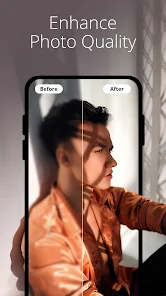
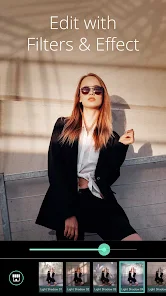
I first stumbled upon PhotoDirector while looking for a decent all-in-one photo editor that didn't require a subscription. Developed by Cyberlink Corp, this app sits somewhere between a beginner-friendly tool and a serious editing suite. You can do everything from basic cropping and color adjustments to more advanced AI-powered edits like removing unwanted objects or changing the sky in your photos. After downloading it from Google Play (it has over 50 million installs) and launching it, I was hit with a fairly clean interface that immediately throws a few tutorial pop-ups at you. It's free to download and use, though some of the more premium features are locked behind in-app purchases or a subscription. The first impression was decent, but I did notice a few ads trying to push the premium version right off the bat.
Once you start using PhotoDirector, the experience is mostly smooth, though not without its quirks. The onboarding walks you through the main editing modules, but I feel like it rushes a bit. I jumped straight into editing a landscape photo and found the tool layout to be intuitive enough. The key actions are along the bottom, so you tap on things like "Adjust," "Effects," or "Remove Object" to get started. One common workflow is selecting a photo, using the AI sky replacement to throw in a dramatic sunset, and then tweaking the exposure and contrast. The AI tools are actually pretty fast, but I noticed that the object removal tool sometimes leaves a faint ghost if the background is too complex. A practical tip I picked up: always zoom in to check the edges after using a removal tool, because the app doesn't automatically alert you to issues. The experience feels powerful, but the sheer number of options can be a little overwhelming at first.
After using PhotoDirector for a couple of weeks, I have a mixed opinion. On one hand, it's a fantastic choice for casual social media enthusiasts who want to quickly make their photos pop without learning a complex software like Lightroom. The AI tools are genuinely fun to play with, especially the sky replacement and the AI portrait enhancer. On the other hand, if you're a professional photographer or someone who needs precise control over every pixel, you'll probably find the interface a bit limiting and the reliance on AI presets frustrating. What sets it apart from apps like Picsart is that it feels more focused on straight photo enhancement rather than being a full-blown social media or design platform. I could see someone keeping it installed for quick edits or removing tourists from travel shots, but I might uninstall it if the ads for the premium version become too pushy, or if the app starts to feel bloated with features I never use. It's a solid tool with a clear audience, but it's not for everyone.
features
- 🤖 AI Sky & Object Replacement: This is the standout feature. Unlike in Snapseed, where you manually tweak layers and masks, PhotoDirector lets you simply select a new sky from a library or remove a stray person in a few taps. The AI does a surprisingly good job at blending the new elements into your original photo, though it can occasionally mess up if the horizon is cluttered or the background is too busy.
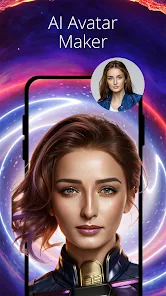
- 🎨 AI Portrait Enhancer: While apps like Facetune require you to manually target each blemish, PhotoDirector's AI automatically detects faces and offers one-tap skin smoothing, eye brightening, and even a subtle makeup enhancer. It's quick and effective for casual selfies, though it sometimes over-smooths skin, making it look a bit plastic if you're not careful with the slider.
- ✨ Content-Aware Remove & Clone: Compared to TouchRetouch, which is a dedicated app just for object removal, PhotoDirector integrates this into its main editor. The "Remove Object" tool works well for simple backgrounds like a clear sky or a solid wall, but it struggles with complex textures like grass or patterned fabrics, often leaving a smudge that requires manual correction.
pros
- 🌅 Faster Results: The AI tools in PhotoDirector are noticeably quicker than manually editing in Lightroom. You can swap a sky, adjust the mood, and export a shareable photo in under a minute, which is a huge time saver for daily social media posts.
- 🔄 No Subscription Lock-In: While Picsart often pushes its premium subscription for advanced tools, PhotoDirector lets you use many of its core AI features with a more generous free tier. The paid version is there, but you get a solid taste of the power without immediately hitting a paywall.
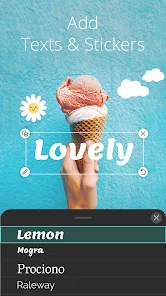
- 🧩 Integrated Workflow: You don't need to jump between a separate background remover (like Background Eraser) and a color grading app. Everything from removal to filters to text overlays is in one place, which simplifies the editing process significantly.
cons
- 🔄 AI Inconsistencies: The sky replacement and object removal tools are impressive about 80% of the time, but when they fail, the results are noticeably bad. You might end up with a weird line around a person's head or a color mismatch that ruins the photo, forcing you to start over or use a different tool.
- 📢 Ad Frequency: Compared to a clean app like Snapseed, PhotoDirector feels a bit more commercial. You'll see ads and prompts to upgrade to the premium version fairly often, especially when you try to use a feature that's locked behind a paywall, which can interrupt the creative flow.
- 🏋️ Bloatware Feeling: The app tries to do everything, from basic edits to collages to video editing. While this sounds like a strength, it often makes the interface feel cluttered. Apps like Adobe Lightroom are more focused, offering a cleaner, less distracting experience for pure photo editing.
Recommended Apps
![]()
Daily Horoscope
KADO Apps4.4
![]()
FOX Sports: Watch Live Games
Fox Digital Services, LLC3.7
![]()
Fake Call from Santa Claus
ThunderClap4.2![]()
Google Maps
Google LLC4.2![]()
PhotoLayers-Superimpose,Eraser
handyCloset Inc.4.6![]()
Healthy Benefits+
Solutran, Inc.4.5![]()
SuperMe - Avatar Maker Creator
THE.DEMON3.7![]()
Air Horn
Tenoku4.8![]()
Football Wallpaper HD 4K
Orange Infotech Studio4.6![]()
Artplay - AI Photo & Video
Hideaway Technology Limited4.5![]()
Horoscopes – Daily Zodiac Horo
Mail.Ru Group4.1![]()
Passport Parking
Passport Labs, Inc.2.5![]()
ParkMobile: Park. Pay. Go.
Parkmobile, LLC4.3![]()
FestAI: Ghost Detector App
Now Tech3.2![]()
Photo Tool
COLIFER LAB4





























