

Square InPic - Photo Editor &

50M+
Installs
Studio 8 Apps
Developer
-
Video Players & Editors
Category
-
Rated for 3+
Content Rating
-
studio8apps@gmail.com
Developer Email
-
http://www.studio8apps.com/privacy-policy/
Privacy Policy
Screenshots
editor reviews
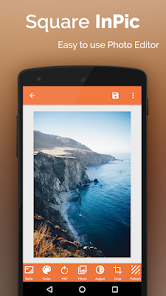
So Square InPic is basically a photo editor, but it's specifically built around one thing — making your pictures fit perfectly into a square crop for Instagram and other social platforms without just chopping off the sides. It's the kind of app you'd grab when you're tired of manually zooming in or leaving awkward white bars around your shots. I stumbled upon it while searching the App Store for a quick way to format my landscape photos for my feed, and honestly, the first impression was pretty good. The interface is clean, not cluttered with a thousand buttons, which made me feel like I could actually get something done without a tutorial. It's a free download, though you do get hit with prompts for the pro version here and there, which is a bit naggy but not a dealbreaker right away.
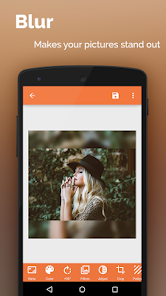
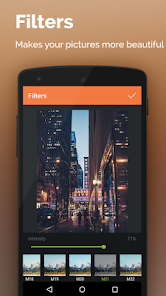
After launching it, you just pick a photo from your camera roll, and then the real work begins. The app gives you a few choices — you can blur the background, add a solid color border, or use a gradient to fill the empty space around your image. Tapping through these options is smooth, and you can adjust the intensity of the blur or pick a custom color pretty quickly. I found myself using the blur feature most often because it keeps the focus on the photo without making it look like a cheap meme. There's also a basic set of editing tools like brightness, contrast, and a few filters, so you can tweak the image before exporting. One thing that tripped me up at first was that the undo button isn't super obvious — it's a tiny arrow in the corner that I kept missing. A small tip: always save your work before switching tabs, because the app can lose your progress if you're not careful.
After using it for a couple of weeks, I think this app is perfect for casual social media posters who just want a fast, no-fuss way to square up their photos. If you're a serious photographer or someone who needs layers, masks, or advanced retouching, you'll probably feel limited pretty fast. What sets Square InPic apart from, say, Adobe Lightroom or even Snapseed is that it doesn't try to do everything — it just does one thing well. That focus is actually refreshing, because you're not wading through a million features to find the crop tool. I ended up keeping it on my phone because it saves me time when I'm posting on the go, but I can see someone uninstalling it if they prefer apps like Instasize that offer more border styles or have a better free tier without ads.
features
- 🎨 The blur fill feature is the standout here — it automatically extends your photo's background with a blurred version of itself, which looks way more polished than a plain white border. Compared to an app like Afterlight, which makes you manually choose a blur intensity, Square InPic's default setting is usually spot-on, so you don't have to fuss around. It feels like the app actually understands what looks good.
- 🖼️ The resize options are incredibly straightforward. You can choose from standard social media sizes (1:1, 4:5, 16:9) with one tap, and it remembers your last selection. In Snapseed, you'd have to manually punch in the dimensions each time, which gets old fast if you're batch-editing for a post.
- ⚡ Speed is a big deal here — exports are nearly instant, even for high-resolution images. I've used apps like PicsArt where saving a single edited photo takes a good 10 seconds, but Square InPic finishes in under two. That alone makes it worth keeping for quick uploads.
pros
- ✅ The interface is genuinely beginner-friendly. There's no learning curve — you open it, pick a photo, and you're done in under a minute. Other apps like VSCO bury their formatting tools under layers of menus, which is annoying when you're in a hurry.
- ✅ It uses very little storage space compared to apps like Photoshop Express, which bloats up with presets and assets. Square InPic is lean and doesn't hog your phone's memory.
- ✅ The background color picker is actually decent — you can sample a color directly from your photo using an eyedropper tool, which is a feature usually reserved for premium desktop software. Most mobile editors charge for that or don't offer it at all.
cons
- ❌ The free version has an annoying ad that pops up after every single export. It's not a video, just a static banner, but it breaks the flow when you're trying to post multiple photos quickly. Instasize, for comparison, only shows an ad when you first launch the app, which is less intrusive.
- ❌ There's no batch editing feature. If you need to square up 10 photos for a carousel post, you have to do them one by one, which gets tedious. Snapseed at least lets you copy edits and paste them onto other images.
- ❌ The filter selection is pretty barebones — maybe 10 or so, and none of them are particularly striking. If you're used to the film-inspired looks in an app like RNI Films, you'll be disappointed here.
Recommended Apps
![]()
Daily Horoscope
KADO Apps4.4
![]()
FOX Sports: Watch Live Games
Fox Digital Services, LLC3.7
![]()
Fake Call from Santa Claus
ThunderClap4.2![]()
Google Maps
Google LLC4.2![]()
PhotoLayers-Superimpose,Eraser
handyCloset Inc.4.6![]()
Healthy Benefits+
Solutran, Inc.4.5![]()
SuperMe - Avatar Maker Creator
THE.DEMON3.7![]()
Air Horn
Tenoku4.8![]()
Football Wallpaper HD 4K
Orange Infotech Studio4.6![]()
Artplay - AI Photo & Video
Hideaway Technology Limited4.5![]()
Horoscopes – Daily Zodiac Horo
Mail.Ru Group4.1![]()
Passport Parking
Passport Labs, Inc.2.5![]()
ParkMobile: Park. Pay. Go.
Parkmobile, LLC4.3![]()
FestAI: Ghost Detector App
Now Tech3.2![]()
Photo Tool
COLIFER LAB4





























