Pic Stitch: Collage Maker

5M+
Installs
Maple Media
Developer
-
Video Players & Editors
Category
-
Rated for 12+
Content Rating
-
contact@maplemedia.io
Developer Email
-
https://maplemedia.io/privacy/
Privacy Policy
Screenshots

editor reviews
Pic Stitch is a straightforward collage maker from Maple Media that lets you combine multiple photos into a single frame. It's one of those utility apps you'd grab from Google Play or the App Store when you need to throw together a quick Instagram grid or a memory board for a friend. I downloaded it because my phone's default gallery tool just wasn't cutting it for anything beyond a basic two-picture split. The first impression after launching the app is clean but a bit dated—the layout feels like it hasn't had a major visual refresh in a few years. It's free to download, and while there are in-app purchases for extra layouts and no-ads access, you can still get a decent collage going without paying a cent. The install count seems solid given Maple Media's portfolio, but I didn't notice any forced sign-up or registration right away, which was a relief.
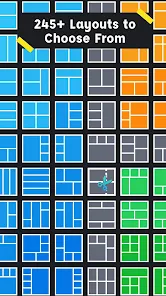
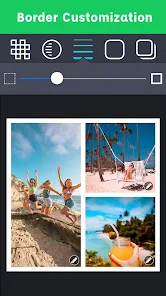
When you actually start using Pic Stitch, the process is pretty simple. You pick a layout from a grid—there are a bunch, like 9-square grids for multiple shots or a single large frame with smaller ones around the edges. Then you tap each slot to load a photo from your camera roll. The interface is straightforward, but the onboarding is almost nonexistent; you just figure it out by tapping around. I found the drag-and-drop to rearrange photos a little clunky—sometimes the image would snap into the wrong slot if I wasn't careful. Once everything's placed, you can tweak the border thickness, color, or add a filter, but nothing feels super smooth. A small tip: zooming in on a photo inside the frame is a pain because you have to pinch directly on the tiny preview, and it often resets. So I'd recommend cropping your images before loading them in. For daily use, it's fine for a quick collage, but if you have a lot of photos, the process gets repetitive fast.
After using it for a while, I'd say Pic Stitch is great if you need a no-fuss tool for social media posts or event invitations, but it's not built for serious photo editing. The main draw is the sheer number of layout templates—there must be over a hundred, which beats what free apps like Layout from Instagram offer. But the trade-off is that the editing tools are basic and the overall feel is a bit sluggish. What makes it different from something like Canva is that Pic Stitch doesn't try to be a full design suite; it's just a collage app. I could see someone keeping it installed if they regularly post photo dumps, but I might uninstall it once I find a tool with smoother controls. It's not bad, but it's not remarkable either—just a reliable way to get pictures into a single frame without much fuss.
features
- 😊 Pic Stitch offers over 100 layout templates, which is far more than what you get in Layout from Instagram (which only has a handful of basic grids). You can find everything from standard 2x2 squares to creative asymmetric arrangements, making it easy to create unique collages without repeating the same look.
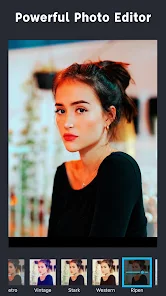
- 😊 The app includes a simple photo editor within the collage workflow, so you can crop, rotate, or add borders to individual images before stitching them together. This beats Canva's collages, which often force you to edit photos separately in another tool before uploading.
- 😊 Pic Stitch supports high-resolution output, so your final collage prints or posts without looking pixelated. This is a step up from some free collage makers like PhotoGrid, which sometimes compress images too aggressively when saving.
pros
- 👍 Pic Stitch is completely free to start with—no subscription nags like PicsArt, which pushes premium plans before you even finish a single collage. You can access most layouts without paying a cent.
- 👍 The app handles batch imports well, letting you select multiple photos at once from your gallery, unlike Layout from Instagram where you have to tap each image individually, which gets tedious with 9+ photos.
- 👍 Maple Media updates the app fairly regularly with new templates and fixes, which is more reliable than some abandoned collage apps like PicCollage that haven't seen major updates in years.
cons
- 👎 The interface feels outdated and clunky, especially compared to the polished experience of Canva's collage tool. Buttons are small, and the layout previews are hard to read on a phone screen, making navigation a bit frustrating.
- 👎 The in-app ads are intrusive—they pop up between every save or template switch, which slows down the workflow significantly. Layout from Instagram has zero ads since it's part of the main Instagram app, so that's a major advantage.
- 👎 Advanced editing features like stickers or text overlays are very barebones, so if you want to add flair beyond just stitching photos, you're better off using PicsArt or Canva for more creative control.
Recommended Apps
![]()
Daily Horoscope
KADO Apps4.4
![]()
FOX Sports: Watch Live Games
Fox Digital Services, LLC3.7
![]()
Fake Call from Santa Claus
ThunderClap4.2![]()
Google Maps
Google LLC4.2![]()
PhotoLayers-Superimpose,Eraser
handyCloset Inc.4.6![]()
Healthy Benefits+
Solutran, Inc.4.5![]()
SuperMe - Avatar Maker Creator
THE.DEMON3.7![]()
Air Horn
Tenoku4.8![]()
Football Wallpaper HD 4K
Orange Infotech Studio4.6![]()
Artplay - AI Photo & Video
Hideaway Technology Limited4.5![]()
Horoscopes – Daily Zodiac Horo
Mail.Ru Group4.1![]()
Passport Parking
Passport Labs, Inc.2.5![]()
ParkMobile: Park. Pay. Go.
Parkmobile, LLC4.3![]()
FestAI: Ghost Detector App
Now Tech3.2![]()
Photo Tool
COLIFER LAB4