
Photo Editor by BeFunky

10M+
Installs
BeFunky
Developer
-
Video Players & Editors
Category
-
Rated for 3+
Content Rating
-
support@befunky.com
Developer Email
-
http://www.befunky.com/privacy/
Privacy Policy
Screenshots
editor reviews
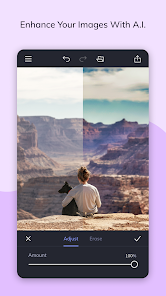
I first stumbled upon the BeFunky photo editor when I needed a quick way to spruce up some social media images but didn't want to deal with subscription fees. It's a browser-based and mobile photo editing suite that sits somewhere between a simple filter app and a full-blown design tool. Basically, you can crop, adjust colors, add text, toss on some graphics, or even do basic touch-up work on portraits. What got me to actually download it was the free tag — no forced credit card entry upfront. After launching the app on my phone, the first impression was pretty clean. The layout felt familiar, with a bottom toolbar and a large preview area, which made me think, "Okay, I can figure this out without watching a tutorial." It reminded me of the old PicMonkey days, just without the aggressive upsell screens right off the bat. There's a free download option, and while it does have in-app purchases for the Plus plan, the basic stuff works without paying a dime, which is rare these days.
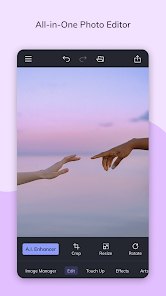
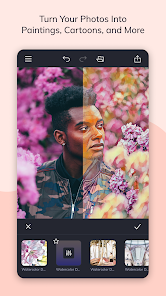
Once I started messing around, the actual hands-on experience was a mixed bag of pleasant surprises and tiny frustrations. The interface greets you with a simple "Edit" button, and after picking a photo from my gallery, I landed on the main editing screen. The tools are laid out in a straightforward row: Adjust, Crop, Touch Up, and Effects. I went straight for the "Perfect Skin" tool under Touch Up, and honestly, it worked way better than I expected. It smoothed things out without making my face look like a wax figure. Moving through the app felt natural — tap a tool, adjust a slider, apply. One small tip I picked up: if you hold down on the preview, it shows the before and after, which is super handy for checking if you went overboard. The onboarding was basically nonexistent, which I actually preferred, but I could see some people getting lost with the more advanced features like layer-based edits or the cosmetics tools. It's smooth enough for quick jobs, but I did hit a moment where I wanted to undo a specific action, and the undo button only steps back one action at a time, which got annoying.
After using BeFunky for a few weeks, here is my personal take. I think it's a solid choice for casual users — people who need to edit vacation photos, create simple collages, or add text to memes without overthinking it. The "Perfect Skin" and "Remove Blemishes" features genuinely surprised me, and the collage maker is actually one of the best I've used on mobile. That said, if you are a heavy-duty editor who needs layers, curves, or RAW support, you will hit a wall pretty fast. Compared to something like Snapseed, BeFunky is more geared toward fun, stylized edits rather than serious color grading. And compared to Canva, BeFunky leans more into photo enhancement while Canva is better for full design projects. I kept it installed because it fills a specific niche: quick touch-ups that look good without needing a manual. But I can see someone uninstalling it if they already have a preferred editor or if the ads for the paid version start feeling pushy after a while.
features
- ✨ One standout feature is the "Perfect Skin" tool in the Touch Up section. It automatically detects faces and smooths skin texture while keeping natural details. Snapseed has a similar "Healing" tool, but it requires manual brushing. BeFunky's version feels more like a one-tap fix, which saves time for quick portrait edits.
- ✨ The collage maker is surprisingly robust. You can choose from grid layouts, freestyle layouts, or even photo strips. Canva also offers collages, but BeFunky gives you more control over spacing, borders, and background colors without forcing you into a design template. It feels more intuitive for photo-only collages.
- ✨ The "Edit" tool includes a batch processing option for web users, which is rare in free editors. You can apply the same crop, resize, or filter to multiple photos in one go. PicsArt doesn't offer this without a premium plan, so it is a nice bonus for organizing photo sets.
pros
- 👍 It runs entirely in a browser, so no storage issues or compatibility problems across devices. Tools like Photoshop Express require downloads and take up space, while BeFunky is accessible from any device with an internet connection.
- 👍 The free tier is genuinely useful. You get access to the basic edit tools, most effects, and the collage maker without watermarks. Snapseed is also free, but BeFunky adds more creative filter options and text overlays, which Snapseed lacks.
- 👍 The learning curve is shallow. I could hand this app to someone who has never edited a photo, and they would figure out the basics in under five minutes. Compared to Lightroom, which has a steeper learning curve, BeFunky wins on accessibility.
cons
- 👎 The undo system is clunky. It only lets you step back one action at a time, and there is no history panel. Snapseed has a full history timeline where you can jump back to any point, which is much more flexible.
- 👎 The app version can be sluggish with high-resolution photos. While loading a 12MP image, I noticed a few seconds of lag before the editing tools became responsive. On a Pixel 7, this was noticeable compared to the near-instant response in PicsArt.
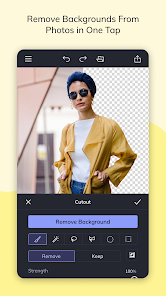
- 👎 Some features are locked behind the Plus plan without clear labeling. For example, the "Remove Background" tool shows a preview but then dims and asks for payment. Snapseed and Canva clearly mark what is free versus paid, which feels more transparent.
Recommended Apps
![]()
Daily Horoscope
KADO Apps4.4
![]()
FOX Sports: Watch Live Games
Fox Digital Services, LLC3.7
![]()
Fake Call from Santa Claus
ThunderClap4.2![]()
Google Maps
Google LLC4.2![]()
PhotoLayers-Superimpose,Eraser
handyCloset Inc.4.6![]()
Healthy Benefits+
Solutran, Inc.4.5![]()
SuperMe - Avatar Maker Creator
THE.DEMON3.7![]()
Air Horn
Tenoku4.8![]()
Football Wallpaper HD 4K
Orange Infotech Studio4.6![]()
Artplay - AI Photo & Video
Hideaway Technology Limited4.5![]()
Horoscopes – Daily Zodiac Horo
Mail.Ru Group4.1![]()
Passport Parking
Passport Labs, Inc.2.5![]()
ParkMobile: Park. Pay. Go.
Parkmobile, LLC4.3![]()
FestAI: Ghost Detector App
Now Tech3.2![]()
Photo Tool
COLIFER LAB4





























