

Picta Photo Print - 1h Pickup

1M+
Installs
Pictarine - Printing Photos
Developer
-
Video Players & Editors
Category
-
Rated for 3+
Content Rating
-
rose@pictarine.com
Developer Email
-
https://pictaphoto.com/privacy-policies-walgreens
Privacy Policy
Screenshots
editor reviews
Picta Photo Print is a mobile app that lets you turn digital photos into physical prints, with the headline grabber being a one-hour pickup option. It's basically a printing service app, not a photo editor or social network. You use it when you need a physical copy fast—maybe for a last-minute gift, a scrapbook project, or just to hold a memory in your hand. I downloaded it after a friend mentioned grabbing prints before a party, and the instant download on Google Play was smooth. It's free to install, though you pay per print order, and there are no ads cluttering the experience. The first launch shows a clean, image-heavy interface that immediately asks for photo access, which feels necessary but a bit invasive if you're not ready.
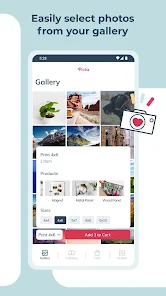
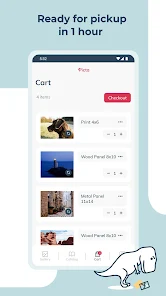
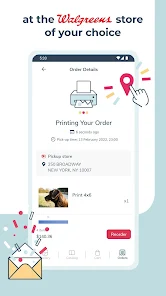
Actually using Picta is pretty straightforward. After granting access, you pick photos from your gallery or cloud storage. The app sorts them by date or album, which helps when you're digging through hundreds of random shots. You choose sizes—4x6, 5x7, wallet—and quantities, then add them to a cart. The interface is responsive, but I hit a snag when trying to crop a photo; the tool is basic and sometimes cuts off heads if you're not careful. A little tip: always preview the crop before adding to cart. The checkout process includes selecting a pickup location, which is a local store, and the timer shows if you'll make the one-hour window. It's mostly smooth, though the map integration hiccupped once and suggested a store 20 minutes away instead of the one next door.
After using Picta for a few weeks, I'd say it's great for people who need prints fast and live near a participating store. The one-hour promise is real—I picked up a batch of vacation shots in 45 minutes, and the quality was decent, not pro-level but solid for casual use. If you're a photographer who needs perfect color accuracy or textured paper, you'll be let down; the prints are glossy and a bit thin. Compared to apps like Shutterfly or Snapfish, Picta wins on speed but loses on editing options and paper variety. Shutterfly has more filters and matte finishes, but you wait days for shipping. I've kept Picta installed because it's handy for emergencies, but I can see uninstalling if I move away from a supported area or if I'm not printing often. It's a niche tool that does one thing well, but that thing isn't for everyone.
features
- 📸 One-Hour Pickup Guarantee – This is the killer feature. You order prints through the app, and within an hour, they're ready at a local store. Compare that to Snapfish, which takes 3-5 business days for shipping, or Shutterfly's 5-7 days. For last-minute needs like a birthday gift or a school project, Picta is unbeatable. The app tracks the order status live, so you know exactly when to head out.
- 🖼️ Simple, Streamlined Workflow – Unlike Google Photos, which buries printing options under menus, Picta focuses purely on ordering. You pick photos, choose sizes, and check out in under two minutes. The interface is minimal, with no ads or promo pop-ups that slow down apps like CVS Photo. It's designed for speed, not exploration.
- 📦 Multiple Size Options – You can order 4x6, 5x7, 8x10, and wallet sizes, which covers most common needs. Snapfish offers similar sizes but often requires a minimum order, while Picta lets you order as few as one print. That flexibility is handy if you just need a single photo for a frame.
pros
- ⚡ Faster Than Any Competitor – Shutterfly and Walmart Photo take days to ship, but Picta's same-day pickup is a game-changer for urgent prints. I've used it for a last-minute gift and had it ready before the party started.
- 🔄 No Minimum Orders – Unlike Snapfish, which pushes bulk packs, Picta lets you order a single 4x6 print. That's perfect for testing a photo or making just one copy without waste.
- 📱 Clean App Experience – The app has no ads or upsells, unlike CVS Photo, which bombards you with coupon pop-ups. Picta stays out of your way, focusing on the task.
cons
- 🖨️ Limited Print Quality – The prints are glossy and thin, not as sturdy as Shutterfly's matte options. Colors can be slightly off, especially with dark photos, which is disappointing for serious hobbyists.
- 📍 Restricted Store Network – You need a participating local store, and coverage is spotty. In my area, only two shops support it, while Snapfish ships anywhere. If you move, the app becomes useless.
- 🛠️ Basic Editing Tools – The crop and rotate features are bare-bones. Google Photos has far better adjustment sliders, and Picta's auto-enhance often over-brightens faces. You'll want to edit photos elsewhere first.
Recommended Apps
![]()
Daily Horoscope
KADO Apps4.4
![]()
FOX Sports: Watch Live Games
Fox Digital Services, LLC3.7
![]()
Fake Call from Santa Claus
ThunderClap4.2![]()
Google Maps
Google LLC4.2![]()
PhotoLayers-Superimpose,Eraser
handyCloset Inc.4.6![]()
Healthy Benefits+
Solutran, Inc.4.5![]()
SuperMe - Avatar Maker Creator
THE.DEMON3.7![]()
Air Horn
Tenoku4.8![]()
Football Wallpaper HD 4K
Orange Infotech Studio4.6![]()
Artplay - AI Photo & Video
Hideaway Technology Limited4.5![]()
Horoscopes – Daily Zodiac Horo
Mail.Ru Group4.1![]()
Passport Parking
Passport Labs, Inc.2.5![]()
ParkMobile: Park. Pay. Go.
Parkmobile, LLC4.3![]()
FestAI: Ghost Detector App
Now Tech3.2![]()
Photo Tool
COLIFER LAB4





























