
Photo Effects, Photo Editor

10M+
Installs
Lyrebird Studio
Developer
-
Video Players & Editors
Category
-
Rated for 3+
Content Rating
-
lyrebirdstudio@gmail.com
Developer Email
-
https://lyrebirdstudio.net/privacy_policy.htm
Privacy Policy
Screenshots
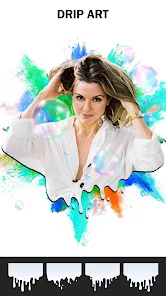
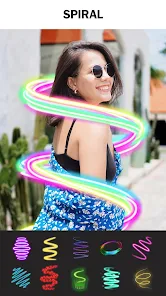

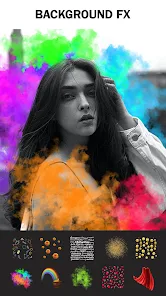
editor reviews
Photo Effects by Lyrebird Studio is a photo editing app that leans heavily into stylized filters and artistic overlays rather than precision adjustment tools. You download it from Google Play or the App Store when you want to quickly jazz up a selfie or a travel snap without opening something like Lightroom. The first impression after launching is that the interface feels very modern and bright, with large preview thumbnails of effects. It's free to install and has a decent amount of downloads, though there are in-app purchases if you want the full filter pack or want to remove watermarks on exports. Registration isn't forced, so you can start editing within seconds of opening the app.
Once you start using it, the workflow is straightforward. You pick a photo from your gallery or take a new one, and then a strip of filter thumbnails slides along the bottom. Tapping any filter immediately applies it to the full-sized preview. Some filters are subtle, but many are heavy — think glitch art, neon outlines, vintage grain, or double exposure effects. Swiping left reveals more, and you can adjust the intensity with a slider that pops up. The app doesn't overwhelm you with sliders for contrast or saturation; it expects you to let the filter do the work. Occasionally, I found the app a bit sluggish when rendering high-resolution photos, but it never crashed during my test run. A small tip: the “erase” tool inside some effects lets you selectively apply the filter to only part of the image, which feels powerful once you discover it.
After spending some time with Photo Effects, it's clear this app isn't meant for serious photography editing. If you want fine control over exposure, curves, or selective color grading, you'll feel limited. But if you enjoy quick, bold looks that make your photos pop on social media, this app delivers. It stands apart from apps like PicsArt or VSCO because it focuses more on dramatic, almost psychedelic effects rather than natural-looking presets. I can see someone keeping it installed specifically for occasions when they want to create a poster-like edit in under a minute. Others might uninstall it once they realize the watermark on free exports is a bit intrusive. For a casual user who just wants something different from the usual editing apps, this one holds its own without pretending to be a professional tool.
features
- 🎨 The app's star feature is its collection of artistic and glitch-style filters, which feel much more imaginative than the standard preset packs you find in most editors. While apps like Snapseed offer natural looks, this one pushes toward surreal, vaporwave, and comic-book aesthetics that stand out instantly.
- ⚡ The one-tap intensity slider is smarter than you'd expect. Instead of just blending the filter on or off, it seems to alter the effect itself — for example, reducing intensity on a neon filter softens the glow instead of just fading it out. That's not something every editor handles well.
- 🖌️ The selective erase brush within effects is a hidden gem. It lets you paint the filter onto specific parts of the photo while keeping the rest untouched. Most similar apps force you to use layers or masks for this, but here it's baked right into the effect menu.
pros
- ✅ The biggest strength is speed. You can open a photo, apply an effect, and export in under 30 seconds. PicsArt often requires navigating menus and waiting for overlays, but this app feels more direct, like a dedicated filter tool rather than a full suite.
- ✅ The filter previews update live as you scroll, not after you tap. That makes browsing feel fluid, similar to how Instagram stories handle effects, which is much more responsive than how VSCO or Afterlight display their presets.
- ✅ There's no clutter. No social feed, no community tab, no templates for collages. It's just you and the photo, which is refreshing for users who don't want distractions.
cons
- ❌ The free version watermarks every export. While many apps do this, the watermark here is placed right in the center and can't be moved. Snapseed and Lightroom offer watermark-free exports for free, so this feels limiting.
- ❌ No RAW file support. If you shoot in RAW on your phone, this app will likely convert the image anyway, losing the original data. Even free tools like Snapseed handle RAW better.
- ❌ The app lacks basic editing controls like exposure or white balance adjustments. Once you apply a filter, you can't fine-tune the underlying image. PicsArt and VSCO both allow layered adjustments, which makes this app feel one-dimensional for advanced users.
Recommended Apps
![]()
Daily Horoscope
KADO Apps4.4
![]()
FOX Sports: Watch Live Games
Fox Digital Services, LLC3.7
![]()
Fake Call from Santa Claus
ThunderClap4.2![]()
Google Maps
Google LLC4.2![]()
PhotoLayers-Superimpose,Eraser
handyCloset Inc.4.6![]()
Healthy Benefits+
Solutran, Inc.4.5![]()
SuperMe - Avatar Maker Creator
THE.DEMON3.7![]()
Air Horn
Tenoku4.8![]()
Football Wallpaper HD 4K
Orange Infotech Studio4.6![]()
Artplay - AI Photo & Video
Hideaway Technology Limited4.5![]()
Horoscopes – Daily Zodiac Horo
Mail.Ru Group4.1![]()
Passport Parking
Passport Labs, Inc.2.5![]()
ParkMobile: Park. Pay. Go.
Parkmobile, LLC4.3![]()
FestAI: Ghost Detector App
Now Tech3.2![]()
Photo Tool
COLIFER LAB4





























