
FamilySearch Tree

5M+
Installs
FamilySearch International
Developer
-
Parenting
Category
-
Rated for 3+
Content Rating
-
fsandroiddeveloper@familysearch.org
Developer Email
-
https://www.familysearch.org/legal/privacy
Privacy Policy
Screenshots
editor reviews
I honestly stumbled upon FamilySearch Tree while trying to dig up some old family photos my grandma mentioned. It's a genealogy app, so its whole purpose is helping you build out your family tree, find relatives, and attach records like census data or birth certificates to people in your line. The app is free to download on both Google Play and the App Store, and from what I can see after installing it, there's no subscription fee or paid tier blocking features. You do have to register for a free account before you can really do anything, which makes sense given that it's syncing with a huge shared database of historical records. Opening it for the first time feels a bit overwhelming, honestly; it throws a lot of options at you right away, like searching for ancestors or starting a new tree from scratch, and the interface is definitely denser than a typical casual app. It claims tens of millions of installs, so it's clearly a go-to for serious family history buffs, but it doesn't feel like something designed for quick, casual browsing.
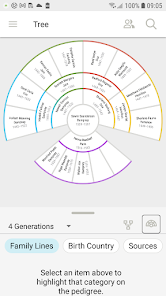
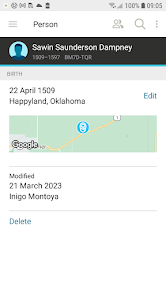
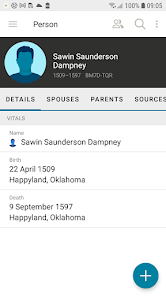
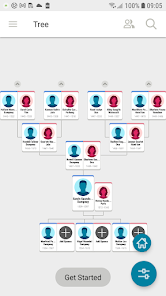
Once you get past the initial login, the actual experience is pretty hands-on if you're into research. The main screen shows your tree in a vertical or horizontal layout, and you can tap on any person's box to see their profile, add events like marriages or deaths, or link them to historical documents. I found the onboarding a bit clunky; there's no tutorial popup that walks you through step by step. I just clicked around until I figured out that the "Search" tab is where you hunt for records, and the "Tree" tab is where you attach them. A common step is finding a great-grandparent, then scanning through possible record matches like old census sheets that the app suggests. It works smoothly most of the time, but the search can be slow if you have a common surname. One small tip: use the "Sources" section to attach photos or stories directly, because that makes the tree feel more personal than just names and dates.
After using it for a few weeks, I think this app really shines for people who treat genealogy like a puzzle. If you're a hobbyist who loves combing through old records and verifying connections, it's fantastic because the database is massive and community-driven. On the flip side, if you just want a simple visual tree to show your kids or a quick peek at your heritage, it might feel like overkill. Compared to something like Ancestry, FamilySearch Tree is less polished in its design and slower in record matching, but it's completely free, which is a huge deal. I keep it installed because I like that I can work offline on my tree and sync later, plus it's tied to the FamilySearch website, so changes sync everywhere. I could see someone uninstalling it if they get frustrated with the cluttered interface or if they prefer a more guided experience like MyHeritage's app. It's not pretty, but it gets the job done for serious digging.
features
- 🆓 It's completely free to use with no hidden costs or subscription traps, unlike Ancestry, which locks many records behind a monthly fee. You get access to billions of historical documents without ever pulling out a credit card, which is rare for a genealogy app of this scale.
- 🔗 The collaborative tree concept lets multiple researchers work on the same ancestors without duplicating work. On FamilySearch Tree, if I add a source for my grandfather, it appears for anyone else researching the same person. This is a huge upgrade over MyHeritage's siloed approach where each user builds their own isolated tree.
- 📄 The record hinting system is pretty clever. It automatically scans census records, marriage licenses, and military drafts to suggest connections, and it often catches details I missed when cross-referencing manually. Unlike FamilyTreeNow, which feels sketchy with data sourcing, FamilySearch pulls from verified archives.
- 🔔 The "Ordinances" tab isn't for everyone, but for members of The Church of Jesus Christ of Latter-day Saints who use the app, it smoothly integrates temple work tracking. This makes it a specialized tool compared to generic apps like WikiTree, which lacks that religious functionality entirely.
pros
- 🌟 The offline mode lets you download entire family trees and work on them without an internet connection. When I was traveling and had no signal, I could still add notes and attach sources, and everything synced later. Other apps like Geni require a constant connection for basic edits.
- 🌟 The hinting algorithm is aggressive in a good way, showing dozens of potential record matches per person instead of just a handful like Ancestry does. Even if many are irrelevant, it saves hours of manual searching by casting a wide net.
- 🌟 The community editing system prevents a single user from locking down an ancestor profile. If someone adds false info or a poorly sourced record, others can correct it. This crowdsourced reliability beats RootsMagic, which lacks any collaborative safeguards.
cons
- 🚫 The interface feels dated and cluttered compared to slicker apps like Ancestry. The menus are dense, the font sizes vary inconsistently, and the navigation between tabs can be disorienting, especially on a phone screen, making it less intuitive for beginners.
- 🚫 Record matching accuracy is hit or miss. It frequently suggests unrelated people with similar names or incorrect census years, and dismissing these false matches is tedious. MyHeritage does a better job with its photo+record AI recognition, which cuts down on irrelevant clutter.
- 🚫 The app can be slow to load when you have a large tree with many attached sources. Scrolling through a profile with hundreds of hints causes noticeable lag, while Family Tree Maker handles large datasets more smoothly on desktop.
- 🚫 Privacy controls are limited. Other users can see and edit your submitted ancestors without your permission unless you mark the profile as private. Platforms like Geni let you control visibility per person, which offers more peace of mind for sensitive or living relatives.
Recommended Apps
![]()
My Name Meaning
KDR Games4
![]()
Find my Phone - Clap, Whistle
FunGear inc4.4![]()
Pet To Human - Pet into Human
Applax Pte. Ltd.4.2![]()
Custom Kicks
Sneakerz4.5
![]()
Italian Brainrot: Quiz & Wiki
EDEO TECH LIMITED0![]()
PrankGen - Funny Prank Sounds
DATONG FUN3.8![]()
Opera Mini: Fast Web Browser
Opera4.3![]()
Artimind: AI Art Generator
Apero Vision Lab4.3![]()
Prediction 2026: Savage Reveal
LKPixel0![]()
Ghost detector radar camera
Prank apps & Joke apps - Herdoza Studio3.9![]()
Imagine : AI Art Generator
Vyro AI3.6![]()
BitMind: AI Detector & Creator
BitMindAI2.8![]()
Number Locator - Phone Tracker
Allegany Boys Camp Inc4.6![]()
myChevrolet
General Motors (GM)4.6![]()
Version AI: AI Photo Generator
Apptribe Dijital4.5















Disclaimer
1.Apklifts does not represent any developer, nor is it the developer of any App or game.
2.Apklifts provide custom reviews of Apps written by our own reviewers, and detailed information of these Apps, such as developer contacts, ratings and screenshots.
3. All trademarks, registered trademarks, product names and company names or logos appearing on the site are the property of their respective owners.
4.Apklifts abides by the federal Digital Millennium Copyright Act (DMCA) by responding to notices of alleged infringement that complies with the DMCA and other applicable laws.
5.If you are the owner or copyright representative and want to delete your information, please contact us info@Apklifts.com.
6.All the information on this website is strictly observed all the terms and conditions of Google Ads Advertising policies and Google Unwanted Software policy.
7.Apklifts.com is an independent, information-only website which is 100% free to all the users.