

Toolwiz Photos - Pro Editor

10M+
Installs
Toolwiz.com
Developer
-
Video Players & Editors
Category
-
Rated for 16+
Content Rating
-
James@toolwiz.com
Developer Email
-
http://www.toolwiz.com/lead/privacy_policy/
Privacy Policy
Screenshots
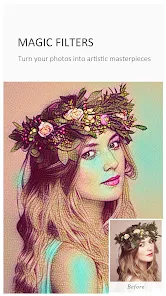
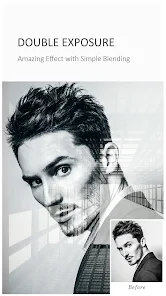


editor reviews
When you first stumble upon Toolwiz Photos - Pro Editor in the Google Play store, you might not expect much from its generic name. It is a full-featured photo editing app that sits somewhere between a quick filter app and a serious editing suite. Developers from Toolwiz.com built it for casual users who want something tougher than what their phone gallery offers but are not ready to jump into complex desktop software like Photoshop. A normal person would download it because they need to remove an object from a vacation shot, or maybe layer two pictures together without losing quality. Right off the bat, the first impression is that the app feels heavier than it looks, but it is free to install. I remember seeing it had over 10 million installs, though I am not sure how many are active daily. There are optional in-app purchases and a small number of ads, but nothing that blocks the core editing flow unless you tap on the wrong thing.
After opening the app for the first time, the interface looks relatively clean, though there are a lot of buttons packed on the bottom. You are greeted with a simple import page, and once you pick a picture, the real experience begins. The onboarding is barely noticeable, which is fine because most people will just start tapping icons to see what happens. Navigating the main editing space, you will find sliders for brightness and contrast, a curves tool, and a clone stamp that actually works decently for erasing small annoyances like dust spots or a stray person in the background. A common usage scenario would be opening a selfie, adjusting the skin tone with the retouch brush, then layering a text overlay with a custom font. One moment that surprised me was how smoothly the app handled a large 12-megapixel image without freezing, though there was a slight lag when switching between the adjustment and layer tabs. A practical tip I picked up: if you want to save memory, avoid using the live preview before exporting, as it slows down older phones.
Using Toolwiz Photos for a few weeks, I think it fits best for people who want advanced tools without paying for a subscription. Someone who loves adding artistic text, double exposures, or minor retouching will feel satisfied, while a photographer who spends hours in Lightroom will likely find the interface cluttered and the selection tools a bit rough. What makes it stand out compared to something like Snapseed is the inclusion of layers, which is rare for a free mobile app. The clone stamp and selective color pop features also feel borrowed from more expensive software. Still, the heavy reliance on ads and the occasional pop-up suggesting a premium version might annoy a patient user enough to uninstall. In the end, I kept it installed because it is one of the few apps that lets me stack edits in a natural way, like a simplified Photoshop on my phone, but I can see why someone would drop it for something simpler like Picsart if they do not need all that extra power.
features
- 🔧 One standout feature is the layer-based editing system, which is almost unheard of in free apps. You can stack multiple images, text layers, and adjustment layers on top of each other, move them around, and change their blending modes. In comparison, Snapseed only lets you apply sequential edits without real layering, so Toolwiz gives you way more control over composition.
- 🎨 The clone stamp tool is another hidden gem. It is not perfect, but it works well enough to remove small objects, skin blemishes, or power lines from a photo. Adobe Photoshop Express has a similar feature but it is locked behind a paywall, while Toolwiz keeps it free, which feels like a big win for casual editors.
- ✏️ The selective color pop effect lets you keep one color in the image while turning the rest black and white. Snapseed has a similar selective adjustment tool, but Toolwiz handles it with a simpler brush approach that feels more intuitive for someone who just wants quick artistic results without reading a manual.
pros
- 📸 The app is completely free for its core editing tools, while many alternatives like Picsart or PhotoDirector lock advanced options behind a subscription. Toolwiz does not ask for money just to remove a background or use layers.
- 🔄 It supports saving projects as editable files, something Snapseed fails to offer. You can close an edit, come back later, and tweak individual layers without starting from scratch, which is a huge time saver for complex compositions.
- 📱 The batch processing option lets you apply the same adjustment to multiple photos at once. This is rare in mobile apps, and it saves serious time when editing a whole set of images from an event.
cons
- 🚫 The app can feel a bit sluggish, especially when working with multiple high-resolution layers. Snapseed handles large images more smoothly, so if speed matters to you, Toolwiz might frustrate you during heavy edits.
- 💪 Some advanced tools like the color curve and selective brush are not as precise as what you get in Photoshop Express or Lightroom. The brush stroke can bleed into unwanted areas, making fine retouching a little messy.
- 📢 Ads appear frequently, and sometimes they pop up right when you tap an important tool. Picsart manages ads in a less intrusive way, so the interruption here feels more annoying and can break your editing flow.
Recommended Apps
![]()
Daily Horoscope
KADO Apps4.4
![]()
FOX Sports: Watch Live Games
Fox Digital Services, LLC3.7
![]()
Fake Call from Santa Claus
ThunderClap4.2![]()
Google Maps
Google LLC4.2![]()
PhotoLayers-Superimpose,Eraser
handyCloset Inc.4.6![]()
Healthy Benefits+
Solutran, Inc.4.5![]()
SuperMe - Avatar Maker Creator
THE.DEMON3.7![]()
Air Horn
Tenoku4.8![]()
Football Wallpaper HD 4K
Orange Infotech Studio4.6![]()
Artplay - AI Photo & Video
Hideaway Technology Limited4.5![]()
Horoscopes – Daily Zodiac Horo
Mail.Ru Group4.1![]()
Passport Parking
Passport Labs, Inc.2.5![]()
ParkMobile: Park. Pay. Go.
Parkmobile, LLC4.3![]()
FestAI: Ghost Detector App
Now Tech3.2![]()
Photo Tool
COLIFER LAB4





























