
PicLab - Photo Editor

10M+
Installs
Maple Media
Developer
-
Video Players & Editors
Category
-
Rated for 12+
Content Rating
-
contact@maplemedia.io
Developer Email
-
https://maplemedia.io/privacy/
Privacy Policy
Screenshots


editor reviews
PicLab is a photo editing app that sits somewhere between a casual filter app and a full-on editing suite. You can grab it from both Google Play and the App Store, and it's free to download with some in-app purchases and optional subscriptions. The install count is in the millions, which is a decent sign. When you first launch it, the interface is clean and bright, and it immediately asks you to pick a photo from your gallery or take a new one. That straightforward start makes you feel like you can jump right in without wading through tutorials or sign-up screens. It's the kind of app you'd install if you want quick edits but don't want to deal with the clutter of more complex tools.
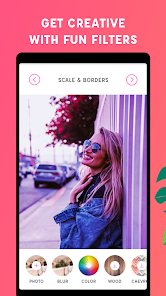
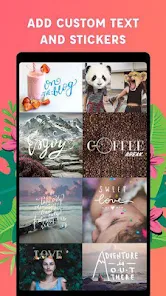
Once you pick a photo, you're dropped into the editing screen. The main actions are laid out along the bottom: adjustments, filters, overlays, text, and frames. Moving through the app feels smooth for the most part. For example, if you want to adjust brightness or contrast, you just tap the Adjustments icon and slide the bars. The filters preview instantly, which saves time, and the text tool offers a solid range of fonts and colors. I did notice that some of the fancier overlays are locked behind a paywall, which can be a bit annoying when you're in the middle of a creative flow. Also, the app sometimes lags a little when applying heavy filters, but nothing that made me want to uninstall it. One small tip: if you're adding text, the app lets you pinch and drag to position it, which feels natural.
After using PicLab for a while, I'd say it's a decent middle-ground app. It's not as powerful as Photoshop Express or as minimal as VSCO, but it offers enough for someone who wants to make their social media posts pop without learning layers and masks. People who enjoy adding text or frames to their photos will probably like it more than those who just want a quick color filter. The difference here is that PicLab leans into the artistic, almost scrapbook-like style, which is fun but not for everyone. I could see someone keeping it installed for quick quote images or collage-style edits. But if you're someone who only adjusts exposure and calls it done, you might find the extra features unnecessary. Overall, it's a solid app for casual creative editing.
features
- 🖼 Text and overlay variety: PicLab stands out for its huge library of fonts and graphic overlays. You find everything from neon signs to vintage stamps. On Pixlr, text options feel more basic, and overlays are fewer without a subscription. So if you like adding captions or decorative elements, PicLab is much better.
- 🎨 Preset filters with quick preview: The filters change in real time as you scroll. This makes trying different looks much faster than in Snapseed, where you have to tap each filter individually to see the result. For casual users, that instant feedback is a big time-saver.
- ✂️ Integrated frames: PicLab includes frames that work right in the editing flow. VSCO doesn't have frames at all, and adding them later takes extra steps. White borders, film strips, and vintage edges are all available in one tap here.
pros
- 📱 Clean and beginner-friendly UI: PicLab keeps tools visible without overwhelming you. In contrast, apps like PicsArt pile everything into one screen with tiny icons, which can feel chaotic. PicLab's layout makes more sense for someone who just wants to edit and move on.
- 🎯 Quick export with no quality loss: The app saves images without compressing them too much. In my experience, some similar editors reduce image quality noticeably. PicLab keeps the sharpness, which is great if you're posting to Instagram or printing.
- 🚫 No forced account creation: You can open and use PicLab without signing up. That's a big plus over Adobe Express, which pushes you to log in. Privacy-minded users appreciate that freedom during casual use.
cons
- 🔒 Heavy reliance on in-app purchases: A lot of the best overlays, fonts, and frames are locked behind a subscription. Compared to Snapseed, which is completely free with no paywalls, PicLab feels restrictive after a while. You often hit a wall when you try to use something nice.
- 🐌 Occasional lag on older devices: When applying multiple effects or using the text tool, the app can stutter noticeably. Pixlr and VSCO run smoother even on budget phones. If you have an older device, this might frustrate you during longer edits.
- 📄 No advanced layer or mask system: You can't blend images or use layer masks like in PicsArt Pro or Photoshop Express. For users who want to do double exposures or detailed composites, PicLab won't cut it. It stays too simple for that type of work.
Recommended Apps
![]()
Daily Horoscope
KADO Apps4.4
![]()
FOX Sports: Watch Live Games
Fox Digital Services, LLC3.7
![]()
Fake Call from Santa Claus
ThunderClap4.2![]()
Google Maps
Google LLC4.2![]()
PhotoLayers-Superimpose,Eraser
handyCloset Inc.4.6![]()
Healthy Benefits+
Solutran, Inc.4.5![]()
SuperMe - Avatar Maker Creator
THE.DEMON3.7![]()
Air Horn
Tenoku4.8![]()
Football Wallpaper HD 4K
Orange Infotech Studio4.6![]()
Artplay - AI Photo & Video
Hideaway Technology Limited4.5![]()
Horoscopes – Daily Zodiac Horo
Mail.Ru Group4.1![]()
Passport Parking
Passport Labs, Inc.2.5![]()
ParkMobile: Park. Pay. Go.
Parkmobile, LLC4.3![]()
FestAI: Ghost Detector App
Now Tech3.2![]()
Photo Tool
COLIFER LAB4





























