
Cut Paste Photo Seamless Edit

50M+
Installs
Peml Art FZC LLC
Developer
-
Video Players & Editors
Category
-
Rated for 3+
Content Rating
-
support@peml.art
Developer Email
-
https://peml.art/privacy-policy.html
Privacy Policy
Screenshots

editor reviews
Cut Paste Photo Seamless Edit is a mobile photo manipulation tool that focuses on the specific task of cutting objects from one image and blending them into another. It falls under the utility and photography category, sitting somewhere between a basic photo editor and a dedicated compositing app. Users mainly download it to remove backgrounds, extract people or objects, and paste them onto new backgrounds without the obvious, jagged edges that simpler tools leave behind. On Google Play, where it has been installed over a million times, the app is offered as a free download, which immediately catches attention because most apps with similar capabilities hide these features behind a paywall. When I first opened it, the interface felt a bit cluttered with small icons and text labels crammed into the screen, but the main tools were clearly marked. No account registration was required to start editing, which made the first impression fairly positive.
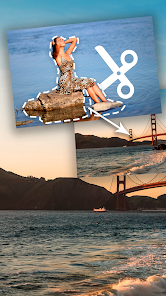
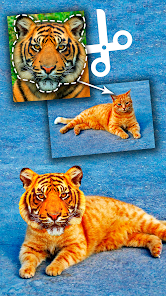
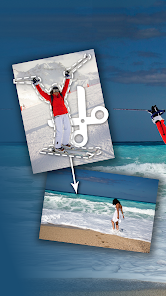
After using the app for a few days, the actual hands-on experience turned out to be mixed. The core workflow involves selecting a photo, using either the automatic cutout tool or the manual lasso to mark the area you want to extract, and then pasting it onto a second image. The automatic detection worked surprisingly well on high-contrast subjects like a person standing against a plain wall, but it struggled with fine details like hair or fur. The manual refine brush helped fix those messy edges, but it wasn't as smooth as I hoped. Onboarding is minimal; you basically learn by tapping around. One common usage step is zooming in with two fingers to carefully trace around complex shapes, which is practical and works fine. The app also offers some basic adjustment sliders for brightness, shadow, and edge softness, which genuinely help the pasted object look more natural. There were moments when the app lagged slightly after applying a heavy edit, but it never crashed on me.
After spending enough time with Cut Paste Photo Seamless Edit, my personal judgment is that it's a decent tool for casual users who need quick cutouts without spending money, but it's not a replacement for professional compositing apps. Someone who occasionally makes memes, edits vacation photos, or creates simple collages will find it useful and might keep it installed for those rare moments. However, anyone serious about photo editing or needing high-quality hair masking will likely uninstall it after a few tries and switch to something like PicsArt or Photoshop Express. What makes it different from those apps is that it strips away all the extra filters and social features and focuses purely on cut-and-paste, which is refreshing in a way. But the lack of layer management and limited export resolution hold it back. For a free tool that does one thing reasonably well, it has its place, but I wouldn't rely on it for important projects.
features
- 🖼️ One-tap background removal is the standout feature. Unlike Adobe Photoshop Express, which requires manual selection for complex areas, this app automatically detects the subject and removes the background in a single tap. It works best on clear subjects, but even on moderately complex images, it saves a lot of time compared to drawing selections manually.
- ✂️ The manual refine brush gives you control where automation fails. After the automatic cutout, you can use a brush to add or remove areas pixel by pixel. This is more precise than similar tools in apps like PicsArt, where the erase function is too blunt and often leaves artifacts.
- 🔄 The paste and blend workflow is straightforward. You don't need to understand layers or masks. You just cut, then paste, and the app automatically places the cutout on a new background. You can then adjust its position, size, and rotation with simple gestures, which is much simpler than the layer-based approach in professional apps.
- 🌓 Basic adjustment tools for shadows and edge softness help the pasted object blend into the new background. These are not as advanced as the blending modes in Snapseed, but they are sufficient for casual use and are presented in a way that beginners can understand without tutorials.
pros
- 👍 The app is completely free to download and use for basic cutouts. There are no hidden fees or subscription traps, unlike apps like Background Eraser, which lock advanced features behind a premium version. For a one-function tool, this is a significant advantage.
- 👍 It does not require an internet connection for editing. All processing happens on your device, which means you can use it offline. This is better than some web-based tools or apps that rely on cloud processing, which can be slow and unreliable.
- 👍 The interface, while cluttered, is entirely focused on the cut-and-paste task. There is no social feed, no ads for other apps, and no filters to distract you. This makes it a more streamlined experience compared to multi-purpose editors like PicsArt, which bombard you with features and suggestions.
cons
- 👎 The automatic cutout struggles significantly with fine details like hair, fur, or transparent objects. Photoshop Express handles these situations much better with its AI-powered selection tools, and the results here often look rough and require heavy manual correction.
- 👎 Export resolution is limited. Even if your original photo is high resolution, the app exports the final image at a lower quality. This makes it unsuitable for printing or professional use. In comparison, Snapseed and PicsArt allow you to export at the original resolution or even higher.
- 👎 The app lacks layer management. Once you paste an object onto a new background, you cannot go back and adjust the original cutout without starting over. This is a major limitation compared to Adobe Photoshop Mix or even the simple layer system in PicsArt.
- 👎 The manual refine brush is not pressure-sensitive and lacks a preview of the edge effect. You often have to guess how soft or hard the edge will be, which leads to trial and error. TouchRetouch offers better precision for such manual adjustments.
Recommended Apps
![]()
Daily Horoscope
KADO Apps4.4
![]()
FOX Sports: Watch Live Games
Fox Digital Services, LLC3.7
![]()
Fake Call from Santa Claus
ThunderClap4.2![]()
Google Maps
Google LLC4.2![]()
PhotoLayers-Superimpose,Eraser
handyCloset Inc.4.6![]()
Healthy Benefits+
Solutran, Inc.4.5![]()
SuperMe - Avatar Maker Creator
THE.DEMON3.7![]()
Air Horn
Tenoku4.8![]()
Football Wallpaper HD 4K
Orange Infotech Studio4.6![]()
Artplay - AI Photo & Video
Hideaway Technology Limited4.5![]()
Horoscopes – Daily Zodiac Horo
Mail.Ru Group4.1![]()
Passport Parking
Passport Labs, Inc.2.5![]()
ParkMobile: Park. Pay. Go.
Parkmobile, LLC4.3![]()
FestAI: Ghost Detector App
Now Tech3.2![]()
Photo Tool
COLIFER LAB4





























